21
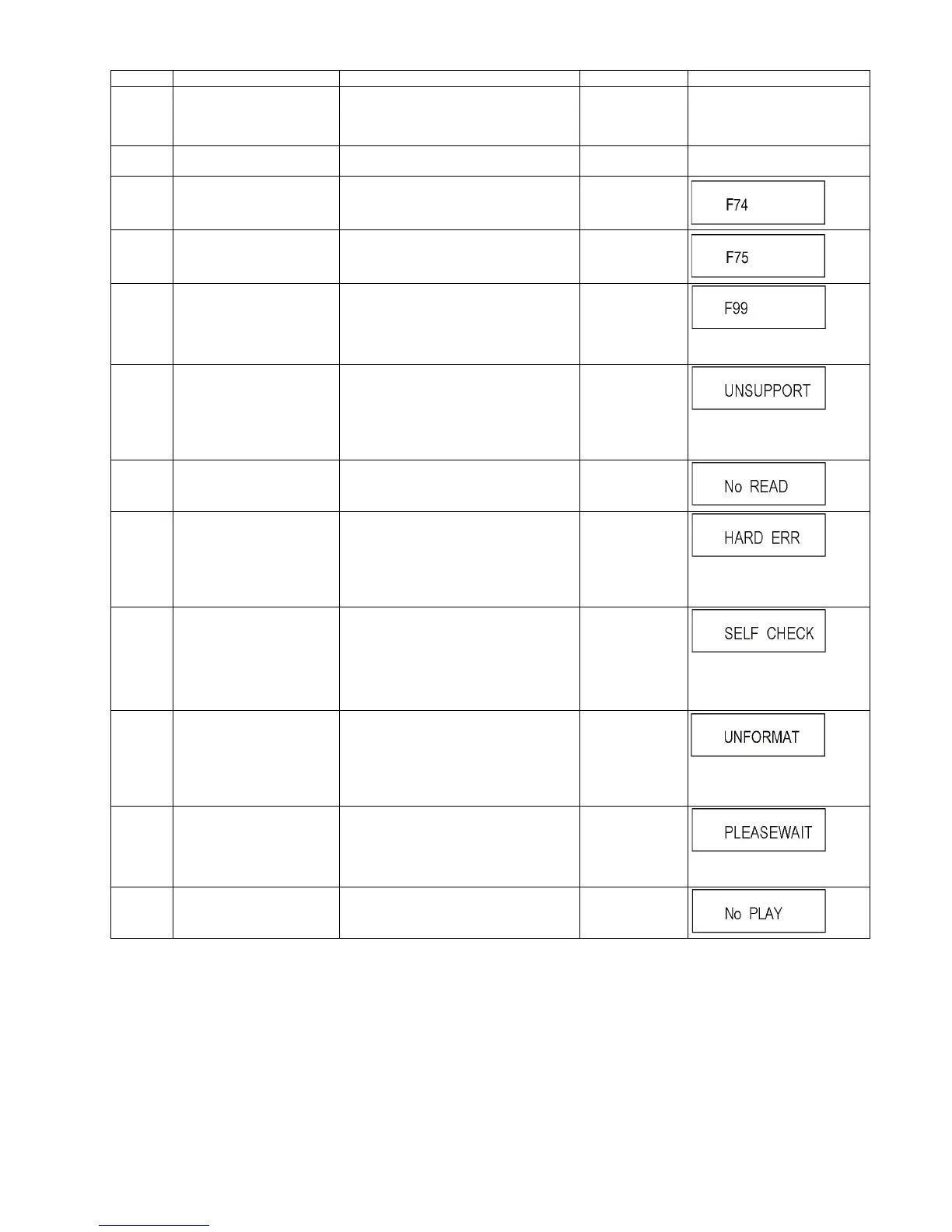
F34 Initialization error When initialization error is detected after start-
ing up main microprocessor, the power is
turned off automatically. The event is saved in
memory.
No display No display
F58 Drive hardware error When drive unit error is detected, the event is
saved in memory.
No display No display
F74 HDMI Device Key Communica-
tion error
This error is displayed when the information
error is occurred at HDMI device key loading.
No display
F75 HDMI Device Key Loading
error
This error is displayed when the key of loaded
is illegal at HDMI device key loading.
No display
F99 Hang-up Displayed when communication error has
occurred between Main microprocessor and
Timer microprocessor.
No display
"F99" is displayed utill the
[POWER] key is pressed.
UNSUP-
PORT
Unsupported disc error *An unsupported format disc was played,
although the drive starts normally.
*The data format is not supported, although
the media type is supported.
*Exceptionally in case of the disc is dirty.
“This disc is
incompatible.”
It is displayed for 5 seconds.
The character indication flows
sideways.
NO READ Disc read error *A disc is flawed or dirty.
*A poor quality failed to start.
*The track information could not be read.
“Cannot read.
Please check the
disc.”
HARD
ERR
Drive error The drive detected a hard error. “BD drive error.”
It is display for 5 seconds.
The character indication flows
sideways.
SELF
CHECK
Restoration operation Since the power cord fell out during a power
failure or operation, it is under restoration
operation.
*It will OK, if a display disappears automati-
cally. If a display does not disappear, there is
the possibility that defective Digital P.C.B. /
BD Drive.
No display
The character indication flows
sideways.
UNFOR-
MAT
Unformatted disc error This error is displayed when the unformatted
DVD-RAM/DVD-RW or the DVD-RW
recorded by another make of recorder is
inserted.
No display
This disc is not formatted properly.
Format the disc in DISC
MANAGEMENT?
PLEASE
WAIT
Unit is in termination process Unit is in termination process now.
[BYE] is displayed and power will be turned
off.
No display
The character indication flows
sideways.
No PLAY When there is a viewing restric-
tion on a BD-Video or
DVD-Video.
Rating password is set. No display
Error Code Diagnosis contents Description Monitor Display Automatic TV display










 To Next Page