22
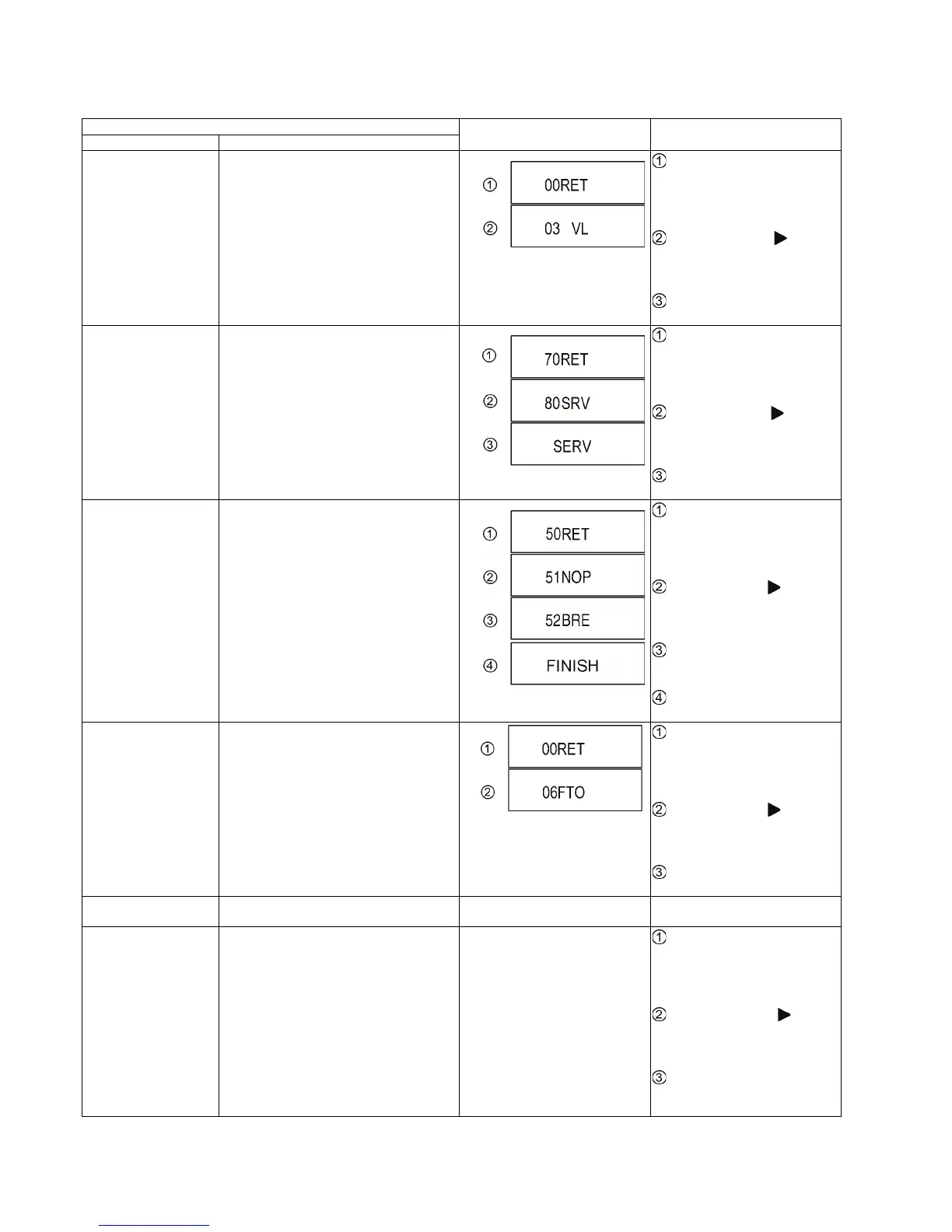
7.1.2. Special Modes Setting
Item
TV display Key operation
Mode name Description
Rating password The audiovisual level setting password is
initialized to Level 8.
While the unit is on, press and
hold [OK], [B] and [Y] on the remote
control at the same time for more
than 5 seconds.
-"00RET" is displayed on the TV.
Repeatedly press
[ ] on the
remote control or [POWER] on the
unit until "03VL" is displayed on the
TV.
Press [OK] on the remote control
or [OPEN/CLOSE] on the unit.
Service Mode Setting every kind of modes for servicing.
*Details are described in 7.1.3. Service Mode
at a glance.
While the unit is on, press and
hold [5], [9] and [R] on the remote
control at the same time for more
than 5 seconds.
-"70RET" is displayed on the TV.
Repeatedly press
[ ] on the
remote control or [POWER] on the
unit until "80SRV" is displayed on
the TV.
Press [OK] on the remote control
or [OPEN/CLOSE] on the unit.
BD-ROM history cleaning <Persistent Storage> of BD-ROM standard is
cleaned.
While the unit is on, press and
hold [6], [7] and [Y] on the remote
control at the same time for more
than 5 seconds.
-"50RET" is displayed on the TV.
Repeatedly press
[ ] on the
remote control or [POWER] on the
unit until "51NOP" is displayed on
the TV.
Press and hold [STOP] on the
remote control until "52BRE" is dis-
played on the TV.
Press [OK] on the remote con-
trol or [OPEN/CLOSE] on the unit.
Forced disc eject Removing a disc that cannot be ejected.
The tray will open and unit will shift to P-off
mode.
While Demonstration Lock is being set, this
Forced disc eject function is not accepted.
While the unit is on, press and
hold [OK], [B] and [Y] on the remote
control at the same time for more
than 5 seconds.
-"00RET" is displayed on the TV.
Repeatedly press
[ ] on the
remote control or [POWER] on the
unit until "06FTO" is displayed on
the TV.
Press [OK] on the remote control
or [OPEN/CLOSE] on the unit.
Forced power-off When the power button is not effective while
power is ON, turn off the power forcibly.
Display in P-off mode. Press [POWER] key over than 10
seconds.
Aging Perform sequence of modes as * Aging
Description shown below continually.
Display following the then mode.
While the unit is on, press and
hold [5], [9] and [R] on the remote
control at the same time for more
than 5 seconds.
-"70RET" is displayed on the TV.
Repeatedly press
[ ] on the
remote control or [POWER] on the
unit until "81AIG" is displayed on the
TV.
Press [OK] on the remote control
or [OPEN/CLOSE] on the unit for at
least 3 seconds.










 To Next Page