25
7.1.3. Service Mode at a glance
Information necessary for service can be displayed.
Service mode setting:
1. Turn the power on.
2. Press the [5] [9] and [R] button simultaneously for five seconds, then [70RET] is displayed on TV.
3. Press the
[ ] button to select until [80SRV] is displayed on TV.
4. Press the [OK] button.
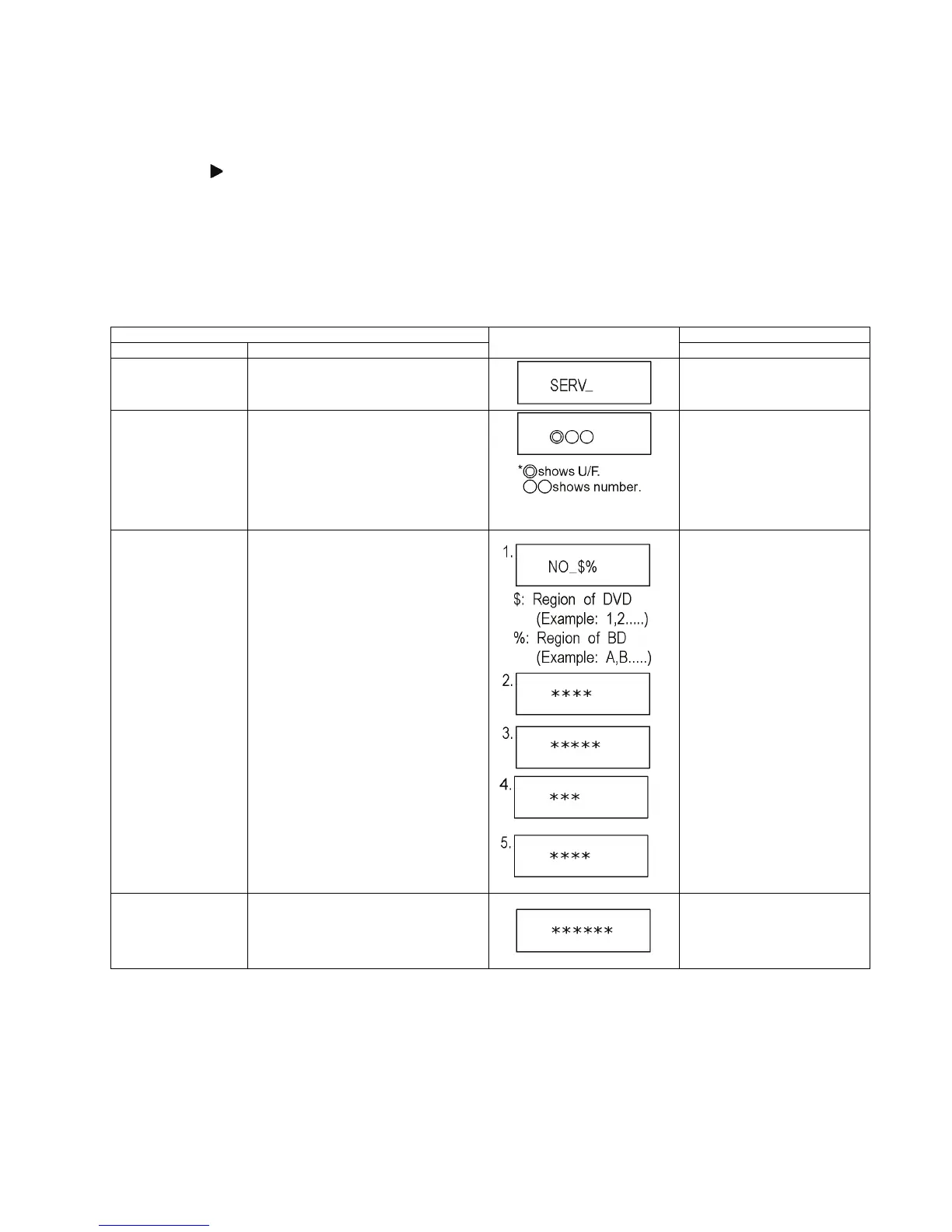
5. It is displayed on TV as [SERV]: It is shown to have entered the service mode.
6. The command is transmitted by attached remote control.
Method of making clear service mode: Press the power button (power off).
The display of information to each command is as follows.
NOTE:
Do not use it excluding the designated command.
Item
TV display
Key operation
Mode name Description (Remote controller key)
Release Items Item of Service Mode executing is cancelled. Press [0] [0] or [Return] in service
mode.
Error Code Display Last Error Code of U/F held by Timer is dis-
played on TV.
*Details are described in
7.1.1. Self-Diagnosis Functions.
If any error history does not exist,
[F00] is displayed.
Press [0] [1] in service mode
ROM Version Display The display contents are switched over every
5 seconds.
1. Region code
2. Main firm version
3. Boot View version
4. Timer firm version
5. Drive firm version
Press [0] [2] in service mode
Display Engineering
Adjusted Value
Displays the Engineering Adjusted Value. Press [0] [9] in service mode.










 To Next Page