24
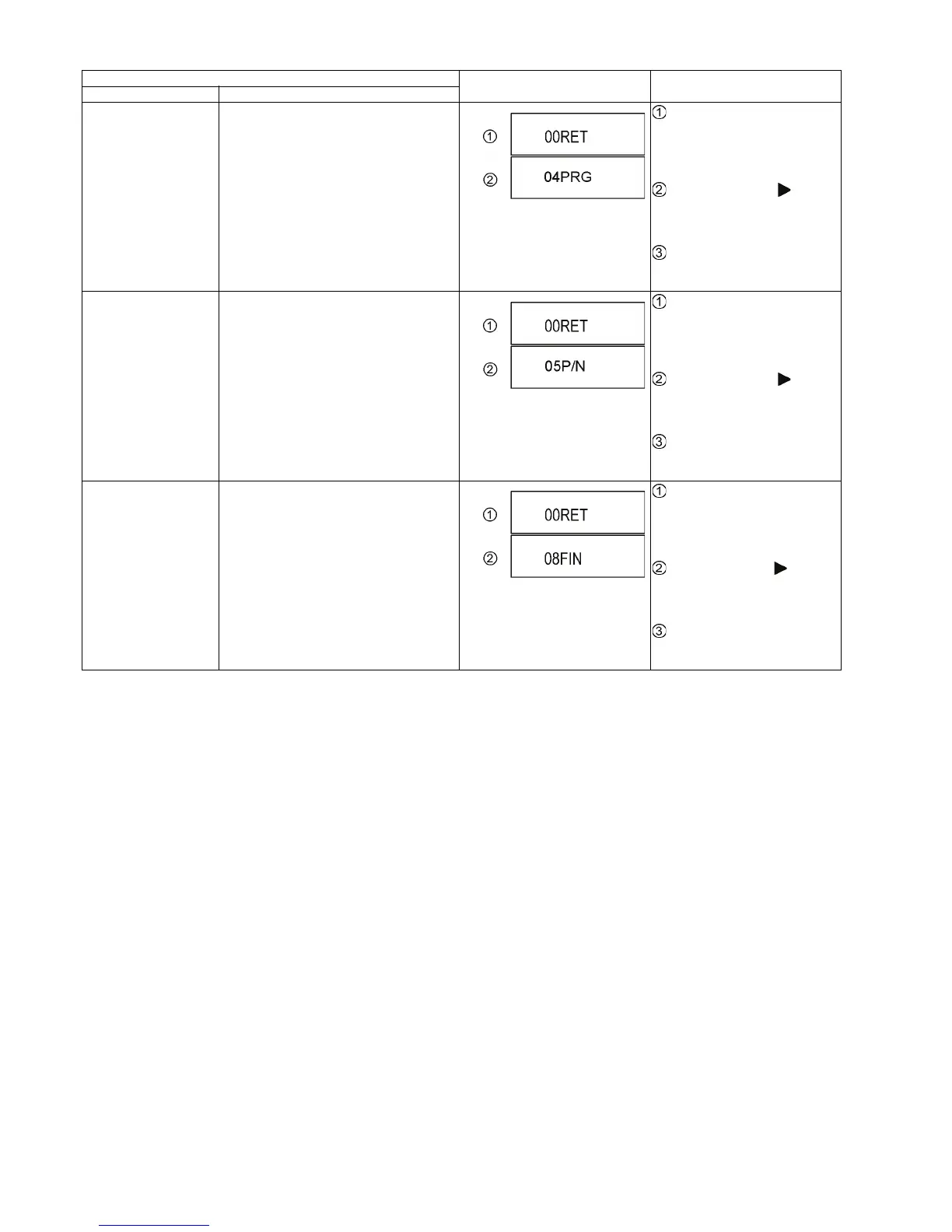
Progressive initialization The progressive setting is initialized to inter-
lace.
While the unit is on, press and
hold [OK], [B] and [Y] on the remote
control at the same time for more
than 5 seconds.
-"00RET" is displayed on the TV.
Repeatedly press
[ ] on the
remote control or [POWER] on the
unit until "04PRG" is displayed on
the TV.
Press and hold [OK] on the
remote control or [OPEN/CLOSE]
on the unit for at least 3 seconds.
PAL/NTSC switch The signal system is switched to PAL or
NTSC.
While the unit is on, press and
hold [OK], [B] and [Y] on the remote
control at the same time for more
than 5 seconds.
-"00RET" is displayed on the TV.
Repeatedly press
[ ] on the
remote control or [POWER] on the
unit until "05P/N" is displayed on the
TV.
Press and hold [OK] on the
remote control or [OPEN/CLOSE]
on the unit for at least 3 seconds.
Default setting The date of Menu, Mode and EEPROM set-
ting, etc. is set to the default condition in fac-
tory.
While the unit is on, press and
hold [OK], [B] and [Y] on the remote
control at the same time for more
than 5 seconds.
-"00RET" is displayed on the TV.
Repeatedly press
[ ] on the
remote control or [POWER] on the
unit until "08FIN" is displayed on the
TV.
Press and hold [OK] on the
remote control or [OPEN/CLOSE]
on the unit for at least 3 seconds.
Item
TV display Key operation
Mode name Description










 To Next Page