30
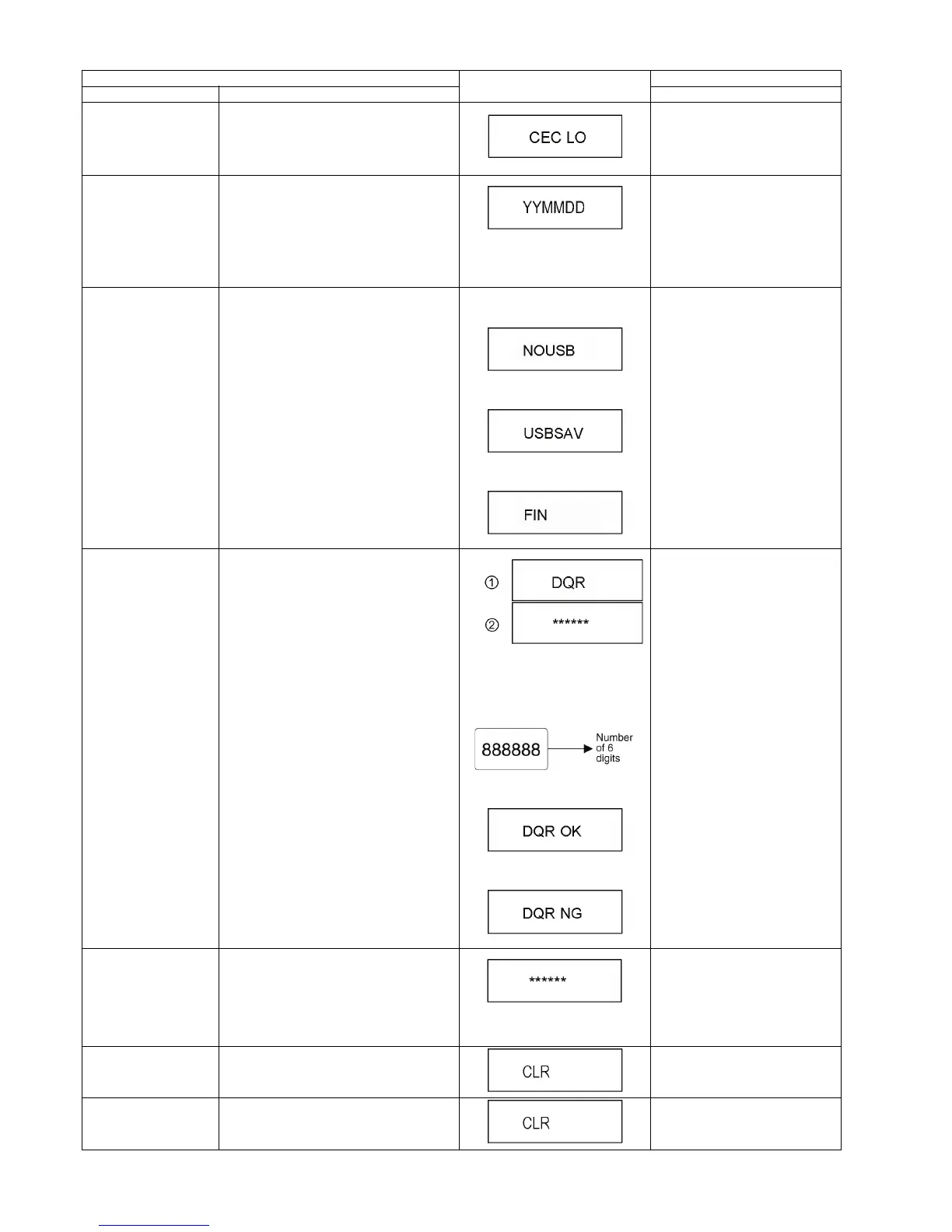
CEC (L) Output The CEC terminal low output of HDMI. Press [5] [6] in service mode.
Manufacturing Date Read out the manufacturing date of the unit.
YY: Year
MM: Month
DD: Date
Press [6] [1] in service mode.
Save the error history to
USB storage device
The error and user operation history of the
remote control are saved to the USB storage
device.
The USB storage device cannot be
recognized
During saving
Save end
Press [6] [9] in service mode.
Update Engineering
Adjusted value
NANDFlash is updated with the 6-figure input
value of a remote control.
Input the 6 digits adjust value, that
is in the Drive or OPU replacement
part,with the remote control's num-
ber keys in the service mode.
When register successful:
When register fail:
Press [7] [2] in service mode.
Tray OPEN/CLOSE Test The BD Drive tray is opened and closed
repeatedly.
"*" is number of open/ close cycle
times.
Press [9] [1] in service mode.
*When releasing this mode, pull out
AC cord.
Delete the Laser Used
Time
Laser used time information stored in the
memory of the unit is deleted.
Press [9] [5] in service mode.
Delete the Last Drive
Error
Laser Drive Error information stored on the
BD Drive is deleted.
Press [9] [6] in service mode.
Item
TV display
Key operation
Mode name Description (Remote controller key)










 To Next Page