Playback
22
[RAM] [DVD-R] [DVD-A] [DVD-V] [VCD] [CD] [MP3]
During play
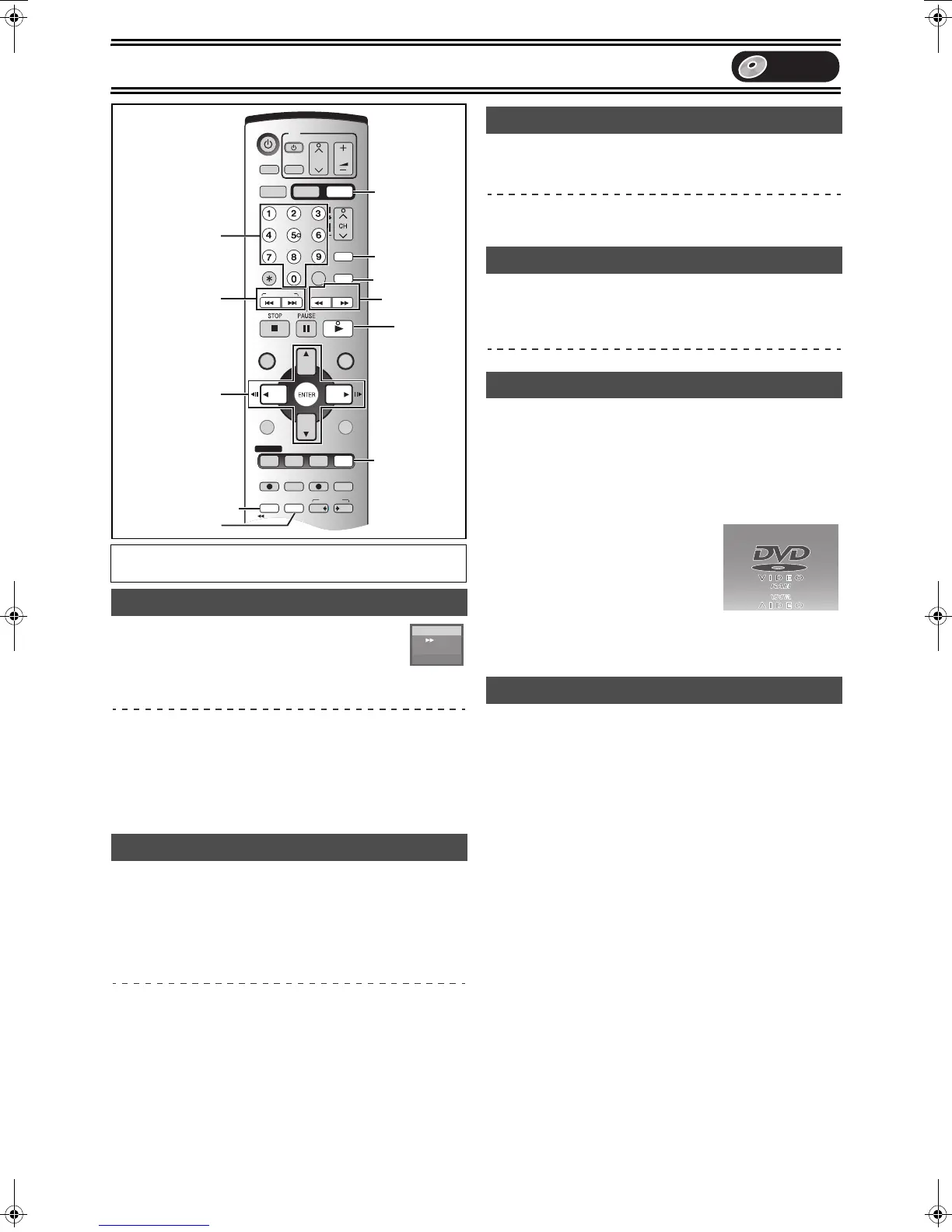
Press [6, SLOW/SEARCH] or [5,
SLOW/SEARCH].
≥On the main unit, press and hold [:/6] or [5/9].
≥There are 5 search speeds. Each press increases the search
speed.
≥Press [1, PLAY] to restart playback.
≥Sound is output only in the first level of fast forward. In the case of
DVD-A (except moving picture parts), CD and MP3, it is output in
all levels.
≥You can turn this sound off if you want to (l 44, “Audio”—“Search
Audio & PLAY t1.3”).
[RAM] [DVD-R] [DVD-A] (Motion picture parts only) [DVD-V] [VCD]
While paused
Press [6, SLOW/SEARCH] or [5, SLOW/
SEARCH].
≥On the main unit, press and hold [:/6] or [5/9].
≥When slow motion play is continued for about 5 minutes it pauses
automatically.
≥The speed increases up to 5 steps.
≥Press [1, PLAY] to restart playback.
≥Forward direction ([5], [5/9]) only. [VCD]
[RAM] [DVD-R] [DVD-A] (Motion picture parts only) [DVD-V] [VCD]
While paused
Press [2;], [;1], [2] or [1].
≥Each press shows the next or previous frame.
≥Press [1, PLAY] to restart playback.
≥Forward direction ([;1], [1]) only. [VCD]
[RAM] [DVD-R] [DVD-A] [DVD-V] [VCD] [CD] [MP3]
During play or while paused
Press [:, SKIP] or [9, SKIP].
≥On the main unit, press [:/6] or [5/9].
≥Each press increases the number of skips.
[RAM] [DVD-R] [DVD-A] [DVD-V] [VCD] [CD] [MP3]
Starting play from a selected title, chapter or track.
During play
Press the numeric buttons to select the item.
e.g.: “5”: [0] )[5] [MP3] “5”: [0] )[0] )[5]
“15”: [1] )[5] “15”: [0] )[1] )[5]
[DVD-A]
A group number can be specified while the
screen saver is displayed.
e.g.: “5”: [5]
≥This works only when stopped (screen
saver is displayed) with some discs.
≥Playing bonus groups
Some discs contain bonus groups. If a
password screen appears after selecting a group, enter the
password with the numeric buttons and press [ENTER]. Refer also
to the disc’s jacket.
[RAM] [DVD-R]
You can skip approximately 1 minute with one press.
During play
Press [CM SKIP].
Preparation
≥Press [DVD].
Fast forward and rewind—SEARCH
Slow-motion play
SKIP/INDEX
SLOW/
SEARCH
REW
FF
PLAY
PROG/CHECK
DVD RECVHS REC
REC MODE
ADD/DLT
DUBBING
VHS DVD
POWER
TIME SLIP
CHAPTER
JET REW
FUNCTIONSDIRECT NAVIGATOR
TOP MENU
VHS MENU
RETURN
CM SKIP
CANCEL/RESET
VOLUME
CH
INPUT SELECT
STATUSDISPLAY
AUDIO
TV
TV/VIDEO
DVD/VHS
VHS
DVD
TRACKING/V-LOCK
SUB MENU
DVD/VHS POWER
DVD ERASE
VCR Plus+
OUTPUT
1
2, 1
2;, ;1
ENTER
DVD
AUDIO
CM SKIP
TIME SLIP
CHAPTER
DVD ERASE
6, 5
:, 9
Numeric
Buttons
L R
t2
DVD-RAM
••••
Frame-by-frame viewing
Skipping
Direct Play
CM Skip
Screen saver
DVD
PP-Sample.book 22 ページ 2004年4月8日 木曜日 午後3時45分











 To Next Page