EasyManua.ls Logo

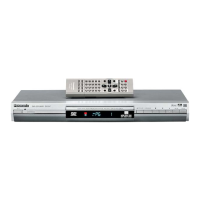
Panasonic DVD-S47EE - User Manual

Panasonic DVD-S47EE
20 pages
Print Icon
To Next Page IconTo Next Page
Loading...
P PC
RQT7553-P
Operating Instructions
DVD/CD PLAYER
Model No. DVD-S47
®
Dear customer
T
hank you for purchasing this product. For optimum performance and
safety, please read these instructions carefully before connecting,
operating or adjusting this product. Please keep this manual for future
reference.
IMPORTANT SAFETY INSTRUCTIONS . . . . . . . . . . . . . . . . . 2
Accessories/Discs that can be played . . . . . . . . . . . . . . . . . 3
Disc handling. . . . . . . . . . . . . . . . . . . . . . . . . . . . . . . . . . . . . . 5
Basic Play . . . . . . . . . . . . . . . . . . . . . . . . . . . . . . . . . . . . . . . . 6
Enjoying higher quality audio and video . . . . . . . . . . . . . . . 7
Changing the play sequences . . . . . . . . . . . . . . . . . . . . . . . . 7
Using navigation menus
. . . . . . . . . . . . . . . . . . . . . . . . . . . . . . 8
Convenient functions . . . . . . . . . . . . . . . . . . . . . . . . . . . . . . . 9
Using On-Screen Menus. . . . . . . . . . . . . . . . . . . . . . . . . . . . 10
Changing the player settings . . . . . . . . . . . . . . . . . . . . . . . . 12
Specifications . . . . . . . . . . . . . . . . . . . . . . . . . . . . . . . . . . . . 13
Troubleshooting guide . . . . . . . . . . . . . . . . . . . . . . . . . . . . . 14
Maintenance. . . . . . . . . . . . . . . . . . . . . . . . . . . . . . . . . . . . . . 15
Limited Warranty (ONLY FOR U.S.A.) . . . . . . . . . . . . . . . . . 16
Product Service . . . . . . . . . . . . . . . . . . . . . . . . . . . . . . . . . . . 17
Main feature index. . . . . . . . . . . . . . . . . . . . . . . . . Back cover
Region number
The player plays DVD-Video marked with labels containing the
region number “1” or “ALL”.
Example:
2
4
1
ALL
1
This manual was printed with soy based ink.
Table of contents
Getting started
STEP 1 The remote control . . . . . . . . . . . . . . . . . . . . . 4
STEP 2 Connection to a television. . . . . . . . . . . . . . . 4
STEP 3 QUICK SETUP . . . . . . . . . . . . . . . . . . . . . . . . . 5
Operations
Reference
Referencia rápida en español . . . . . . . . . . . . . . . . . . 18
7553En.fm1ページ2003年12月26日 金曜日 午前10時32分

Questions and Answers

  • T
    Thomas WellsSep 12, 2025
    Why is my Panasonic DVD Player not operating?
    • M
      mruizSep 12, 2025
      If your Panasonic DVD Player is not operating, try turning it off and then back on. Alternatively, turn the unit off, disconnect the AC mains lead, and then reconnect it. Wait 1 to 2 hours for condensation to evaporate. Ensure the batteries in the remote are correctly installed and not depleted (replace them if necessary). Point the remote control at the remote control sensor and operate. Check the video or audio connection and the power or input setting of the connected equipment. Also, check that the DVD-RAM has something recorded on it. While stopped, press and hold [D] and [;] on the unit and then also press and hold [
  • S
    Scott DuncanSep 14, 2025
    Why is there ghosting when progressive output is on Panasonic DVD-S47EE?
    • T
      Theresa GrossSep 14, 2025
      If you see ghosting or the pictures are not in progressive output on your Panasonic DVD Player, it may be due to the editing method or material used on the DVD-Video. Try changing the 'Video Output Mode' in the Picture Menu to '480I'. If the unit is connected to the television through VIDEO OUT or S VIDEO OUT, output will be interlace. You can also select 'Enable (NTSC Disc Only)' in 'Progressive Out (Component)' in the 'Video' tab, and then select '480P' in 'Video Output Mode' in the Picture Menu.
  • M
    Marcus BrewerSep 16, 2025
    Why can't I record with my Panasonic DVD-S47EE?
    • D
      Douglas BrownSep 16, 2025
      If you cannot record to digital recording equipment or the sound recorded is incorrect with your Panasonic DVD Player: * You cannot record WMA/MP3. * You cannot record DVDs that have protection preventing digital recording. * You cannot record DVDs if the recording equipment cannot handle signals with a sampling frequency of 48 kHz. Make the following settings: – Advanced Surround: Off – PCM Digital Output: Up to 48 kHz – Dolby Digital/DTS Digital Surround: PCM.
  • B
    bradley43Sep 18, 2025
    How do I fix ghosting on my Panasonic DVD-S47EE?
    • C
      Christina SantosSep 18, 2025
      If you are experiencing ghosting when progressive output is on, pictures are not in progressive output, or closed captions are not displayed on your Panasonic DVD Player: * Change “Video Output Mode” in Picture Menu to “480I.” The problem may be caused by the editing method or material used on DVD-Video, but should be corrected if you use interlace output. * If the unit is connected to the television through VIDEO OUT or S VIDEO OUT, output will be interlace. * Select “Enable” in “Progressive Out (Component)” in “Video” tab. Then, select “480P” in “Video Output Mode” in Picture Menu. * When progressive output is on, closed captions will not be displayed.
  • J
    justin86Nov 19, 2025
    How to fix a Panasonic DVD-S47EE DVD Player that is not working?
    • R
      Robert FlemingNov 19, 2025
      If your Panasonic DVD Player is not operating, try the following: * Turn the unit off and then back on. * Turn the unit off, disconnect the AC power supply cord, and then reconnect it. * Wait 1 to 2 hours for it to evaporate. * Check that the batteries are installed correctly. If the batteries are depleted, replace them with new ones. * Point the remote control at the remote control sensor and operate. * Check the video or audio connection. * Check the power or input setting of the connected equipment. * Check that the DVD-RAM has something recorded on it. While stopped, press and hold [D] and [;] on the unit and then also press and hold [

Panasonic DVD-S47EE Specifications

General IconGeneral
BrandPanasonic
ModelDVD-S47EE
CategoryDVD Player
LanguageEnglish

Related product manuals