13
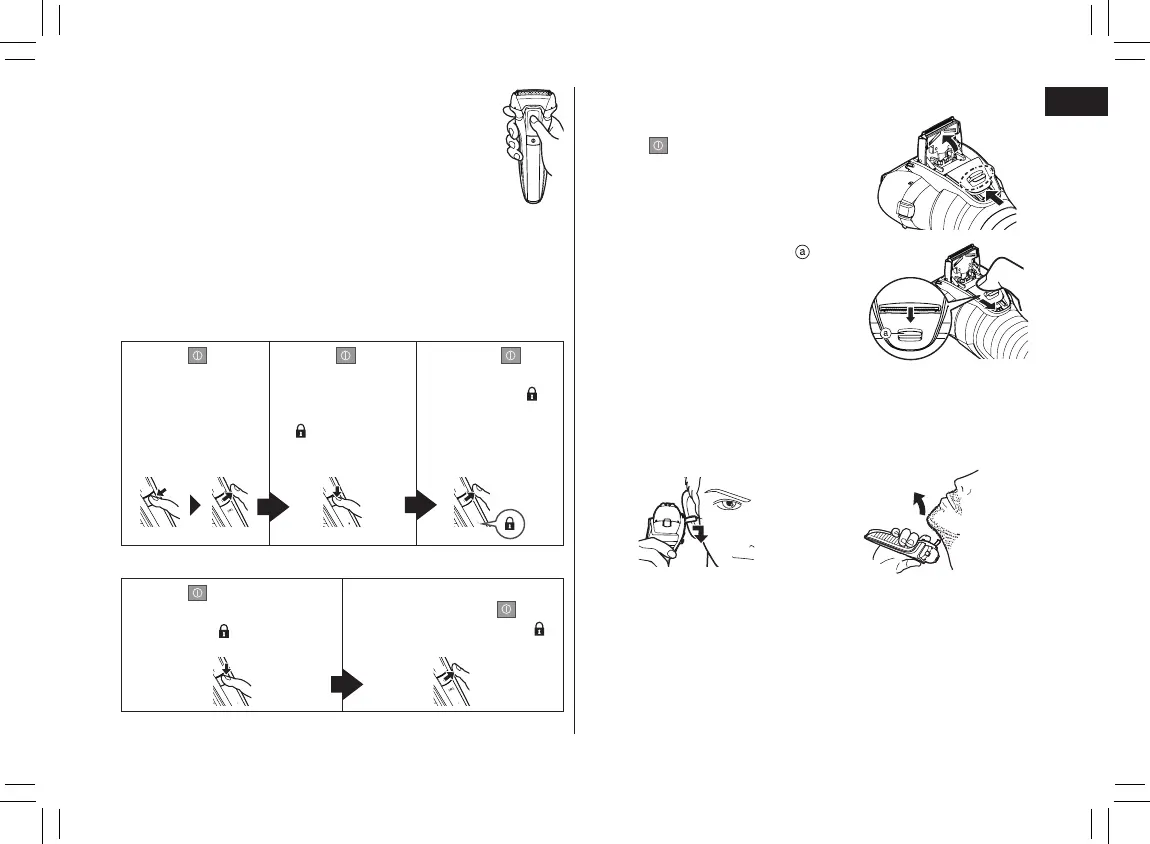
►Using the trimmer
1. Slide the trimmer handle up.
2. Press
and use.
Press and hold the top knob ( ) and
slide the trimmer handle down to
lower the trimmer.
Tips for better usage
Apply the trimmer edge perpendicular to skin gently and move
it to the arrow direction slowly.
Trimming sideburns or
building beard shape
Pre-shave of long beards
• To prevent erroneous operation, place your
ngers on the thumb rest while using the
shaver.
• The sonic vibration cleaning mode is activated when the power
switch is pressed for more than 2 seconds while the shaver
is not operating (the switch lock is unlocked). (See page 15.)
You cannot shave in this mode.
►Locking/unlocking the power switch
Locking the power switch
1. Press once
and then
release.
• The shaver
starts
operating.
2. Press
for
more than 2
seconds until the
switch lock lamp
(
) turns on.
• The shaver will
stop operating.
3. Release .
• The switch
lock lamp (
)
will light up for
5 seconds and
turn off.
Unlocking the power switch
1. Press for more than
2 seconds until the switch
lock lamp (
) turns off.
2. Once the shaver starts
operating, release
.
• The switch lock lamp (
)
will turn off.
PB016461 - ES-LL2141-K551 ������_(01EN)_08-01-18.indd 13 2018/8/1 17:25:22






 To Next Page