14
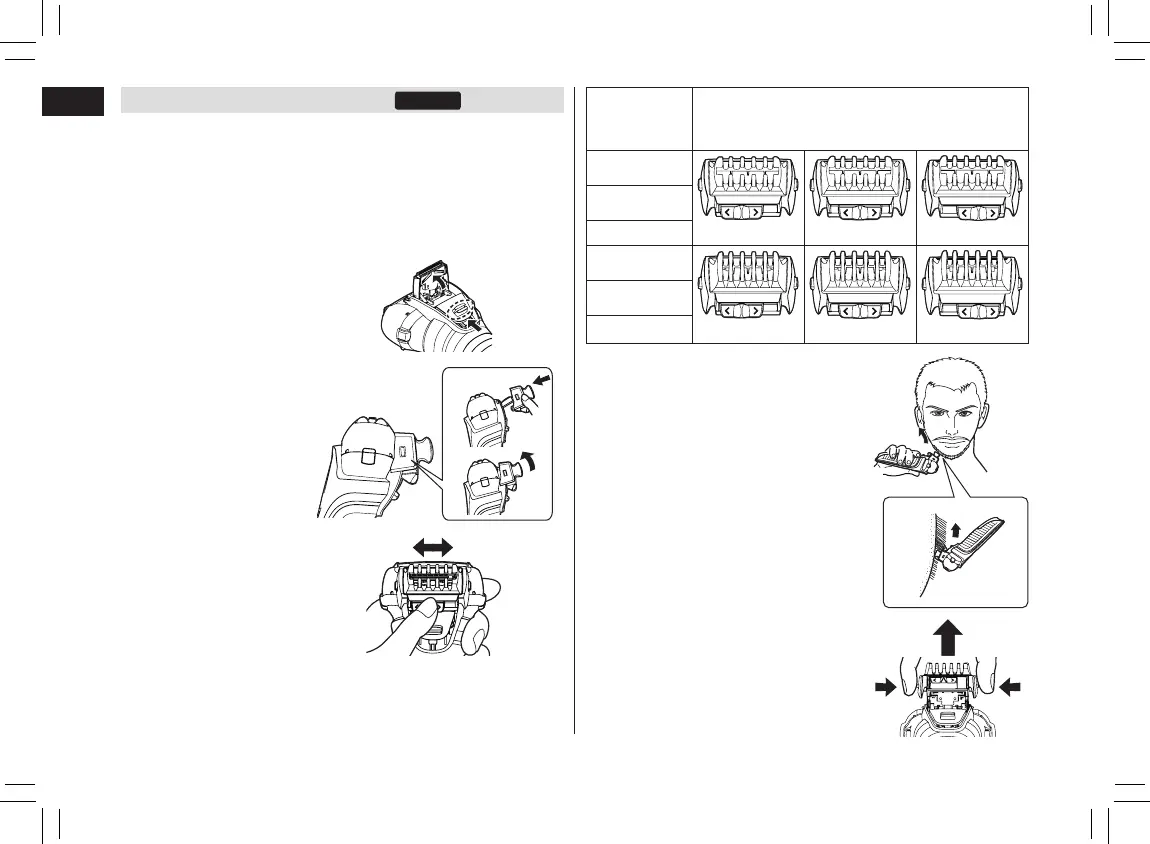
Using the comb attachment
• Turn the shaver off.
• Apply the oil to the trimmer before and after each use.
(See page 16.)
• Do not use with shaving creams applied or when the beard
is wet. Wet beard can stick to the skin or clump making it
difcult for the blade to cut.
• Comb beard and sideburns before trimming.
1. Slide the trimmer
handle up.
2. Mount the comb
attachment to the
main body until it
clicks.
1)
2)
3. Slide the trimming
height lever left
and right to align it
to the desired
trimming length.
Trimming
height
(approx.)
Corresponding position of trimming height
lever and trimming height mark
1 mm (1/32˝)
1 2 3
1 mm (1/32˝)
1 2 3
2 mm (5/64˝)
1 2 3
3 mm (1/8˝)
2 mm (5/64˝)
3 mm (1/8˝)
5 mm (3/16˝)
5 6 7
5 mm (3/16˝)
5 6 7
6 mm (1/4˝)
5 6 7
7 mm (9/32˝)
6 mm (1/4˝)
7 mm (9/32˝)
4. Turn the shaver on, bring the
comb of the comb attachment
into contact with the skin, and
cut the beard by moving the
trimmer.
5. Press and hold the comb
attachment release buttons to
remove.
PB016461 - ES-LL2141-K551 ������_(01EN)_08-01-18.indd 14 2018/8/1 17:25:25






 To Next Page