Home
Panasonic
Fitness Equipment
EU6441-U1
Page 10 (Machine Cover Removal)
Panasonic EU6441-U1 - Machine Cover Removal; Main PCB Case Removal; Elevation Cover Removal
19 pages
Manual
Save Page as PDF
To Next Page
To Next Page
To Previous Page
To Previous Page
Loading...
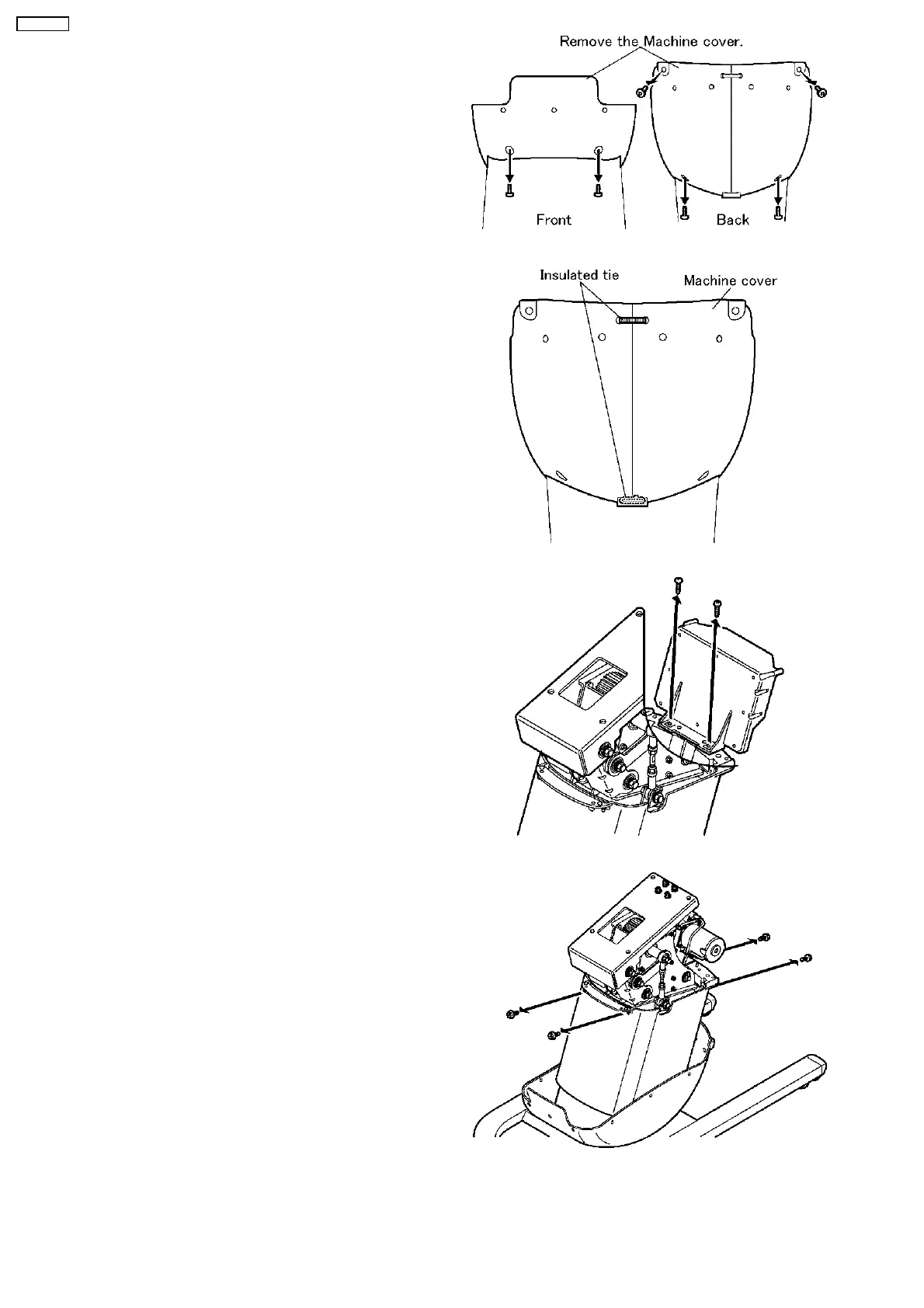
6.
Remove
the
Machine
cover.
a.
Unscrew
six
screws
as
the
Figure.
b.
Cut
two
Insulate
d
ties.
7.
Remove
the
Main
PCB
case.
a.
Unscrew
two
screws
as
the
Figure.
8.
Remove
the
Elevation
cover.
a.
Unscrew
four
screws
as
the
Figure.
10
EU6441-U1
9
11
Table of Contents
Main Page
Table of Contents
1
Diagram of Main Pcb
2
Checking
3
Disassembly
8
Replace the Driving Unit
12
How to Allign Wires
13
Check the Operation
16
Install the Safety Cover and Machine Cover
16
Final Operation Checking
16
Exploded View
17
Replacement Parts List
18
Related product manuals
Panasonic EU6441
22 pages
Panasonic EU7805K
23 pages
Panasonic EW6011
15 pages


 To Next Page