-
7
-
Installing the software
● Before installing the software, quit all other open applications.
1. Double-click “Panasonic Device Programmer.zip.”
2. Follow the instructions on the screen to install the software.
● Restart the computer once the installation is complete.
Configuring settings with the software
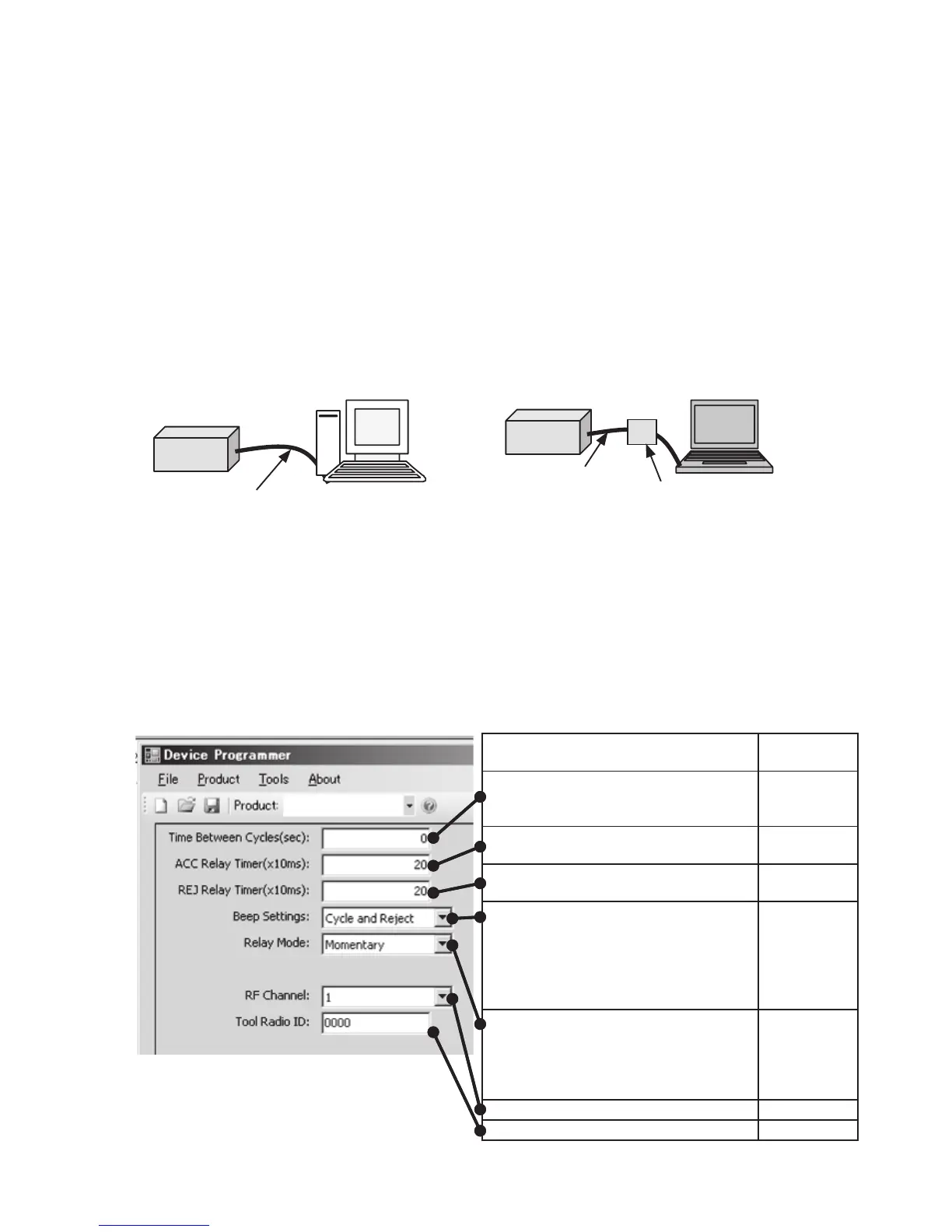
1. Connect the assembly qualifier to the computer.
• Use an RS-232C straight cable.
Using a serial RS-232C port to
connect the assembly qualifier
Using a USB port to connect the
assembly qualifier
RS-232C straight cable
RS-232C
straight cable
USB serial conversion
adapter
2. Turn on the assembly qualifier.
3. Launch the Device Programmer application.
4. Click the “Read Settings” button.
• The software will load the assembly qualifier’s current settings.
5. Configure the settings as desired.
• Enter values and select settings.
Function description
Initial
setting
Time during which to invalidate the
next reception (so that cycles are not
counted twice)
0(0 sec)
Fastening PASS signal relay output time
20
(0.2 sec)
Fastening FAIL signal relay output time
20
(0.2 sec)
Sets the beep mode to any of three
options.
1 Accept and Reject: Fastening PASS
and fastening FAIL
2 Accept only: Fastening PASS only
3 Reject only: Fastening FAIL only
Accept and
Reject
Sets the relay output method to either
of two options.
1 Latching: Output continuously.
2 Momentary: Output for duration
defined by relay output time.
Momentary
Sets the frequency to any of 12 channels.
1
Displays the registered tool ID.
0000
Function description
Initial
setting
Time during which to invalidate the
next reception (so that cycles are not
counted twice)
0(0 sec)
Fastening PASS signal relay output time
20
(0.2 sec)
Fastening FAIL signal relay output time
20
(0.2 sec)
Sets the beep mode to any of three
options.
1 Accept and Reject: Fastening PASS
and fastening FAIL
2 Accept only: Fastening PASS only
3 Reject only: Fastening FAIL only
Accept and
Reject
Sets the relay output method to either
of two options.
1 Latching: Output continuously.
2 Momentary: Output for duration
defined by relay output time.
Momentary
Sets the frequency to any of 12 channels.
1
Displays the registered tool ID.
0000









 To Next Page