PM2.5
35
Confirmation and
preparation
VR901
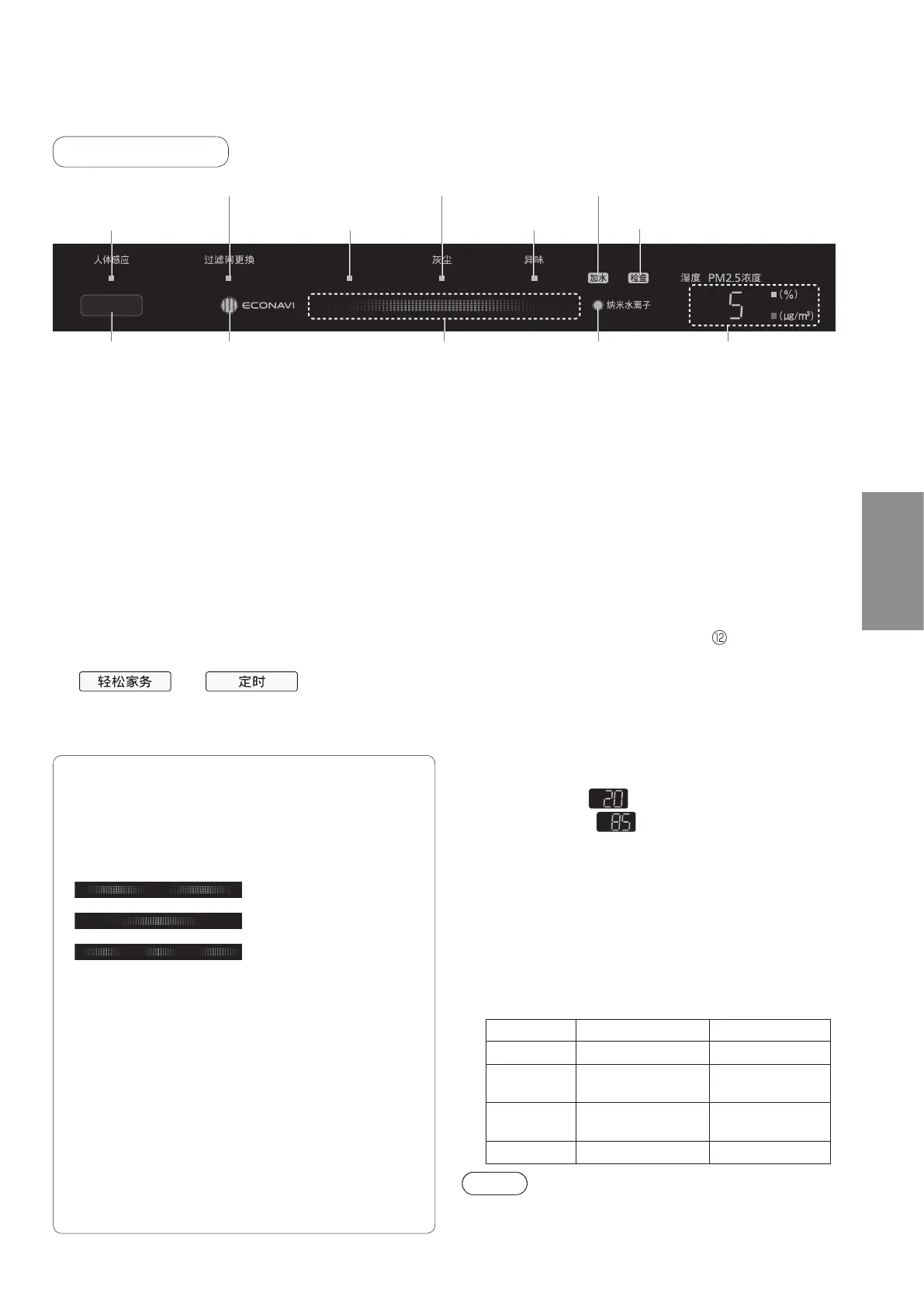
Humidity / PM2.5
concentration
indicator
nanoe™indicatorClean signEconavi indicator
Presence detection indicator
Check indicator
Front indication
■Presence sensor (P.31)
Detects and notifies the actions of people with a sign
(the indicator lit).
The sensitivity of the sensor can be changed. (P.51 Q13)
■ Econavi indicator
●
The indicator is lit during ECONAVI operation (P.49).
●
ECONAVI operation can be turned off. (P.51 Q17)
■ Filter replacement notification indicator
● The replacement timing for the composite air filter
and deodorizing filter are notified with the indicator
lit. When the indicator turns on, it is time to replace
the composite air filter and deodorizing filter, so
please replace the filters.
(Replacingfilters→P.36to37)
After replacing the filters, press and hold
and simultaneously for
3 seconds to reset the product. (The indicator is
turned off.) If the product is not reset, it will stop
operating 1 week after the indicator turns on.
■ nanoe™ indicator
●Theindicatorislitwhennanoe™isgenerated.
(It turns on in all operating modes.)
●nanoe™operationcanbeturnedoff.(P.51Q18)
■Water supply indicator
● If there is no more water in the tank when
humidification is set, a beeping notification sound is
emittedandthe“Watersupply”indicatorblinks.
→Fillthetankwithwater.(P.37)
● When the water supply indicator is blinking, the product
operates without any humidification.
■Check indicator
●
When the abnormality occurs in the products, the indicator is lit.
→Whentheindicatorislit.(P.53 )
■Humidity / PM2.5 concentration indicator
Alternates notifying the general level of the current
humidity and PM2.5 concentration. The indicators are
lit even when operation is stopped.
●For the current humidity, the general humidity level
is notified in 1% units.
The display range is from 20% to 85%.
20% or less…
turns on
85% or more…
turns on
(The humidity figure cannot be set.)
●For the PM2.5 concentration, the general
concentration is notified in 1 µg/m
3
units.
The display range is from 0 µg/m
3
to 600 µg/m
3
.
●
The indicator display can be changed. (P.51 Q19)
● A warning sound is emitted each time the PM2.5
concentration of the room exceeds the following
levels while the product is operating.
●Eachwarningsoundisemittedfor60minutesuntilthe
concentration returns to safe levels.
Level Concentration
Warning sound
Safe level Less than 75 µg/m³ No sound emitted
Caution level
75 µg/m³ or more to
less than 150 µg/m³
Ping ping
Warning level
150
µg
/m³ or more to
less than 250
µg
/m³
Ping ping ping
Danger level 250
µg
/m³ or more
Ping ping beep ping
Note
●Thewarningsoundisnotemittedin“Sleepmode”
and“Lightsensormode”.
● It may take time from detection of PM2.5
concentration until the indicator is displayed.
Water supply indicator
PM2.5 indicator
Presence sensor
detector
Pollen / house dust indicator
Odor indicator
Filterreplacementnoticationindicator
The clean sign notifies how dirty the air is, and each
sign indicates the type of dirt present.
The sensitivity of the sensor can be changed.
(P.50 Q8)
■Clean sign
(Blue):
indicates the air is clean.
(Red·Small):
indicates the air
is slightly dirty.
(Red·Large): indicates the air
is dirty.
■ PM2.5 indicator
It turns on when PM2.5 is detected.
(PM2.5 includes cigarette smoke, dust and other
contaminantsof2.5μmorless.)
■ Pollen / house dust indicator
It turns on when pollen or house dust is detected.
■ Odor indicator
It turns on when odors are detected.
*
Depending on the dirt present, only the clean sign
may turn on red without any other indicator turning on.



 To Next Page