49
When you feel
confused
VR901
Econavi operation
Anautomaticoperatingmodewiththe“Airvolume”issetto[自动(Auto)].Thismodeisacombinationof“Patrol
mode”thatdetectsdirtintheairoftheroomeveryhour,and“Learningmode”thatlearnswhendustislikelytobe
generated in advance from the daily dirt generation patterns.
It saves power by stopping operation automatically when the air is clean. Meanwhile, the product will operate in
advance to eliminate the dirt effectively before spreading, thus reducing the operation time.
The power saving effect is different depending on the installation environment and the usage.
Patrol mode
Learning mode
The product pauses automatically when the air is
clean, and after remaining paused for 55 minutes,
“Patrol mode” (“Air volume” set to [中速 (Medium)])
starts for 5 minutes.
During operation, the product memorizes the time
and dirtiness level, and the next day, it will run the
preventive operation 5 minutes before the
memorized time.
(The memory is updated every day. If it is
disconnected, the previous memory is erased.)
●While the operation is paused and in the patrol mode,
if the dirt is detected, the product will operate with the
air volume corresponding to the level of dirtiness.
●When humidification is set, the product may operate
depending on the level of humidity in the room,
regardless of whether the air there is clean.
Functions of the anti-fungus assembly
Keepstheinsideofthetrayclean.
Testing trustee: Japan spinning inspection association Test method: Verify the method to prevent mold bacteria (Halo method).
Anti-fungus method: Install the anti-fungus assembly to the tray. Target: Humidifying filter in the tray Test outcome: Confirm that inhibited.
[No. 09006504-1]
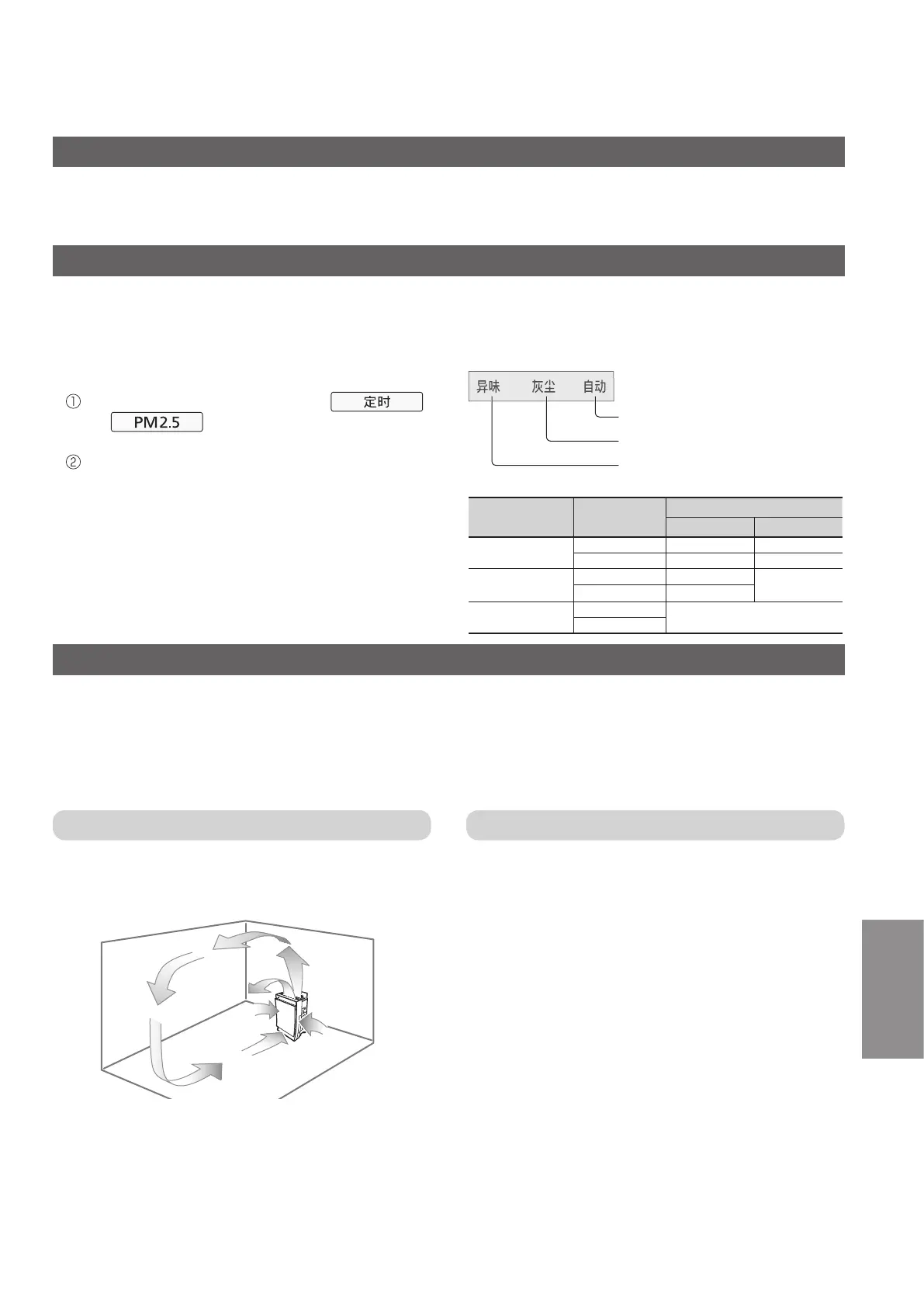
About light sensor mode
Detecting indoor brightness with the light sensor, the product adjusts the brightness of indicators and the front
indication of control panel and adjusts the air volume, automatically.
(Theinitialsettingis“Lightsensor1”.)
●Thebrightnessofthefrontindicationin“Lightsensor
mode”canbechanged.
Stop operation, then press and hold
and simultaneously.
(“Airflow”indicatorislitinorder.)
Release the buttons when the brightness reaches
you want.
“Airow”indicatordisplay:
No Light sensor
Light sensor 2
Light sensor 1
●Theairvolumedoesnotchangeifthe“Airvolume”is
set to [急速 (High)], [中速 (Medium)] or [低速 (Low)],
oriftheproductisoperatingin“Housekeeping
Assist”,“PM2.5”modes.
Light Sensor
Setting
Display
Indoor brightness
dim dark
Light sensor 1
Control panel All on Half on
Front indication
Half on Off
Light sensor 2
Control panel All on
Half on
Front indication
Half on
No Light sensor
Control panel
All on
Front indication



 To Next Page