Basic Instructions
2 − 82
You must be careful when using one of the instructions below, which are executed by detecting the leading
edge of execution condition (trigger) such as the differential instruction.
− DF (leading edge differential)
− Count input of CT (counter)
− Count input of F118 (UDC) (up/down counter)
− Shift input of SR (shift register)
− Shift input of F119 (LRSR) (left/right shift register)
− NSTP (next step)
− Differential execution type high−level instruction (this instruction is specified by P and a number)
Examples of step ladder instructions
1
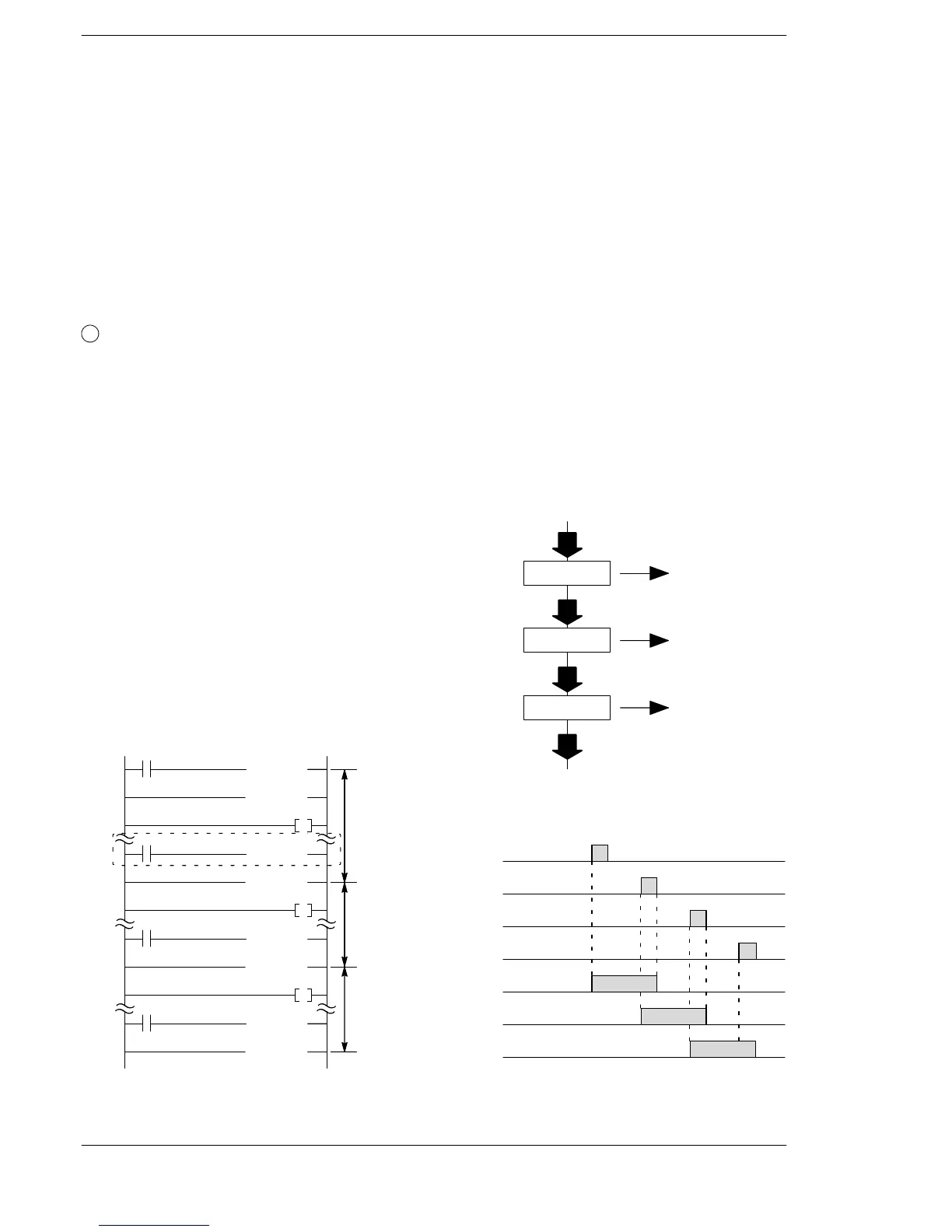
Sequence control of a process
This program repeats the same process until the work in a particular process is completed, then
switches to be the next process as soon as the work is completed.
Program an NSTL instruction to trigger the next process in each process. When the NSTL instruction
is executed, the next process is activated, and the currently executing process is cleared.
It is not necessary to execute in order of process number. You can also program the NSTL instruction
to trigger a previous process in response to current conditions.
Program example
1) When the X10 turns on, process 10 is executed.
2) When X11 turns on, process 10 is cleared and
process 11 is executed.
3) When X12 turns on, process 11 is cleared and
process 12 is executed.
4) When X14 turns on, process 12 is cleared and
step ladder operation finishes.
on
off
on
off
on
off
on
off
Process 10
Process 11
Process 12
Time chart
Executing
Cleared
Executing
Cleared
Executing
Cleared
X10
X11
X12
X14
R50
R51
R52
(CSTP 12 )
(NSTP 10 )
Process 10
(SSTP 10 )
Process 12
X10
R50
(NSTL 11 )
(SSTP 11 )
X11
R51
(NSTL 12 )
(SSTP 12 )
X12
R52
(STPE )
X14
Process 11
Program
Process 10
X10: on
R50 turns on
Process 11
X11: on
R51 turns on
Process 12
X12: on
R52 turns on
X14: on
END
Process flowchart












 To Next Page