EasyManua.ls Logo

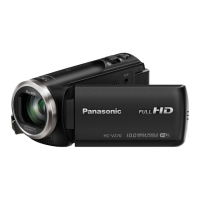
Panasonic HC-V160 - User Manual

Panasonic HC-V160
100 pages
Print Icon
To Next Page IconTo Next Page
Loading...
Operating Instructions
High Definition Video Camera
Model No. HC-V160
Please read these instructions carefully before using this product, and save this manual for future
use.
until
2014/12/4
SQW0092
HC-V160-EB&EP&GC&GA&GW&GN-SQW0092_mst.book 1 ージ 2014年11月4日 火曜日 午後6時15

Table of Contents

Other manuals for Panasonic HC-V160

Questions and Answers

  • Y
    yclarkAug 18, 2025
    Why is my Panasonic HC-V160 not detected by PC via USB?
    • C
      Christian AllisonAug 18, 2025
      Try re-inserting the SD card into the unit, then reconnect the supplied USB cable. Also, try a different USB terminal on your PC. Ensure you check the operating environment. Restart your PC and the camcorder before reconnecting the USB cable.
  • R
    Rhonda WilsonAug 20, 2025
    How to fix Panasonic Camcorder auto focus?
    • H
      hugheslukeAug 20, 2025
      Switch to Intelligent Auto Mode. If the scene is difficult to focus in Auto Focus Mode, use Manual Focus Mode to adjust the focus.
  • D
    danielkellyAug 23, 2025
    What to do if my Panasonic HC-V160 Camcorder is on but not operating?
    • S
      Steven BennettAug 23, 2025
      Remove the battery or AC adapter, wait approximately one minute, and then reconnect it. After another minute, turn the unit on again. Note that performing this while the media is being accessed may corrupt the data. If normal operation isn't restored, disconnect the power and consult with the dealer from whom you purchased the camcorder.
  • J
    Jessica HarrisAug 26, 2025
    Why does my Panasonic Camcorder stop recording on its own?
    • W
      Whitney WatersAug 26, 2025
      Ensure you are using an SD card suitable for motion picture recording. The recordable time may be reduced due to data writing speed deterioration or repeated recording and deletion. Format the SD card using the camcorder.
  • M
    Matthew MaciasAug 28, 2025
    What to do if my Panasonic Camcorder displays 'ERROR OCCURRED'?
    • D
      Darlene JonesAug 28, 2025
      The unit has detected an error automatically. Try restarting it by turning it off and then on again. If the error message persists after restarting, the unit requires repair. Disconnect the power and consult the dealer from whom you purchased the camcorder. Do not attempt to repair it yourself.
  • Z
    zmartinAug 30, 2025
    What to do if my Panasonic Camcorder doesn't recognize the SD card?
    • H
      Hannah JohnsonAug 30, 2025
      If the SD card was formatted on a PC, the unit might not recognize it. Format the SD card using the Panasonic Camcorder.
  • G
    Gregory StuartSep 1, 2025
    Why does my Panasonic HC-V160 Camcorder turn off automatically?
    • A
      alex96Sep 1, 2025
      If the unit turns off when you turn off the TV with the TV remote, VIERA Link is active. If you aren't using VIERA Link, set [VIERA Link] to [OFF].
  • J
    jessicabowenSep 3, 2025
    Why is the color balance strange on my Panasonic HC-V160 Camcorder in a gymnasium?
    • E
      Emily PerezSep 4, 2025
      In locations with multiple light sources, like a gymnasium, set the White Balance to (Indoor mode 2). If the image is still unclear, switch to (Manual adjustment mode).
  • H
    henryphillipSep 6, 2025
    What does 'CONDITION TOO DARK, OR OPEN LENS COVER' mean on my Panasonic HC-V160?
    • T
      Tammy ShafferSep 6, 2025
      Ensure the lens cover is open before turning on the unit. This message may appear when recording in very dark environments.
  • R
    Rebecca GonzalezSep 8, 2025
    Why doesn't my Panasonic HC-V160 show the remaining or elapsed time?
    • T
      torrescaitlinSep 8, 2025
      [DISPLAY] in [SETUP] is set to [OFF].

Summary

Read this first

About the recording format for recording motion pictures

Explains AVCHD, iFrame, and MP4 recording formats for motion pictures.

Indemnity about recorded content

Panasonic's disclaimer regarding loss or damage to recorded/edited content.

About Condensation

Explains how condensation occurs and how to prevent/resolve it.

Cards that you can use with this unit

Lists compatible SD memory cards (SD, SDHC, SDXC) and specifications.

With a PC

What you can do with a PC

Details functions of HD Writer LE 3.0 software for PC interaction.

Connecting to a PC

Step-by-step guide for connecting the unit to a computer.

Others

Indications

Explains various icons and indicators shown on the unit's screen.

Messages

Lists major confirmation and error messages displayed on the screen.

Troubleshooting

Provides solutions for common problems encountered with the unit.

Cautions for use

Important warnings and advice for safe and proper use of the unit.

Preparation

Names and Functions of Main Parts

Identifies and describes the main physical components of the video camera.

Power supply

Information on using and charging the unit's battery.

Charging the battery

Step-by-step guide for charging the battery using an AC adaptor.

Recording to a card

Instructions on how to record motion and still pictures to an SD card.

Turning the unit on;off

Explains how to power the unit on and off using the power button or LCD monitor.

Setting date and time

Guide to setting the unit's internal clock and date.

Basic

Before recording

Basic guidance on camera positioning and holding for steady recording.

Recording motion pictures

Step-by-step instructions for recording motion pictures.

Recording still pictures

Instructions for recording still pictures using the camera.

Intelligent Auto Mode

Explains how the camera automatically adjusts settings for optimal recording.

Motion picture;Still picture playback

Guide to playing back recorded motion pictures and still pictures.

Advanced (Recording)

Using the Zoom

Explains how to use the zoom lever for close-up and wide-angle recording.

Recording functions of operation icons

Describes how to use icons for effects like Fade and Backlight Compensation.

Manual recording

Instructions for manually adjusting White Balance, Shutter Speed, Iris, and Focus.

Advanced (Playback)

Playback Operations

Details playback controls like slow-motion and frame-by-frame playback.

Zooming in on a still picture during playback

Explains how to zoom in and out of still pictures during playback.

Deleting scenes;still pictures

Guide to deleting recorded scenes or still pictures.

Watching Video;Pictures on your TV

Instructions for connecting the unit to a TV for playback.

Copy;Dubbing

Dubbing with a Blu-ray disc recorder, video devices, etc.

Explains how to dub recorded content to other devices.

Panasonic HC-V160 Specifications

General IconGeneral
BrandPanasonic
ModelHC-V160
CategoryCamcorder
LanguageEnglish

Related product manuals