EasyManua.ls Logo

Panasonic KX-TDA0141 - Before Site Survey Procedures; Assigning CS ID to Portable Station

Panasonic KX-TDA0141
62 pages
Print Icon
To Next Page IconTo Next Page
To Previous Page IconTo Previous Page
Loading...
4 Before Site Survey
Use the KX-TCA175/KX-TCA255/KX-TCA256
/KX-TCA275/KX-TCA355/KX-TD7590 PS to conduct the site
survey.
Note
Display prompts for the site survey are only available in English.
Checking the CS ID Number
Check
the CS ID number label attached to the CS. If the CS ID number label is not attached to the CS, check
the CS ID number using the Maintenance Console. For details, refer to "Utility—CS Information" in the PC
Programming Manual or the On-line Help for your PBX.
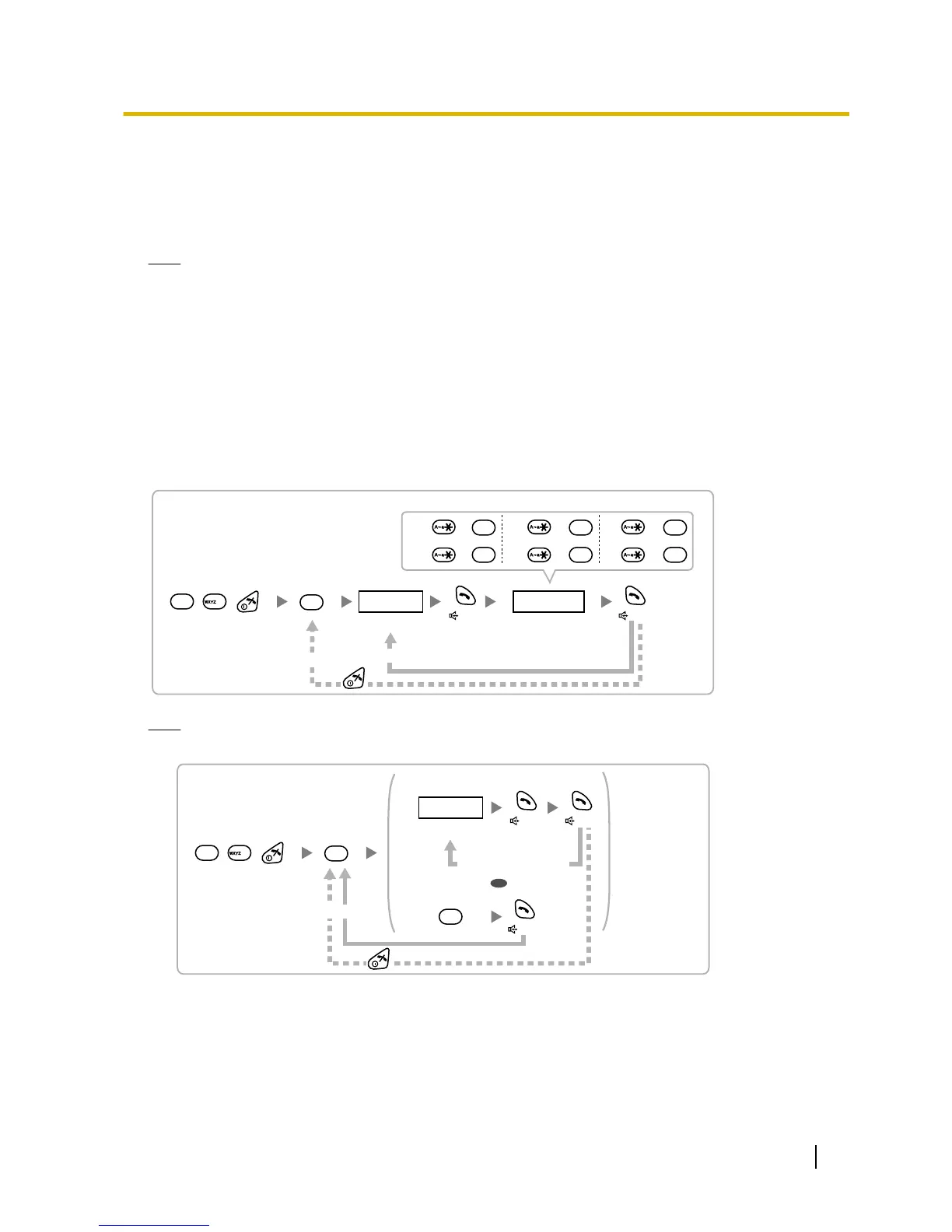
Assigning the CS ID Number to the PS
Using the KX-TCA175/KX-TCA255/KX-TCA256/KX-TCA275/KX-TCA355

Press 1, 9, and POWER
for more than 2 seconds.
0 to 7 0 to 9 and A to F
CS No. CS ID No.
1
9
9
2
ABC
To enter letters
A: + C: + E: +
B: + D: + F: +
To the initial display
To the Desired CS No.
3
DEF
4
GHI
0
1
5
JKL
2
ABC
Note
To clear the CS ID number assigned to the PS, follow the procedure below:
Press 1, 9, and POWER
for more than 2 seconds.
0 to 7
CS No.
1
9
9
3
DEF
To the Desired CS No.
OR
#
To clear one by one
To clear all at once
To the initial display
Quick Installation Guide 17
4 Before Site Survey