9 Troubleshooting
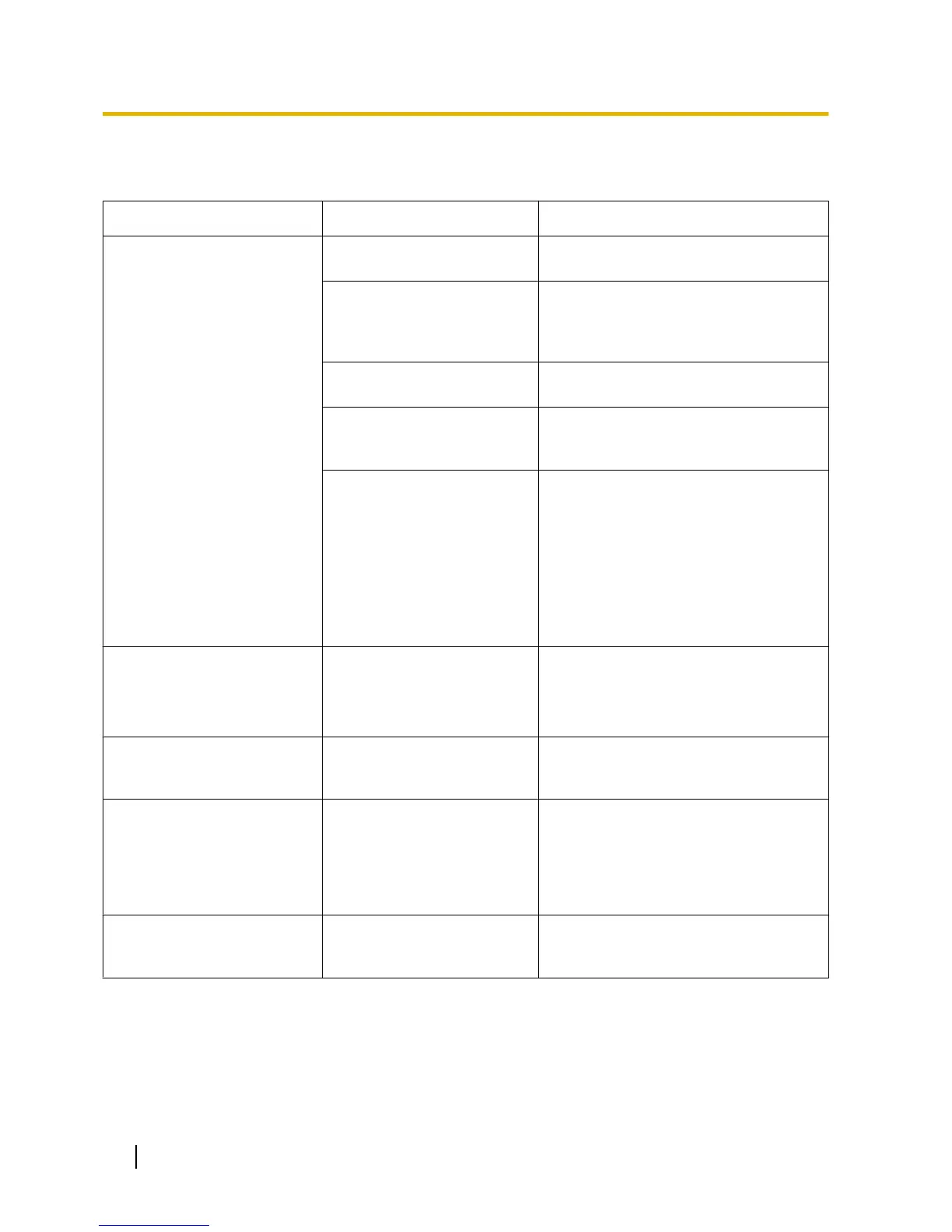
PROBLEM PROBABLE CAUSE SOLUTION
• The
LED of the CS does not
change to Green ON.
• The optional service card is
not working.
• Install the card properly.
• CS is not connected
properly.
• Make sure that the cable is connected
properly with correct pin assignments.
Also,
make sure that the cable does not
make short circuits.
• CS is not set for normal
operation.
• Switch all DIP switches off.
• The status of the port that
the CS is connected to is
Out of Service.
• Change the port status from Out of
Service to In Service using the
Maintenance Console.
<Only when connecting a
KX-TDA0158 CS to a
KX-TDA600/KX-TDE100/
KX-TDE200/KX-TDE600>
• The
Local Processor (LPR)
software of the
corresponding DHLC/DLC
card is not version 5.000 or
later.
• Upgrade the LPR software of the
DHLC/DLC card.
<KX-TDA0158 only>
• The maximum number of
PS calls that the CS
supports cannot be made.
• Poor connection • Make sure that a 4-pair cable is used
for connection.
• The LED of the CS stays
Red ON during normal
operation.
• CS malfunction • Replace the CS.
• "CLEAR SCAN DATA" is
displayed on the PS's
screen after turning on the
PS.
• The
PS cannot be used for
normal operation when
scan data is stored on the
PS.
• Clear the scan data by following the
procedure described in "Clearing the
Stored Scan Data" in "5 Site Survey
Using the KX-TCA175/KX-TCA255/
KX-TCA256/KX-TCA275/KX-TCA355/
KX-TD7590".
• Cannot register the PS. • Wrong Personal
Identification
Number (PIN)
is registered to the PS.
• Enter the PIN set to the PBX into the
PS.
60 Quick Installation Guide
9 Troubleshooting



 To Next Page