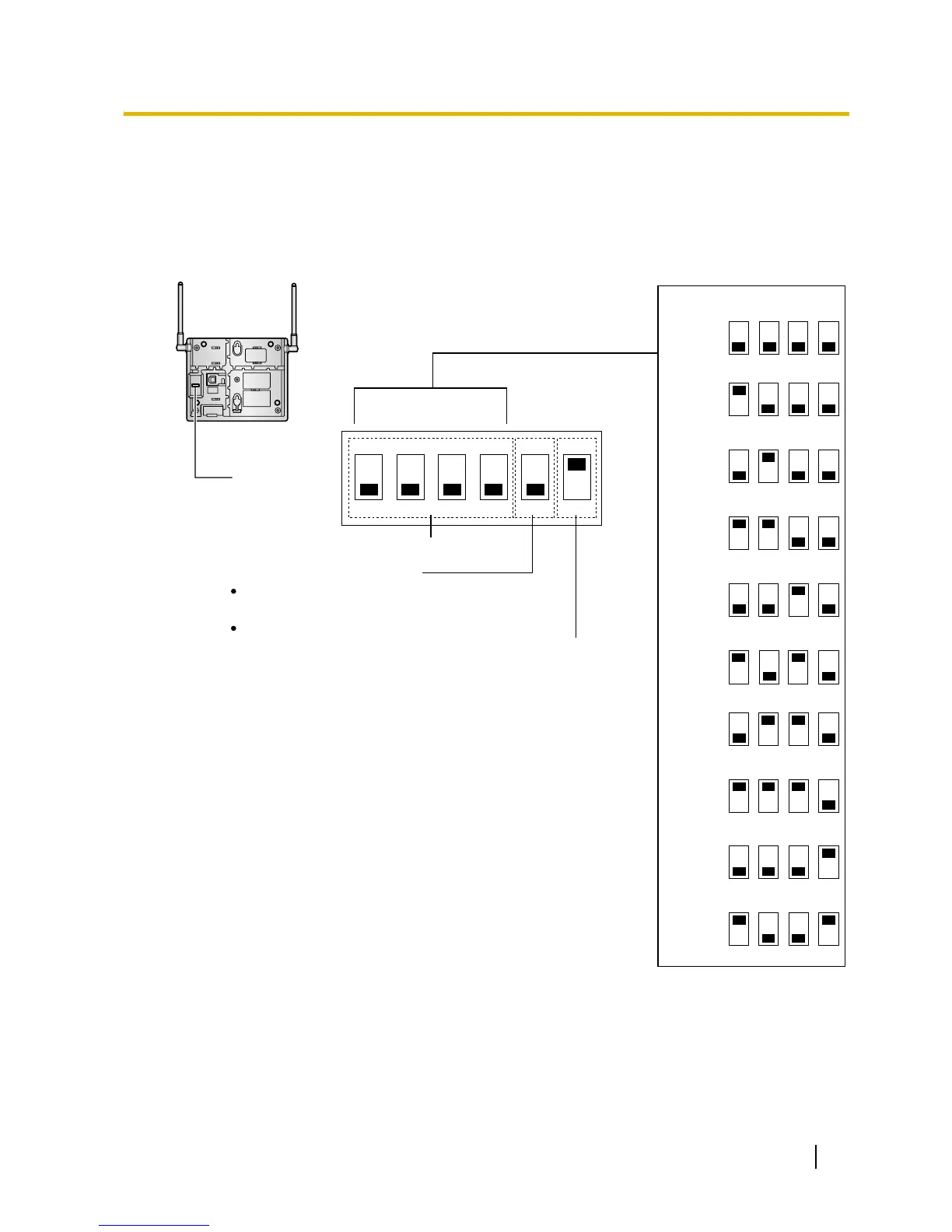
Setting and Installing the CS Temporarily for Site Survey
1. Switch the Radio Signal Test switch from OFF to ON.
2. Set the channel number switches as desired.
3. Set the Power Supply Select switch as desired (
KX-TDA0155, KX-TDA0156, and KX-TDA0158 only).
KX-TDA0155/KX-TDA0156
12 34 5 6
4
4
4
4
3
3
3
3
2
2
2
2
1
1
1
1
4321
Channel 1
Channel 0
Channel 2
Channel 3
Channel 4
DIP Switch
Radio Signal Test Switch
Power Supply Select Switch
Channel Number Switch
OFF
ON
ON: From the AC Adaptor (KX-A11/KX-TCA1)/
Battery Box (PSZZTD142CE)
OFF: From the PBX
4
4
4
4
3
3
3
3
2
2
2
2
1
1
1
1
4321
Channel 6
Channel 5
Channel 7
Channel 8
Channel 9



 To Next Page