EasyManua.ls Logo

Panasonic KX-TG4381AL - User Manual

Panasonic KX-TG4381AL
52 pages
Print Icon
To Next Page IconTo Next Page
Loading...
This unit is compatible with Caller ID. You must subscribe to the appropriate
service offered by your service provider/telephone company.
Please read these operating instructions before using the unit and save
them for future reference.
Charge the batteries for about 7 hours before initial use.
Operating Instructions
5.8 GHz Digital Cordless
Answering System
Model No. KX-TG4391AL
with 2 Handsets
Model No. KX-TG4392AL
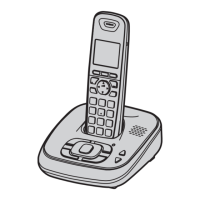
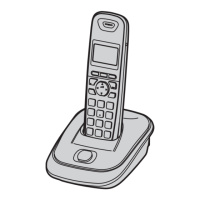
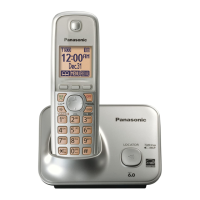
Model shown is KX-TG4381AL.
5.8 GHz Digital Cordless Phone
Model No. KX-TG4381AL
with 2 Handsets
Model No. KX-TG4382AL
with 3 Handsets
Model No. KX-TG4393AL
with 4 Handsets
Model No. KX-TG4394AL
TG43xxAL(e)_OI.book Page 1 Friday, May 23, 2008 3:51 PM

Questions and Answers

  • M
    Matthew SchmidtAug 16, 2025
    What to do if my Panasonic KX-TG4381AL Cordless Telephone does not work?
    • M
      mercedesreynoldsAug 16, 2025
      If your Panasonic Cordless Telephone is not working, try the following: Ensure the batteries are correctly installed. Fully charge the batteries. Check all connections. Unplug the base unit’s AC adaptor to reset it, then reconnect. Also, make sure the handset is registered to the base unit.
  • M
    Meredith TurnerAug 19, 2025
    Why I cannot hear a dial tone on my Panasonic KX-TG4381AL Cordless Telephone?
    • J
      James DunnAug 20, 2025
      If you cannot hear a dial tone on your Panasonic Cordless Telephone, check that the base unit’s AC adaptor and telephone line cord are properly connected. If you're using a splitter, remove it and connect the unit directly to the wall socket. If it works then, check the splitter. Disconnect the base unit and connect the telephone line to a working telephone to determine the source of the problem.
  • J
    Jessica ObrienAug 22, 2025
    What to do if my Panasonic Cordless Telephone handset beeps and/or 7 flashes?
    • C
      Christopher WalkerAug 22, 2025
      If your Panasonic Cordless Telephone handset beeps and/or flashes 7 times, it indicates that the battery charge is low. You should fully charge the batteries.
  • V
    Valerie PhillipsAug 26, 2025
    Why is my Panasonic KX-TG4381AL handset not ringing?
    • J
      John RobertsonAug 26, 2025
      If your Panasonic Cordless Telephone handset is not ringing, check if the ringer volume is turned off and adjust it accordingly. Also, verify that night mode is not turned on; if it is, turn it off.
  • T
    trussoAug 28, 2025
    Why is there noise heard, and sound cuts in and out on my Panasonic KX-TG4381AL Cordless Telephone?
    • D
      David RamirezAug 28, 2025
      If you are experiencing noise or sound cutting in and out on your Panasonic Cordless Telephone, it could be due to electrical interference. Try moving the base unit and handset away from potential sources of interference. Also, try moving closer to the base unit. If you have DSL/ADSL service, consider connecting a filter to the telephone line between the base unit and the telephone line socket.
  • D
    Dr. Brittney HernandezAug 31, 2025
    Why is my Panasonic KX-TG4381AL base unit not ringing?
    • S
      Stephanie GarciaAug 31, 2025
      If the base unit of your Panasonic Cordless Telephone is not ringing, the ringer volume might be turned off. Adjust the ringer volume on the base unit.
  • M
    Meghan YoungSep 3, 2025
    Why is the operating time shorter after I fully charged the batteries of my Panasonic KX-TG4381AL Cordless Telephone?
    • G
      gpayneSep 4, 2025
      If the operating time of your Panasonic Cordless Telephone seems shorter after fully charging the batteries, clean the battery ends and the charge contacts with a dry cloth, and then charge again.
  • M
    Mary ReyesSep 6, 2025
    What to do if I cannot make a call on my Panasonic Cordless Telephone?
    • T
      Troy GoldenSep 6, 2025
      If you cannot make a call on your Panasonic Cordless Telephone, first ensure that the handset is not too far from the base unit. If that doesn't work, try setting the dialing mode. If the registration fails, try to deregister the handset.
  • R
    Richard AlvarezSep 9, 2025
    What to do if liquid has entered my Panasonic KX-TG4381AL handset/base unit?
    • S
      Stephen SchroederSep 10, 2025
      If liquid or moisture has entered your Panasonic Cordless Telephone handset or base unit, disconnect the AC adaptor and telephone line cord from the base unit. Remove the batteries from the handset and allow it to dry for at least 3 days. Once completely dry, reconnect the AC adaptor and telephone line cord, then insert the batteries and charge fully before use.
  • D
    Diana JohnsonSep 12, 2025
    What to do if I fully charged the batteries, but 7 still flashes or 8 is displayed on my Panasonic KX-TG4381AL?
    • L
      Lauren SnyderSep 12, 2025
      If you have fully charged the batteries on your Panasonic Cordless Telephone, but '7' still flashes or '8' is displayed, clean the charge contacts and charge again. If the problem persists, it may be time to replace the batteries.

Panasonic KX-TG4381AL Specifications

General IconGeneral
BrandPanasonic
ModelKX-TG4381AL
TypeCordless Telephone
Number of Handsets1
ExpandableYes
Caller IDYes
Standby Time7 days
DisplayLCD
Answering SystemYes
Digital Answering System Recording Time18 minutes
SpeakerphoneYes
Call WaitingYes
DECT 6.0 TechnologyYes
Handset LocatorYes
Ringer IDYes
Talking Caller IDYes
Power SourceAC adapter
Battery TypeNi-MH
Frequency1.9 GHz
ColorBlack
Phonebook Memory100 entries

Related product manuals