EasyManua.ls Logo

Panasonic KX-TG4381NZ - User Manual

Panasonic KX-TG4381NZ
52 pages
Print Icon
To Next Page IconTo Next Page
Loading...
This unit is compatible with Caller ID. You must subscribe to the appropriate
service offered by your service provider/telephone company.
Please read these operating instructions before using the unit and save
them for future reference.
Charge the batteries for about 7 hours before initial use.
Operating Instructions
5.8 GHz Digital Cordless
Answering System
Model No. KX-TG4391NZ
with 2 Handsets
Model No. KX-TG4392NZ
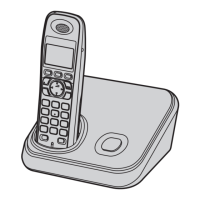
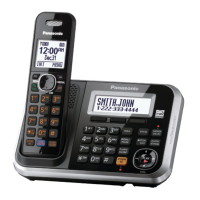
Model shown is KX-TG4381NZ.
5.8 GHz Digital Cordless Phone
Model No. KX-TG4381NZ
with 2 Handsets
Model No. KX-TG4382NZ
TG43xxNZ(e)_OI.book Page 1 Tuesday, August 26, 2008 1:58 PM

Questions and Answers

  • B
    Brenda HooperAug 17, 2025
    What to do if my Panasonic KX-TG4381NZ Cordless Telephone does not work?
    • J
      Jonathon VasquezAug 18, 2025
      If your Panasonic Cordless Telephone is not working, try the following: Ensure the batteries are correctly installed. Fully charge the batteries. Check all connections. Unplug the base unit’s AC adaptor to reset the unit, then reconnect it. Also, ensure the handset is registered to the base unit.
  • B
    braydanielAug 20, 2025
    What to do if I cannot hear a dial tone on my Panasonic KX-TG4381NZ Cordless Telephone?
    • H
      hhayesAug 20, 2025
      If you cannot hear a dial tone on your Panasonic Cordless Telephone, check that the base unit’s AC adaptor and telephone line cord are properly connected. If you are using a splitter, remove it and connect the unit directly to the wall socket. You can also disconnect the base unit from the telephone line and connect the line to a known working telephone to determine if the issue is with the phone or the service provider.
  • B
    Blake ArmstrongAug 23, 2025
    What to do if my Panasonic KX-TG4381NZ handset does not ring?
    • W
      Wendy TorresAug 23, 2025
      If your Panasonic Cordless Telephone handset does not ring, check if the ringer volume is turned off and adjust it. Also, ensure that night mode is not turned on; if it is, turn it off.
  • J
    Jessica WhiteAug 25, 2025
    Why is there noise or sound cutting in and out on my Panasonic KX-TG4381NZ?
    • D
      Denise MccoyAug 26, 2025
      If you are experiencing noise or sound cutting in and out on your Panasonic Cordless Telephone, it could be due to high electrical interference in the area. Try placing the base unit and using the handset away from sources of interference. Also, try moving closer to the base unit. If you have DSL/ADSL service, contact your provider to install a DSL/ADSL Splitter.
  • D
    Debra WaltersAug 27, 2025
    What to do if my Panasonic KX-TG4381NZ Cordless Telephone handset beeps and/or 7 flashes?
    • K
      kkennedyAug 27, 2025
      If your Panasonic Cordless Telephone handset beeps and/or flashes 7 times, it indicates that the battery charge is low. You should fully charge the batteries.
  • G
    gillespiebryanAug 30, 2025
    What to do if I cannot make a call on my Panasonic Cordless Telephone?
    • J
      James MccoyAug 30, 2025
      If you cannot make a call on your Panasonic Cordless Telephone, first ensure that the handset is not too far from the base unit. If dial lock is turned on, turn it off. If the problem persists, set the dialling mode: Press {MENU} {2}{5}{1} 2 Press {*}{7}{0}{0}{0}. 3 {Save} i {Yes} i {OFF}.
  • S
    Shannon NavarroSep 1, 2025
    What to do if my Panasonic Cordless Telephone base unit does not ring?
    • S
      sara77Sep 2, 2025
      If your Panasonic Cordless Telephone base unit does not ring, check if the ringer volume is turned off and adjust it.
  • C
    clarkjohnSep 4, 2025
    Why is the indicator on my Panasonic Cordless Telephone handset flashing slowly?
    • T
      Tonya JordanSep 4, 2025
      If the indicator on your Panasonic Cordless Telephone handset is flashing slowly, it means new messages or new voice mail messages have been recorded. You should listen to the new messages or new voice mail messages.
  • K
    Keith DavisSep 7, 2025
    What to do if my Panasonic KX-TG4381NZ handset starts to ring while programming?
    • W
      wwrightSep 7, 2025
      If your Panasonic Cordless Telephone handset starts to ring while you are programming it, it means a call is being received. Answer the call and start the programming again after hanging up.
  • E
    Ernest ClarkSep 9, 2025
    What to do if liquid entered my Panasonic KX-TG4381NZ handset/base unit?
    • P
      Phillip JensenSep 9, 2025
      If liquid or moisture has entered your Panasonic Cordless Telephone handset or base unit, disconnect the AC adaptor and telephone line cord from the base unit. Remove the batteries from the handset and let it dry for at least 3 days. After it is completely dry, reconnect the AC adaptor and telephone line cord, insert the batteries, and charge fully before use.

Panasonic KX-TG4381NZ Specifications

General IconGeneral
BrandPanasonic
ModelKX-TG4381NZ
CategoryCordless Telephone
LanguageEnglish

Related product manuals