EasyManua.ls Logo

Panasonic KX-TG8161E - User Manual

Panasonic KX-TG8161E
56 pages
Print Icon
To Next Page IconTo Next Page
Loading...
Operating Instructions
Model No. KX-TG8161E
KX-TG8162E
KX-TG8163E
Digital Cordless Answering System
Digital Cordless Phone
Model No. KX-TG8151E
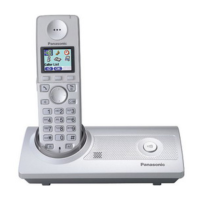
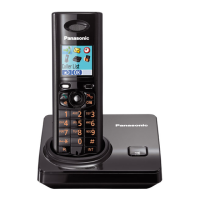
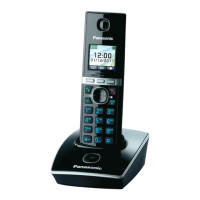
Model shown is KX-TG8151.
Before initial use, see “Getting Started”
on page 11.
Thank you for purchasing a Panasonic product.
Please read these operating instructions before using the unit and save them for
future reference.
Please access our online customer survey:
http://panasonic.net/pcc/tel/q
TG8151_61E(en)_1220_ver021.pdf 1 2011/12/20 18:50:42

Table of Contents

Questions and Answers

  • J
    Julie MarshAug 15, 2025
    What to do if Panasonic Cordless Telephone handset beeps or flashes?
    • S
      Sierra KimAug 15, 2025
      If your Panasonic cordless phone handset is beeping or flashing, it likely means the battery charge is low. You should fully charge the batteries.
  • T
    Toni CaseyAug 17, 2025
    What to do if I cannot hear a dial tone on my Panasonic KX-TG8161E Cordless Telephone?
    • B
      Brian RomeroAug 18, 2025
      If you cannot hear a dial tone on your Panasonic cordless telephone, ensure that you are using the supplied telephone line cord, as older cords may have different wiring. Check that the base unit’s AC adapter and telephone line cord are properly connected. If the issue persists, disconnect the base unit and connect the telephone line to a working telephone. If the working telephone operates correctly, the unit may need repair; contact service personnel. If the working telephone also fails, contact your service provider or telephone company.
  • V
    Veronica JohnsonAug 21, 2025
    What to do if Panasonic Cordless Telephone display is blank or dark?
    • M
      Morgan RobersonAug 21, 2025
      If your Panasonic cordless phone handset display is blank or dark, it might be in screen saver mode. Activate the display by pressing MFN or MEN during a call, or M N at other times. Also, check if “LCD in charging” is set to “Off” while charging and change the setting if needed. Ensure the handset is turned on.
  • C
    Caitlin WilliamsonAug 25, 2025
    What to do if Panasonic KX-TG8161E Cordless Telephone handset does not turn on?
    • J
      Juan GuerreroAug 25, 2025
      If your Panasonic cordless phone handset does not turn on even after installing charged batteries, place the handset on the base unit or charger to turn it on.
  • R
    Robert KaiserAug 28, 2025
    Why I cannot register a handset to a base unit of Panasonic Cordless Telephone?
    • M
      Margaret CooleyAug 28, 2025
      You may not be able to register a handset to the base unit of your Panasonic cordless telephone because the maximum number of handsets (6) is already registered. Or you entered the wrong PIN.
  • A
    amanda58Aug 31, 2025
    What to do if Panasonic KX-TG8161E Cordless Telephone batteries fully charged, but still flashes or operating time is shorter?
    • M
      Manuel HuffAug 31, 2025
      If you have fully charged the batteries of your Panasonic cordless telephone, but the handset still flashes or the operating time is shorter, clean the battery ends and the charge contacts with a dry cloth and charge again. It may also be time to replace the batteries.
  • C
    Cody NewmanSep 3, 2025
    What to do if liquid entered Panasonic KX-TG8161E handset or base unit?
    • J
      Jake AguirreSep 4, 2025
      If liquid or moisture has entered your Panasonic cordless phone handset or base unit, disconnect the AC adapter and telephone line cord from the base unit. Remove the batteries from the handset and let it dry for at least 3 days. After it's completely dry, reconnect the AC adapter and telephone line cord, and reinsert the batteries, charging them fully before use. If it still doesn't work, contact an authorized service center.
  • E
    Elizabeth CollierSep 7, 2025
    Why I cannot use the smart function key on Panasonic KX-TG8161E Cordless Telephone?
    • F
      falvaradoSep 7, 2025
      If you cannot use the smart function key on your Panasonic cordless phone, even when the indicator is flashing, it could be because another unit is currently in use; wait and try again later. Alternatively, the key lock feature might be turned on; turn it off.
  • J
    jesusthompsonSep 12, 2025
    Why I cannot activate the eco mode on Panasonic KX-TG8161E Cordless Telephone?
    • J
      Jessica LynnSep 12, 2025
      You cannot activate eco mode on your Panasonic cordless telephone when you set the repeater mode “On”. If required, set the repeater mode to “Off”.

Summary

Introduction

Model composition

Details the different product models and their included components and quantities.

General information

Provides essential details about the equipment's design and compliance.

Important Information

For your safety

Crucial safety warnings and precautions to prevent injury and ensure proper operation.

Specifications

Technical details including standard, frequency range, and power consumption.

Getting Started

Setting up

Step-by-step guide for connecting the base unit, charger, and telephone line.

Controls

Identifies and explains the buttons and features on the handset and base unit.

Display

Explains the various items and icons displayed on the handset screen.

Making;Answering Calls

Making calls

Instructions on how to dial phone numbers using the handset.

Answering calls

Guide on how to receive and respond to incoming phone calls.

Useful features during a call

Details on functions like Hold, Mute, and Call Waiting during a conversation.

Phonebook

Handset phonebook

Information on storing, managing, and categorizing contacts.

Adding entries

Step-by-step guide to adding new names and phone numbers.

Finding and calling from a phonebook entry

Methods for searching contacts and initiating calls from the phonebook.

Programming

Programmable settings

Overview of features that can be customized via the handset menus.

Special programming

Advanced settings for alarm, night mode, and other special functions.

Registering a handset to the base unit

Instructions for pairing additional handsets with the base unit.

Caller ID Service

Using Caller ID service

Requirements and benefits of subscribing to and using Caller ID.

Caller list

Viewing the history of incoming calls and caller information.

Answering System

Answering system

Overview of the unit's answering and recording capabilities.

Listening to messages using the handset

How to access and manage recorded messages via the handset.

Remote operation

Accessing the answering system and its settings from an external phone.

Intercom;Locator

Intercom

Making calls between different handsets within the system.

Transferring calls, conference calls

Managing external calls, including transfers and conference call setup.

Useful Information

Character entry

Instructions on how to input text and numbers using the dial keys.

Troubleshooting

Solutions for common problems encountered during product use.

Conditions of guarantee

Details the product's warranty terms, conditions, and period.

Panasonic KX-TG8161E Specifications

General IconGeneral
BrandPanasonic
ModelKX-TG8161E
CategoryCordless Telephone
LanguageEnglish

Related product manuals