EasyManua.ls Logo

Panasonic KX-TGC312CX - User Manual

Panasonic KX-TGC312CX
36 pages
Print Icon
To Next Page IconTo Next Page
Loading...
Operating Instructions
Digital Cordless Phone
Model No.
KX-TGC310CX
KX-TGC312CX
KX-TGC313CX
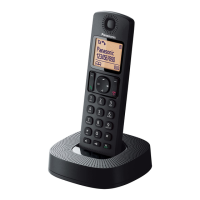
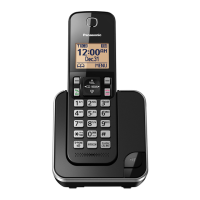
Model shown is KX-TGC310.
Before initial use, see “Getting Started”
on page 8.
Thank you for purchasing a Panasonic product.
Please read these operating instructions before using the unit and save them for
future reference.
TGC3xxCX(en)_0309_ver011.pdf 1 2015/03/09 9:58:39
Question and Answer IconNeed help?

Do you have a question about the Panasonic KX-TGC312CX and is the answer not in the manual?

Summary

Important Information

For Your Safety

Crucial safety guidelines to prevent injury and property loss during product use.

Battery Precautions

Guidelines for handling, charging, and using rechargeable batteries safely.

General Safety Precautions

Basic safety measures to reduce risk of fire, electric shock, and injury.

Specifications

Technical details including DECT standard, frequency range, power consumption, and operating conditions.

Getting Started

Setting Up Connections

Step-by-step guide to connect the base unit, charger, and telephone line.

Battery Charging and Maintenance

Procedures for charging batteries, cleaning contacts, and battery performance.

Making and Answering Calls

Making Calls and Using Features

Guides on making calls, using speakerphone, redial, and pause functions.

Phonebook Management

Adding and Storing Entries

How to add new contacts, store redial numbers, and save caller information to the phonebook.

Speed Dial Setup and Usage

How to assign numbers to speed dial keys, edit, erase, and make calls using speed dial.

Programming Features

Initial Setup Options

Configuration for Ringer, Time, Handset Name, Nuisance Call Block, Eco, Display, and Keytones.

Line and Registration Setup

Configuring line settings like dial mode, recall/flash, privacy, PIN, repeater, and registration.

Nuisance Call Blocking

How to block unwanted callers by single number or number range.

Caller ID Service

Using Caller ID Features

Explains how to use Caller ID, view missed calls, and display phonebook names with calls.

Caller List Management

How to view, call back, edit, and erase entries from the caller list.

Useful Information

Error Messages and Solutions

Lists common error messages and their corresponding causes and solutions.

Troubleshooting Common Issues

Provides solutions for general problems like the handset not turning on or battery issues.

Troubleshooting Calls and Caller ID

Solutions for issues with intercom, call quality, no dial tone, and Caller ID display.

Summary

Important Information

For Your Safety

Crucial safety guidelines to prevent injury and property loss during product use.

Battery Precautions

Guidelines for handling, charging, and using rechargeable batteries safely.

General Safety Precautions

Basic safety measures to reduce risk of fire, electric shock, and injury.

Specifications

Technical details including DECT standard, frequency range, power consumption, and operating conditions.

Getting Started

Setting Up Connections

Step-by-step guide to connect the base unit, charger, and telephone line.

Battery Charging and Maintenance

Procedures for charging batteries, cleaning contacts, and battery performance.

Making and Answering Calls

Making Calls and Using Features

Guides on making calls, using speakerphone, redial, and pause functions.

Phonebook Management

Adding and Storing Entries

How to add new contacts, store redial numbers, and save caller information to the phonebook.

Speed Dial Setup and Usage

How to assign numbers to speed dial keys, edit, erase, and make calls using speed dial.

Programming Features

Initial Setup Options

Configuration for Ringer, Time, Handset Name, Nuisance Call Block, Eco, Display, and Keytones.

Line and Registration Setup

Configuring line settings like dial mode, recall/flash, privacy, PIN, repeater, and registration.

Nuisance Call Blocking

How to block unwanted callers by single number or number range.

Caller ID Service

Using Caller ID Features

Explains how to use Caller ID, view missed calls, and display phonebook names with calls.

Caller List Management

How to view, call back, edit, and erase entries from the caller list.

Useful Information

Error Messages and Solutions

Lists common error messages and their corresponding causes and solutions.

Troubleshooting Common Issues

Provides solutions for general problems like the handset not turning on or battery issues.

Troubleshooting Calls and Caller ID

Solutions for issues with intercom, call quality, no dial tone, and Caller ID display.

Panasonic KX-TGC312CX Specifications

General IconGeneral
BrandPanasonic
ModelKX-TGC312CX
CategoryCordless Telephone
LanguageEnglish

Related product manuals