EasyManua.ls Logo

Panasonic KX-TGC380C - User Manual

Panasonic KX-TGC380C
32 pages
Print Icon
To Next Page IconTo Next Page
Loading...
Operating Instructions
Digital Cordless Phone
Model No.
KX-TGC380C
KX-TGC382C
KX-TGC383C
KX-TGC384C
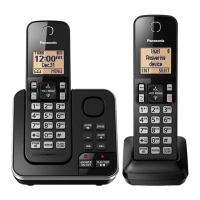
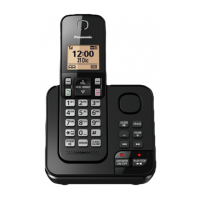
Model shown is KX-TGC380.
Before initial use, see “Getting Started”
on page 8.
Thank you for purchasing a Panasonic product.
Please read these operating instructions before using the unit and save them for
future reference.
For assistance, please visit our Support page:
www.panasonic.ca/english/support
TGC38x(en)_1204_ver011.pdf 1 2015/12/04 16:50:47
Question and Answer IconNeed help?

Do you have a question about the Panasonic KX-TGC380C and is the answer not in the manual?

Summary

Introduction

Expanding your phone system

Explains how to add more handsets to the base unit.

Important Information

For your safety

Crucial safety precautions to prevent injury and property damage.

Operating safeguards

Guidelines for safe operation and maintenance of the device.

Installation and location

Recommendations for safe and effective placement of the phone.

Battery

Information on using and caring for the rechargeable batteries.

Important safety instructions

Numbered list of essential safety precautions for product use.

Getting Started

Setting up

Step-by-step instructions for connecting and setting up the phone system.

Controls

Identification and function of buttons and keys on the handset and base unit.

Making;Answering Calls

Making calls

Steps to initiate a phone call using the handset.

Answering calls

Instructions on how to receive an incoming call.

Intercom

Phonebook

Adding phonebook entries

How to save contacts with names and numbers.

Editing entries

Modifying existing contact information in the phonebook.

Speed dial

Adding phone numbers to speed dial keys

Assigning numbers to quick dial keys.

Programming

Menu list

Overview of navigating the phone's menu system.

Display menu tree and direct command code table

Reference for accessing features via menus or codes.

Initial setting

Configuration options available during the initial setup phase.

Call block

Feature to block unwanted incoming calls.

Storing unwanted callers

How to add numbers to the call block list.

Other programming

Registering a handset to the base unit

Procedure to add a new handset.

Caller ID Service

Caller ID features

Overview of the Caller ID service and its capabilities.

Caller list

Viewing the caller list and calling back

Accessing call history and redialing numbers.

Useful Information

Voicemail service

Explanation of the voicemail feature and its provider dependency.

Error messages

Lists and explains common error messages and their solutions.

Troubleshooting

Guidance for resolving common issues with the phone unit.

Liquid damage

Procedures and warnings for dealing with water damage.

Summary

Introduction

Expanding your phone system

Explains how to add more handsets to the base unit.

Important Information

For your safety

Crucial safety precautions to prevent injury and property damage.

Operating safeguards

Guidelines for safe operation and maintenance of the device.

Installation and location

Recommendations for safe and effective placement of the phone.

Battery

Information on using and caring for the rechargeable batteries.

Important safety instructions

Numbered list of essential safety precautions for product use.

Getting Started

Setting up

Step-by-step instructions for connecting and setting up the phone system.

Controls

Identification and function of buttons and keys on the handset and base unit.

Making;Answering Calls

Making calls

Steps to initiate a phone call using the handset.

Answering calls

Instructions on how to receive an incoming call.

Intercom

Phonebook

Adding phonebook entries

How to save contacts with names and numbers.

Editing entries

Modifying existing contact information in the phonebook.

Speed dial

Adding phone numbers to speed dial keys

Assigning numbers to quick dial keys.

Programming

Menu list

Overview of navigating the phone's menu system.

Display menu tree and direct command code table

Reference for accessing features via menus or codes.

Initial setting

Configuration options available during the initial setup phase.

Call block

Feature to block unwanted incoming calls.

Storing unwanted callers

How to add numbers to the call block list.

Other programming

Registering a handset to the base unit

Procedure to add a new handset.

Caller ID Service

Caller ID features

Overview of the Caller ID service and its capabilities.

Caller list

Viewing the caller list and calling back

Accessing call history and redialing numbers.

Useful Information

Voicemail service

Explanation of the voicemail feature and its provider dependency.

Error messages

Lists and explains common error messages and their solutions.

Troubleshooting

Guidance for resolving common issues with the phone unit.

Liquid damage

Procedures and warnings for dealing with water damage.

Panasonic KX-TGC380C Specifications

General IconGeneral
TypeCordless Telephone
Number of Handsets1
DECT TechnologyYes
Frequency1.9 GHz
Caller IDYes
Talk TimeUp to 10 hours
SpeakerphoneYes
Answering SystemYes
Call BlockYes
DisplayLCD
Ringer IDYes
Power BackupNo
Battery TypeNi-MH
Wall MountableYes
ECO ModeYes
RangeUp to 300 meters outdoors, 50 meters indoors
Call WaitingYes
IntercomYes
Power SourceAC Adapter
Standby Time120 hours
Phonebook Capacity50 entries

Related product manuals