EasyManua.ls Logo

Panasonic KX-TGC352 - User Manual

Panasonic KX-TGC352
44 pages
Print Icon
To Next Page IconTo Next Page
Loading...
Operating Instructions
Cordless Telephone
Model No.
KX-TGC350
KX-TGC352
Cordless Telephone with
Digital Answering Machine
Model No.
KX-TGC360
KX-TGC362
KX-TGC364
KX-TG3620
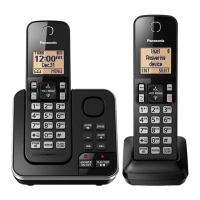
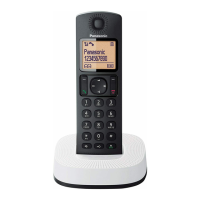
Model shown is KX-TGC350.
Before initial use, see “Getting Started”
on page 8.
Thank you for purchasing a Panasonic product.
Please read these operating instructions before using the unit and save them for
future reference.
Consulte “Guía Rápida Española”, página 36.
For assistance, visit our Web site: http://shop.panasonic.com/support for
customers in the U.S.A.
Please register your product: http://shop.panasonic.com/support
Question and Answer IconNeed help?

Do you have a question about the Panasonic KX-TGC352 and is the answer not in the manual?

Summary

Introduction

Model Composition

Details the components included with different model numbers.

Important Information

For Your Safety

Provides essential safety precautions to prevent injury and property loss.

Operating Safeguards

Lists precautions for safe operation, including cleaning and disassembly.

Installation and Location

Details safe installation practices and location considerations for the phone.

Important Safety Instructions

Reiterates crucial safety guidelines for product usage.

Battery

Provides information on battery types, handling, and charging.

Specifications

Getting Started

Setting Up

Guides through connecting the unit and installing batteries.

Battery Charging

Explains the process and duration for charging the handset batteries.

Controls

Identifies and explains the functions of handset and base unit controls.

Date and Time

Guides on setting the current date and time for the unit.

Making;Answering Calls

Making Calls

Step-by-step guide on how to make phone calls.

Answering Calls

Instructions on how to answer incoming calls.

Phonebook

Phonebook Overview

Overview of phonebook capacity and functionality.

Adding Phonebook Entries

Step-by-step guide to add new contacts to the phonebook.

Speed Dial

Adding Speed Dial Numbers

How to assign phone numbers to speed dial keys.

Making a Speed Dial Call

How to make a call using the speed dial feature.

Programming

Menu List Navigation

Explains how to navigate the device's menu structure.

Registering a Handset

Steps to register a new handset to the base unit.

Caller ID Service

Using Caller ID Service

Overview and requirements for using Caller ID features.

Answering System

Answering System Overview

Introduction to the answering system's capabilities and recording capacity.

Turning Answering System On;Off

How to enable or disable the answering system.

Listening to Messages

How to listen to recorded caller messages.

Erasing All Messages

How to delete all recorded messages.

Using Handset for Messages

How to access and manage messages using the handset.

Remote Operation Overview

Instructions for accessing the answering system remotely.

Using Answering System Remotely

Detailed steps for remote operation.

Turning Answering System On Remotely

Steps to turn on the answering system from a remote phone.

Useful Information

Error Messages

Lists common error messages and their causes/solutions.

Troubleshooting Guide

General troubleshooting steps for common issues.

Common Troubleshooting Scenarios

Addresses various common problems and their solutions.

FCC and Other Information

Appendix

Limited Warranty (USA Only)

Details the limited warranty coverage for products purchased and serviced in the USA.

Warranty Limits and Exclusions

Specifies what is covered and excluded by the limited warranty.

Summary

Introduction

Model Composition

Details the components included with different model numbers.

Important Information

For Your Safety

Provides essential safety precautions to prevent injury and property loss.

Operating Safeguards

Lists precautions for safe operation, including cleaning and disassembly.

Installation and Location

Details safe installation practices and location considerations for the phone.

Important Safety Instructions

Reiterates crucial safety guidelines for product usage.

Battery

Provides information on battery types, handling, and charging.

Specifications

Getting Started

Setting Up

Guides through connecting the unit and installing batteries.

Battery Charging

Explains the process and duration for charging the handset batteries.

Controls

Identifies and explains the functions of handset and base unit controls.

Date and Time

Guides on setting the current date and time for the unit.

Making;Answering Calls

Making Calls

Step-by-step guide on how to make phone calls.

Answering Calls

Instructions on how to answer incoming calls.

Phonebook

Phonebook Overview

Overview of phonebook capacity and functionality.

Adding Phonebook Entries

Step-by-step guide to add new contacts to the phonebook.

Speed Dial

Adding Speed Dial Numbers

How to assign phone numbers to speed dial keys.

Making a Speed Dial Call

How to make a call using the speed dial feature.

Programming

Menu List Navigation

Explains how to navigate the device's menu structure.

Registering a Handset

Steps to register a new handset to the base unit.

Caller ID Service

Using Caller ID Service

Overview and requirements for using Caller ID features.

Answering System

Answering System Overview

Introduction to the answering system's capabilities and recording capacity.

Turning Answering System On;Off

How to enable or disable the answering system.

Listening to Messages

How to listen to recorded caller messages.

Erasing All Messages

How to delete all recorded messages.

Using Handset for Messages

How to access and manage messages using the handset.

Remote Operation Overview

Instructions for accessing the answering system remotely.

Using Answering System Remotely

Detailed steps for remote operation.

Turning Answering System On Remotely

Steps to turn on the answering system from a remote phone.

Useful Information

Error Messages

Lists common error messages and their causes/solutions.

Troubleshooting Guide

General troubleshooting steps for common issues.

Common Troubleshooting Scenarios

Addresses various common problems and their solutions.

FCC and Other Information

Appendix

Limited Warranty (USA Only)

Details the limited warranty coverage for products purchased and serviced in the USA.

Warranty Limits and Exclusions

Specifies what is covered and excluded by the limited warranty.

Panasonic KX-TGC352 Specifications

General IconGeneral
BrandPanasonic
ModelKX-TGC352
CategoryCordless Telephone
LanguageEnglish

Related product manuals