
 Need help?
Do you have a question about the Panasonic KX-TGD210 and is the answer not in the manual?
Lists the available Panasonic Digital Cordless Phone and Answering System models.
Details product variants, included parts, and supplied accessories for each model.
Covers general safety, power connection, installation, and operating safeguards.
Addresses potential interference with medical devices and RF energy.
Detailed safety guidelines and best practices for product use.
Recommendations for optimal base unit placement and operating conditions.
Guidelines for product placement, cleaning, and general maintenance.
Information on product disposal, transfer, return, and ENERGY STAR compliance.
Step-by-step guide for connecting the base unit, charger, and telephone line.
Instructions for inserting batteries and performing the initial charge.
Important notes during setup and information on the Intelligent Eco Mode feature.
Identifies buttons, keys, and indicators on the handset and base unit.
Explanation of handset display icons and how to change language settings.
Procedure for setting the current date and time on the unit.
Instructions for making, answering, and ending calls.
Adjusting volumes and using features like speakerphone during calls.
Covers hold, mute, flash, clarity booster, and call sharing functionalities.
Making and answering calls between handsets using the intercom feature.
Steps to add new contacts, store caller information, and character input.
Organizing contacts into groups, finding entries, and initiating calls.
Modifying, deleting contacts, and using chain dial for quick dialing.
Assigning numbers to speed dial keys and managing those entries.
Overview of accessing features via menu trees and direct command codes.
Programming settings like ring count, recording time, and voice mail access.
Programming Caller ID, handset names, and call blocking features.
Setting dial mode, flash time, line mode, and managing unit registration.
Configuring alarm functions and activating silent mode for calls.
Blocking unwanted callers and managing the call block list.
Customizing handset names and removing handsets from the system.
Overview and subscription requirements for Caller ID features.
Details on missed calls, phonebook display, and viewing the caller list.
Enables auditory announcements of caller information.
Modifying and deleting entries from the caller list.
Feature for automatically formatting phone numbers from caller ID.
Functionality, memory capacity, and basic operation of the answering system.
Instructions for activating or deactivating the answering system.
Steps for recording a personalized greeting message.
Listening to, repeating, skipping, and erasing recorded messages.
Accessing the answering system remotely and managing remote access codes.
Customizing call screening, ring count, and other system behaviors.
Setting maximum message length and selecting greeting-only mode.
Information on using external voice mail services provided by telephone companies.
Detailed steps for mounting the base unit on a wall.
List of common error messages and their corresponding solutions.
Guidance for resolving problems with calls, noise, ringing, and battery.
Solutions for specific issues related to Caller ID and the answering system.
Procedures to follow if the unit is exposed to moisture or liquid.
Details on FCC compliance, RF exposure, and other regulatory information.
Information regarding hearing aid compatibility with T-Coil equipped devices.
Contact details for support, product information, and purchasing parts.
Details of the limited warranty coverage for Panasonic telephone products.
Specific warranty limitations, exclusions, and instructions for shipping for service.
 General
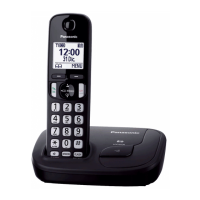
| Type | DECT telephone |
|---|---|
| Intercom | Yes |
| Ringer type | Polyphonic |
| Answering machine | No |
| Number of melodies | 32 |
| Mounting type | Desk/Wall |
| Product color | Black |
| Phonebook capacity | 100 entries |
| Call log entries | 50 |
| Languages support | Spanish |
| Backlight color | White |
| Display diagonal | 1.6 \ |
| Display resolution | 103 x 65 pixels |
| Display number of lines | 1 lines |
| Display number of colors | Monochrome |
| Battery type | AAA |
| Standby time | 144 h |
| Battery technology | Nickel-Metal Hydride (NiMH) |
| Number of batteries supported | 2 |
 Weight and Dimensions
| Base weight | 140 g |
|---|---|
| Base dimensions | 143 x 103 x 48 mm |
| Handset dimensions (WxDxH) | 48 x 30 x 168 mm |


 To Next Page