
 To Next Page

M
Michael AndradeSep 14, 2025
Why can't I switch cellular calls from the Panasonic KX-TGD563 Cordless Telephone unit to the cellular phone?
- LlawsonzacharySep 14, 2025
Your cellular phone may not support this feature.

Why can't I switch cellular calls from the Panasonic KX-TGD563 Cordless Telephone unit to the cellular phone?
Your cellular phone may not support this feature.
What to do if my Panasonic Cordless Telephone does not work?
If your Panasonic Cordless Telephone isn't working, ensure the batteries are installed correctly. Fully charge the batteries. Check the connections. Unplug the base unit’s AC adaptor to reset the unit, then reconnect it and try again. Also, the handset may not be registered to the base unit; register the handset.
Why can't I hear a dial tone on my Panasonic KX-TGD563?
If you cannot hear a dial tone, the base unit’s AC adaptor or telephone line cord is not connected. Check the connections. Disconnect the base unit from the telephone line and connect the line to a known working telephone. If the working telephone operates properly, contact our service personnel to have the unit repaired. If the working telephone does not operate properly, contact your phone service provider.
Why I cannot connect a cellular phone to the Panasonic Cordless Telephone?
There might be several reasons why you can't connect a cellular phone to the base unit. First, confirm that your cellular phone is turned on and is within the base unit range. If the auto connection feature is not working, you can connect to the base unit manually. Ensure that the cellular phone is paired with the base unit. Disconnecting and reconnecting the device might also help. If your cellular phone is already registered on another Panasonic DECT phone, this function may not work properly, so it's recommended to remove the registration from both devices.
Why can't I make a call using a landline on my Panasonic KX-TGD563?
If you cannot make a call using a landline, the dialing mode may be set incorrectly. Change the setting.
How to turn on the Panasonic KX-TGD563 Cordless Telephone handset?
Place the handset on the base unit or charger to turn on the handset.
Why can't I make or answer cellular calls with my Panasonic Cordless Telephone handset?
Depending on the cellular phone’s compatibility, you may not be able to make or answer cellular calls even if the cellular phone is connected to the base unit. Make sure that the CELL indicator lights up and the cellular phone is connected to the base unit. Only 2 Bluetooth devices can be used with the unit at the same time (for example, 2 cellular lines, or the headset and 1 cellular line). The cellular phone may be being used separately from your system.
What to do if my Panasonic KX-TGD563 batteries still flashes after fully charged?
If, after fully charging the batteries, the indicator still flashes, the display shows a specific symbol, or the operating time seems shorter, clean the battery ends and the charge contacts with a dry cloth and charge again. It may also be time to replace the batteries.
Why does my Panasonic Cordless Telephone handset beep and/or flash?
If your Panasonic Cordless Telephone handset is beeping and/or flashing, the battery charge is likely low. Fully charge the batteries.
Why does my Panasonic KX-TGD563 have noise and sound cutting in and out?
If you are experiencing noise or sound cutting in and out on your Panasonic Cordless Telephone, it could be due to electrical interference. Try repositioning the base unit and using the handset away from sources of interference. Also, move closer to the base unit. If you use a DSL/ADSL service, consider connecting a DSL/ADSL filter between the base unit and the telephone line jack.
Essential safety precautions to prevent injury and property loss during use.
Guidelines for using and handling rechargeable batteries safely.
Basic safety precautions to reduce the risk of fire, shock, and injury.
Recommendations for optimal base unit placement to avoid noise.
Instructions for connecting the base unit, charger, and telephone line.
Procedure for installing rechargeable batteries into the handset.
Overview of using Bluetooth to make cellular calls via the phone system.
Step-by-step guide to pair a cellular phone with the base unit.
Setting the unit to use only cellular lines, disabling landline features.
Procedure to change the Bluetooth PIN for security.
Instructions for making calls using cellular lines.
Instructions for making calls using the landline.
Methods to answer incoming calls on the handset or base unit.
Procedures for transferring calls and setting up conference calls.
Methods to transfer cellular calls between devices.
Overview of the call blocking feature to disconnect calls.
Methods to block specific numbers or ranges of numbers.
Guide to storing a single phone number for blocking.
How to add numbers from the caller list to the block list.
Setting to block calls with no caller ID information.
Steps to add new names and phone numbers to the phonebook.
Methods to search and make calls from phonebook entries.
Procedure to edit existing entries in the phonebook.
Assigning phone numbers to speed dial keys for quick dialing.
Methods to access features via menus or direct command codes.
Table of operations, codes, and page references for features.
Settings related to linking cellular phones, including device management.
Functionality for transferring phonebook entries via Bluetooth.
Settings for pairing and managing Bluetooth headsets.
Settings for enabling or disabling voice announcements for callers.
Settings for blocking calls, including specific numbers and unknown IDs.
Registering or deregistering handsets and other devices.
Setting up alarms with time, memo, and snooze options.
Setting a period where the handset will not ring.
Procedure for registering additional handsets to the base unit.
Information on using Caller ID features and subscribing to the service.
Details on displaying caller information and handling unreceived data.
Feature for voice announcement of caller names or numbers.
Viewing and managing the list of incoming calls.
Transferring phonebook entries from a cellular phone to the unit.
Instructions for installing and using the Link to Cell app for Android.
Configuring alerts for cellular phone notifications on the DECT phone.
Operating cellular phone's voice recognition via the handset.
Information on pairing and using a Bluetooth headset.
Step-by-step guide to pair a Bluetooth headset.
Overview of the answering system's call answering and recording capabilities.
Instructions for enabling or disabling the answering system.
Methods to listen to new or all recorded messages.
Accessing the answering system remotely via phone.
Detailed steps for operating the answering system remotely.
List of error messages and their corresponding causes/solutions.
General troubleshooting tips for common problems.
Troubleshooting common problems with Bluetooth connectivity.
Troubleshooting issues related to the answering system's functionality.
Details of the limited warranty coverage, terms, and conditions.
Specific exclusions and limitations of the product warranty.
 General
| Type | Cordless Telephone |
|---|---|
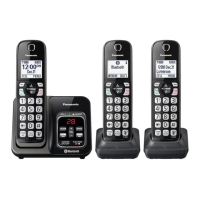
| Number of Handsets Included | 3 |
| DECT 6.0 Technology | Yes |
| Frequency | 1.9 GHz |
| Expandable Up To | 6 handsets |
| Caller ID | Yes |
| Call Block | Yes |
| Talking Caller ID | Yes |
| Answering System | Yes |
| Answering System Recording Time | 18 minutes |
| Keypad on Base Unit | Yes |
| Speakerphone | Yes |
| Ringer ID | Yes |
| Power Backup | No |
| ECO Mode | Yes |
| Range | Up to 1000 feet |
| Call Waiting | Yes |
| Conference Calling | Yes |
| Intercom | Yes |
| Display | LCD |
| Backlit Display | Yes |
| Power Source | AC Adapter |