EasyManua.ls Logo

Panasonic KX-TGD532 - User Manual

Panasonic KX-TGD532
64 pages
Print Icon
To Next Page IconTo Next Page
Loading...
Operating Instructions
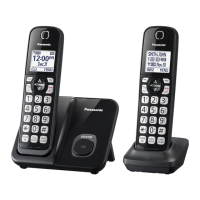
Cordless Telephone
Model No.
KX-TGD510
KX-TGD512
KX-TGD513
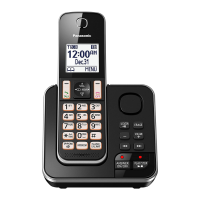
Cordless Telephone with
Digital Answering Machine
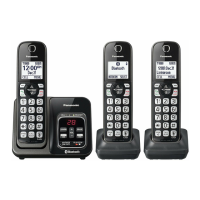
Model shown is KX-TGD510.
Model No.
KX-TGD530
KX-TGD532
KX-TGD533
KX-TGD534
KX-TGD535
Before initial use, see “Getting Started”
on page 10.
Thank you for purchasing a Panasonic product.
Please read these operating instructions before using the unit and save them for
future reference.
Consulte “Guía Rápida Española”, página 52.
For assistance, visit our Web site: http://shop.panasonic.com/support for
customers in the U.S.A.
Please register your product: http://shop.panasonic.com/support
TGD51x_OI(en)_1007_ver002.pdf 1 2016/10/07 10:05:45

Questions and Answers

Summary

Important Information

For your safety

Provides essential safety precautions to prevent injury and property damage.

Important safety instructions

Lists crucial safety guidelines for product usage to reduce risks.

Getting Started

Setting up

Guides through the initial setup process, including connections.

Making;Answering Calls

Making calls

Instructions on how to initiate phone calls.

Answering calls

Guidance on how to receive incoming calls.

Call Block

Blocking unwanted callers

How to block specific numbers or ranges of callers.

Phonebook

Adding phonebook entries

Instructions for adding new names and numbers to the phonebook.

Programming

Menu list

Lists features accessible via menus and direct command codes.

Call block

Settings related to blocking incoming calls.

Speed dial

Managing speed dial entries.

Alarm

Setting and managing the alarm function.

Silent mode

Configure periods when the handset will not ring.

Registering a unit

Instructions for adding and registering new handsets.

Deregistering a handset

Process to remove a handset's registration from the base unit.

Caller ID Service

Using Caller ID service

Overview of Caller ID compatibility and subscription requirements.

Talking Caller ID

Feature to announce caller information aloud.

Viewing the caller list and calling back

How to view call history and return calls.

Answering System

Answering system

Basic function of the answering system to record calls.

Turning the answering system on;off

Instructions to activate or deactivate the answering system.

Greeting message

Information on using own or pre-recorded greeting messages.

Recording your greeting message

Step-by-step guide to record a custom greeting.

Listening to messages

How to play back recorded messages.

Remote operation

Accessing system features via a remote touch-tone phone.

Using the answering system remotely

Detailed steps for remote operation of the answering system.

Answering system settings

Adjusting settings like call screening and ring count.

Useful Information

Voicemail service

Information about voicemail services from phone providers.

Error messages

List of display messages and their potential causes/solutions.

Troubleshooting

Common problems and their solutions for the unit.

Caller ID;Talking Caller ID

Troubleshooting issues related to Caller ID features.

Summary

Important Information

For your safety

Provides essential safety precautions to prevent injury and property damage.

Important safety instructions

Lists crucial safety guidelines for product usage to reduce risks.

Getting Started

Setting up

Guides through the initial setup process, including connections.

Making;Answering Calls

Making calls

Instructions on how to initiate phone calls.

Answering calls

Guidance on how to receive incoming calls.

Call Block

Blocking unwanted callers

How to block specific numbers or ranges of callers.

Phonebook

Adding phonebook entries

Instructions for adding new names and numbers to the phonebook.

Programming

Menu list

Lists features accessible via menus and direct command codes.

Call block

Settings related to blocking incoming calls.

Speed dial

Managing speed dial entries.

Alarm

Setting and managing the alarm function.

Silent mode

Configure periods when the handset will not ring.

Registering a unit

Instructions for adding and registering new handsets.

Deregistering a handset

Process to remove a handset's registration from the base unit.

Caller ID Service

Using Caller ID service

Overview of Caller ID compatibility and subscription requirements.

Talking Caller ID

Feature to announce caller information aloud.

Viewing the caller list and calling back

How to view call history and return calls.

Answering System

Answering system

Basic function of the answering system to record calls.

Turning the answering system on;off

Instructions to activate or deactivate the answering system.

Greeting message

Information on using own or pre-recorded greeting messages.

Recording your greeting message

Step-by-step guide to record a custom greeting.

Listening to messages

How to play back recorded messages.

Remote operation

Accessing system features via a remote touch-tone phone.

Using the answering system remotely

Detailed steps for remote operation of the answering system.

Answering system settings

Adjusting settings like call screening and ring count.

Useful Information

Voicemail service

Information about voicemail services from phone providers.

Error messages

List of display messages and their potential causes/solutions.

Troubleshooting

Common problems and their solutions for the unit.

Caller ID;Talking Caller ID

Troubleshooting issues related to Caller ID features.

Panasonic KX-TGD532 Specifications

General IconGeneral
BrandPanasonic
ModelKX-TGD532
CategoryCordless Telephone
LanguageEnglish

Related product manuals