EasyManua.ls Logo

Panasonic KX-TGD510 - User Manual

Panasonic KX-TGD510
64 pages
Print Icon
To Next Page IconTo Next Page
Loading...
Operating Instructions
Cordless Telephone
Model No.
KX-TGD510
KX-TGD512
KX-TGD513
Cordless Telephone with
Digital Answering Machine
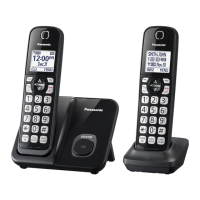
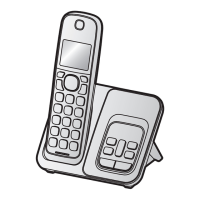
Model shown is KX-TGD510.
Model No.
KX-TGD530
KX-TGD532
KX-TGD533
KX-TGD534
KX-TGD535
Before initial use, see “Getting Started”
on page 10.
Thank you for purchasing a Panasonic product.
Please read these operating instructions before using the unit and save them for
future reference.
Consulte “Guía Rápida Española”, página 52.
For assistance, visit our Web site: http://shop.panasonic.com/support for
customers in the U.S.A.
Please register your product: http://shop.panasonic.com/support
TGD51x_OI(en)_1007_ver002.pdf 1 2016/10/07 10:05:45

Questions and Answers

  • B
    Brandon HallSep 23, 2025
    What to do if liquid gets into my Panasonic KX-TGD510?
    • S
      Sarah WilliamsSep 23, 2025
      If liquid or moisture has entered your Panasonic Cordless Telephone handset or base unit, disconnect the AC adapter and telephone line cord from the base unit. Remove the batteries from the handset and leave to dry for at least 3 days. Reconnect the AC adapter and telephone line cord. Insert the batteries and charge fully before use. If the issue persists, contact an authorized service center.
  • M
    Mark SotoAug 25, 2025
    Why I cannot hear a dial tone on my Panasonic Cordless Telephone?
    • V
      Vernon WrightAug 25, 2025
      If you cannot hear a dial tone on your Panasonic Cordless Telephone, it might be because the base unit’s AC adaptor or telephone line cord is not connected properly. Check the connections to ensure they are secure.
  • C
    Crystal WhiteAug 25, 2025
    What to do if Panasonic Cordless Telephone handset does not ring?
    • J
      justin05Aug 26, 2025
      If the handset of your Panasonic Cordless Telephone does not ring, ensure that the ringer volume is not turned off. Adjust the ringer volume as needed. Also, check if silent mode is turned on and turn it off if it is. Additionally, pressing and holding 0 can toggle the ringer on or off, so ensure it is turned on this way as well.
  • M
    Miss Rebecca BoyleAug 26, 2025
    Why is my Panasonic KX-TGD510 Cordless Telephone battery not charging properly?
    • C
      Christopher PattersonAug 27, 2025
      If you fully charged the batteries of your Panasonic Cordless Telephone, but the battery icon still flashes, displays a low battery symbol, or the operating time seems shorter, clean the battery ends and the charge contacts with a dry cloth and charge again. It may also be time to replace the batteries.
  • A
    Andrew OliverAug 27, 2025
    What to do if my Panasonic KX-TGD510 Cordless Telephone does not work?
    • A
      Aaron HillAug 27, 2025
      If your Panasonic Cordless Telephone isn't working, there are several things to try: * Ensure the batteries are correctly installed. * Fully charge the batteries. * Check all connections. * Unplug the base unit’s AC adapter to reset the unit. * Register the handset.
  • G
    gelliottSep 14, 2025
    What to do if liquid entered my Panasonic KX-TGD510?
    • J
      Jessica WalkerSep 14, 2025
      If liquid or other moisture has entered your Panasonic Cordless Telephone handset or base unit, disconnect the AC adaptor and telephone line cord from the base unit. Remove the batteries from the handset and let it dry for at least 3 days. After it is completely dry, reconnect the AC adaptor and telephone line cord. Insert the batteries and charge fully before use.
  • N
    Nicole CastilloSep 12, 2025
    Why is caller information late on Panasonic KX-TGD510 Cordless Telephone?
    • A
      Angela SanchezSep 12, 2025
      If caller information is displayed or announced late on your Panasonic Cordless Telephone, it may be due to your phone service provider. The unit may display or announce the caller’s information at the 2nd ring or later, depending on the provider.
  • Q
    qhardySep 13, 2025
    Why is caller information not announced on my Panasonic Cordless Telephone?
    • L
      linda52Sep 13, 2025
      If caller information is not announced on your Panasonic Cordless Telephone, ensure that the handset or base unit’s ringer volume is not turned off by adjusting it. Also, confirm that the Talking Caller ID feature is turned on. Finally, check that the number of rings for the answering system is not set to “2 rings” or “Toll saver”; select a different setting if it is.
  • M
    Michael CannonSep 5, 2025
    How to fix Panasonic Cordless Telephone when I cannot make a call?
    • K
      Kenneth GreenSep 5, 2025
      If you cannot make a call on your Panasonic Cordless Telephone, try changing the dialing mode setting.
  • A
    Alan HubbardSep 2, 2025
    Why does my Panasonic KX-TGD510 Cordless Telephone have static and cut out?
    • R
      Robert RiceSep 2, 2025
      If you're experiencing noise or sound cutting in and out on your Panasonic Cordless Telephone: * The handset or base unit might be in an area with high electrical interference. Try re-positioning the base unit and using the handset away from sources of interference. * Move closer to the base unit. * You may need to contact your DSL/ADSL provider for details.

Summary

Important Information

For Your Safety

Provides critical safety warnings regarding power connection, installation, and operation.

Operating Safeguards

Details precautions for safe operation, including cleaning and disassembly.

Installation and Location

Guidance on proper installation and placement to avoid electrical hazards and interference.

Important Safety Instructions

Lists essential safety precautions to reduce risks of fire, shock, and injury.

Getting Started

Setting Up

Step-by-step guide for connecting the base unit and charger.

Battery Installation

Instructions for correctly installing the rechargeable batteries.

Controls

Identification and function of handset controls.

Making and Answering Calls

Making Calls

Steps for initiating calls using the handset, speakerphone, and redial list.

Answering Calls

How to answer incoming calls and end conversations.

Useful Features During a Call

Explains features like Hold, Mute, and Flash used during an active call.

Call Block

Call Block

Overview of blocking calls and adding numbers to the call block list.

Storing Unwanted Callers

Methods for blocking specific numbers or number ranges.

Storing a Single Phone Number

Instructions for adding individual numbers to the block list.

Phonebook

Phonebook

Overview of adding, storing, and managing contacts.

Adding Phonebook Entries

Steps to add new contacts with names, numbers, and groups.

Speed Dial

Adding Phone Numbers to Speed Dial Keys

Assigning phone numbers to speed dial keys.

Programming

Menu List

Explains two methods to access features: scrolling menus or using direct command codes.

Alarm

Setting and managing alarm functions, including text memos and snooze.

Silent Mode

Configuration for silencing incoming calls during specific periods.

Other Programming

Covers miscellaneous programming options like handset naming.

Registering a Unit

Procedures for adding and managing additional handsets.

Caller ID Service

Using Caller ID Service

Explains requirements and features of Caller ID service.

Caller ID Features

Details on how caller information is displayed and logged.

Caller List

Overview of the caller list and its management.

Answering System

Answering System

Overview of the answering system's capabilities.

Turning the Answering System On;Off

Instructions for activating and deactivating the answering system.

Greeting Message

Information on playing greeting messages to callers.

Listening to Messages

Methods for listening to new or all recorded messages.

Remote Operation

Accessing answering system functions remotely via phone.

Remote Access Code

Setting and managing the remote access code for security.

Using the Answering System Remotely

Step-by-step guide for operating the system remotely.

Answering System Settings

Configuration options for call screening, ring count, and recording time.

Call Screening

Option to listen to callers while they leave messages.

Number of Rings Before the Unit Answers a Call

Setting the number of rings before the answering system activates.

Useful Information

Voicemail Service

Information on using voicemail service from your phone provider.

Wall Mounting

Instructions for mounting the base unit on a wall.

Error Messages

Lists common display messages and their causes/solutions.

Troubleshooting

General troubleshooting steps for common problems.

Caller ID and Talking Caller ID

Troubleshooting for caller ID display, announcement, and related features.

FCC and Other Information

Compliance information regarding FCC rules, wiring, and hearing aid compatibility.

Appendix

Limited Warranty (ONLY FOR U.S.A.)

Details the limited warranty coverage and terms for products purchased in the USA.

Limited Warranty Limits and Exclusions

Specifies what is NOT covered by the limited warranty.

Panasonic KX-TGD510 Specifications

General IconGeneral
BrandPanasonic
ModelKX-TGD510
CategoryCordless Telephone
LanguageEnglish

Related product manuals