EasyManua.ls Logo

Panasonic KX-TGD610 - User Manual

Panasonic KX-TGD610
64 pages
Print Icon
To Next Page IconTo Next Page
Loading...
Operating Instructions
Cordless Phone
Model No.
KX-TGD610
KX-TGD613
KX-TGD630
KX-TGD632
KX-TGD633
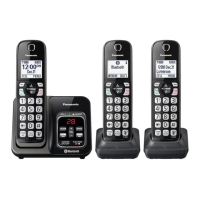
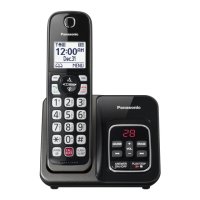
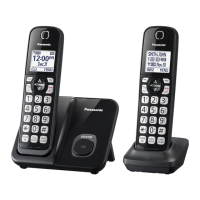
Model shown is KX-TGD610.
Before initial use, see “Getting Started”
on page 10.
Thank you for purchasing a Panasonic product.
Please read these operating instructions before using the unit and save them for
future reference.
Consulte “Guía Rápida Española”, página 54.
For assistance, visit our Web site: http://shop.panasonic.com/support for
customers in the U.S.A.
Please register your product: http://shop.panasonic.com/support
TGD61x_63x(en)_0428_ver021.pdf 1 2021/04/28 11:28:11
Question and Answer IconNeed help?

Do you have a question about the Panasonic KX-TGD610 and is the answer not in the manual?

Summary

Introduction

Model Composition

Details the different models and their configurations within the product line.

Accessory Information

Lists and describes the items supplied with the cordless phone.

Introduction Continued

Graphical Symbols for Use on Equipment and Their Descriptions

Explains the meaning of various symbols found on the phone's equipment.

Important Information

For Your Safety

Provides crucial safety precautions to prevent injury and ensure safe operation.

Important Information Continued

For Best Performance

Offers guidance on optimal placement and environmental conditions for phone performance.

Important Information Continued

Specifications

Details the technical specifications of the cordless phone, including frequency and power.

Getting Started

Setting Up

Guides the user through the initial setup process, including connections and battery installation.

Getting Started Continued

Controls

Identifies and explains the function of various buttons and indicators on the handset.

Getting Started Continued

Display Icons;Indicators

Explains the meaning of icons displayed on the handset screen.

Getting Started Continued

Language Settings

Instructions for changing the display and voice announcement languages.

Date and Time

Steps to set the current date and time on the unit.

Getting Started Continued

Recording Your Greeting Message

Instructions on how to record a personalized greeting message for the answering system.

Other Settings

Covers additional settings like dialing mode and low battery alerts.

Making;Answering Calls

Making Calls

Details the process of initiating calls using the handset.

Answering Calls

Explains how to receive incoming calls on the handset.

Making;Answering Calls Continued

Useful Features During a Call

Describes features like Hold, Mute, and Flash used during an active call.

Making;Answering Calls Continued

Transferring Calls, Conference Calls

Instructions for transferring calls and setting up conference calls.

Intercom

Explains how to make calls between handsets within the system.

Making;Answering Calls Continued

Making an Intercom Call

Step-by-step guide for initiating an intercom call between handsets.

Call Block

Call Block

Details how to block incoming calls from specific numbers or ranges.

Storing Unwanted Callers

Instructions for adding numbers to the call block list to prevent unwanted calls.

Call Block Continued

Blocking Incoming Calls That Have No Phone Number

How to block calls where the caller ID is not provided.

Turning the First Ring On;Off

Option to control whether the first ring is heard for blocked calls.

Phonebook

Adding Phonebook Entries

Guide on how to add new contacts with names and numbers to the phonebook.

Storing Caller Information to the Phonebook

How to save incoming caller information directly into the phonebook.

Groups

Explains how to categorize phonebook entries for easier searching and identification.

Phonebook Continued

Editing Entries

Instructions for modifying existing phonebook entries, including names and numbers.

Erasing Entries

Steps to remove entries from the phonebook.

Phonebook Continued

Speed Dial

How to assign phone numbers to speed dial keys for quick dialing.

Programming

Menu List

Overview of accessing features through the menu system and direct command codes.

Programming Continued

Settings

Configuration options for ring count, recording time, remote code, and screen call.

Programming Continued

Ring Adjustments

Settings for ringer volume and tone for incoming and intercom calls.

Set Date & Time

Options related to setting the date, time, memo alarms, and time adjustment.

Programming Continued

Key Detector Setting

Configuration for adding or deregistering key detector devices.

Call Block

Accessing call blocking features like blocking single numbers or ranges.

Programming Continued

Auto Talk

Feature to enable automatic answering of calls by lifting the handset.

Call Sharing

Instructions on how to join an existing outside call or share conversations.

Programming Continued

Alarm

Instructions for setting, programming, and customizing alarm times and memos.

Silent Mode

How to set a period when the handset will not ring for outside calls.

Programming Continued

Turning Silent Mode On;Off

Steps to activate or deactivate the silent mode feature on the handset.

Baby Monitor

Details on setting up and using the baby monitor feature for room monitoring.

Programming Continued

To Monitor From Outside

How to set up the baby monitor to call an external number when sound is detected.

Baby Monitor Sensitivity

Adjusting the sensitivity level for the baby monitor feature to trigger on sound.

Registering a Unit

Operating Additional Units

Information on expanding the system with additional handsets.

Registering a Handset to the Base Unit

Procedures for registering a new handset to the base unit if it's not already paired.

Caller ID Service

Using Caller ID Service

Explains how to use Caller ID features and what to expect for incoming calls.

Talking Caller ID

How to enable and use the feature that announces caller information audibly.

Caller ID Service Continued

Editing a Callers Phone Number

Steps to modify phone numbers in the caller list, such as removing area codes.

Answering System

Answering System

Introduction to the answering system's capabilities and important setup notes.

Turning the Answering System On;Off

Instructions on how to activate or deactivate the answering system.

Answering System Continued

Listening to Messages

How to play back new and old messages using the base unit or handset.

Operating the Answering System During Playback

Details controls for managing message playback, such as repeat, skip, and stop.

Answering System Continued

Remote Operation

Guide on how to access answering system features remotely using a touch-tone phone.

Remote Access Code

Information about setting up and using a remote access code for security.

Answering System Continued

Call Screening

How to listen to a caller leaving a message through the unit's speaker.

Number of Rings Before the Unit Answers a Call

Setting the number of rings before the answering system activates.

Answering System Continued

Selecting Greeting Only

Option to announce a greeting but not record messages from callers.

Useful Information

Voicemail Service

Explanation of how voicemail service from the phone provider works with the unit.

Storing the Voicemail (VM) Access Number

Steps to save the voicemail access number for easy retrieval.

Useful Information Continued

Wall Mounting

Instructions and guidelines for mounting the base unit on a wall.

Useful Information Continued

Error Messages

Lists common error messages and their corresponding causes and solutions.

Troubleshooting

General troubleshooting steps for resolving common issues with the phone.

Useful Information Continued

General Use

Common problems related to the handset not turning on or the unit not working.

Menu List

Troubleshooting for display language issues and handset registration limits.

Useful Information Continued

Making;Answering Calls, Intercom

Troubleshooting for issues like handset distance, noise, no ring, or inability to make calls.

Useful Information Continued

Caller ID;Talking Caller ID

Troubleshooting for caller information display, announcement, and auto-edit features.

Useful Information Continued

FCC and Other Information

Compliance information with FCC rules, including REN, wiring, and hearing aid compatibility.

Appendix

Customer Services

Information on where to find support, accessories, and contact customer service.

Appendix Continued

Limited Warranty (ONLY FOR U.S.A.)

Details the warranty coverage, period, and exclusions for Panasonic products in the USA.

Appendix Continued

Limited Warranty Limits and Exclusions

Further explanation of what is not covered by the product warranty.

Summary

Introduction

Model Composition

Details the different models and their configurations within the product line.

Accessory Information

Lists and describes the items supplied with the cordless phone.

Introduction Continued

Graphical Symbols for Use on Equipment and Their Descriptions

Explains the meaning of various symbols found on the phone's equipment.

Important Information

For Your Safety

Provides crucial safety precautions to prevent injury and ensure safe operation.

Important Information Continued

For Best Performance

Offers guidance on optimal placement and environmental conditions for phone performance.

Important Information Continued

Specifications

Details the technical specifications of the cordless phone, including frequency and power.

Getting Started

Setting Up

Guides the user through the initial setup process, including connections and battery installation.

Getting Started Continued

Controls

Identifies and explains the function of various buttons and indicators on the handset.

Getting Started Continued

Display Icons;Indicators

Explains the meaning of icons displayed on the handset screen.

Getting Started Continued

Language Settings

Instructions for changing the display and voice announcement languages.

Date and Time

Steps to set the current date and time on the unit.

Getting Started Continued

Recording Your Greeting Message

Instructions on how to record a personalized greeting message for the answering system.

Other Settings

Covers additional settings like dialing mode and low battery alerts.

Making;Answering Calls

Making Calls

Details the process of initiating calls using the handset.

Answering Calls

Explains how to receive incoming calls on the handset.

Making;Answering Calls Continued

Useful Features During a Call

Describes features like Hold, Mute, and Flash used during an active call.

Making;Answering Calls Continued

Transferring Calls, Conference Calls

Instructions for transferring calls and setting up conference calls.

Intercom

Explains how to make calls between handsets within the system.

Making;Answering Calls Continued

Making an Intercom Call

Step-by-step guide for initiating an intercom call between handsets.

Call Block

Call Block

Details how to block incoming calls from specific numbers or ranges.

Storing Unwanted Callers

Instructions for adding numbers to the call block list to prevent unwanted calls.

Call Block Continued

Blocking Incoming Calls That Have No Phone Number

How to block calls where the caller ID is not provided.

Turning the First Ring On;Off

Option to control whether the first ring is heard for blocked calls.

Phonebook

Adding Phonebook Entries

Guide on how to add new contacts with names and numbers to the phonebook.

Storing Caller Information to the Phonebook

How to save incoming caller information directly into the phonebook.

Groups

Explains how to categorize phonebook entries for easier searching and identification.

Phonebook Continued

Editing Entries

Instructions for modifying existing phonebook entries, including names and numbers.

Erasing Entries

Steps to remove entries from the phonebook.

Phonebook Continued

Speed Dial

How to assign phone numbers to speed dial keys for quick dialing.

Programming

Menu List

Overview of accessing features through the menu system and direct command codes.

Programming Continued

Settings

Configuration options for ring count, recording time, remote code, and screen call.

Programming Continued

Ring Adjustments

Settings for ringer volume and tone for incoming and intercom calls.

Set Date & Time

Options related to setting the date, time, memo alarms, and time adjustment.

Programming Continued

Key Detector Setting

Configuration for adding or deregistering key detector devices.

Call Block

Accessing call blocking features like blocking single numbers or ranges.

Programming Continued

Auto Talk

Feature to enable automatic answering of calls by lifting the handset.

Call Sharing

Instructions on how to join an existing outside call or share conversations.

Programming Continued

Alarm

Instructions for setting, programming, and customizing alarm times and memos.

Silent Mode

How to set a period when the handset will not ring for outside calls.

Programming Continued

Turning Silent Mode On;Off

Steps to activate or deactivate the silent mode feature on the handset.

Baby Monitor

Details on setting up and using the baby monitor feature for room monitoring.

Programming Continued

To Monitor From Outside

How to set up the baby monitor to call an external number when sound is detected.

Baby Monitor Sensitivity

Adjusting the sensitivity level for the baby monitor feature to trigger on sound.

Registering a Unit

Operating Additional Units

Information on expanding the system with additional handsets.

Registering a Handset to the Base Unit

Procedures for registering a new handset to the base unit if it's not already paired.

Caller ID Service

Using Caller ID Service

Explains how to use Caller ID features and what to expect for incoming calls.

Talking Caller ID

How to enable and use the feature that announces caller information audibly.

Caller ID Service Continued

Editing a Callers Phone Number

Steps to modify phone numbers in the caller list, such as removing area codes.

Answering System

Answering System

Introduction to the answering system's capabilities and important setup notes.

Turning the Answering System On;Off

Instructions on how to activate or deactivate the answering system.

Answering System Continued

Listening to Messages

How to play back new and old messages using the base unit or handset.

Operating the Answering System During Playback

Details controls for managing message playback, such as repeat, skip, and stop.

Answering System Continued

Remote Operation

Guide on how to access answering system features remotely using a touch-tone phone.

Remote Access Code

Information about setting up and using a remote access code for security.

Answering System Continued

Call Screening

How to listen to a caller leaving a message through the unit's speaker.

Number of Rings Before the Unit Answers a Call

Setting the number of rings before the answering system activates.

Answering System Continued

Selecting Greeting Only

Option to announce a greeting but not record messages from callers.

Useful Information

Voicemail Service

Explanation of how voicemail service from the phone provider works with the unit.

Storing the Voicemail (VM) Access Number

Steps to save the voicemail access number for easy retrieval.

Useful Information Continued

Wall Mounting

Instructions and guidelines for mounting the base unit on a wall.

Useful Information Continued

Error Messages

Lists common error messages and their corresponding causes and solutions.

Troubleshooting

General troubleshooting steps for resolving common issues with the phone.

Useful Information Continued

General Use

Common problems related to the handset not turning on or the unit not working.

Menu List

Troubleshooting for display language issues and handset registration limits.

Useful Information Continued

Making;Answering Calls, Intercom

Troubleshooting for issues like handset distance, noise, no ring, or inability to make calls.

Useful Information Continued

Caller ID;Talking Caller ID

Troubleshooting for caller information display, announcement, and auto-edit features.

Useful Information Continued

FCC and Other Information

Compliance information with FCC rules, including REN, wiring, and hearing aid compatibility.

Appendix

Customer Services

Information on where to find support, accessories, and contact customer service.

Appendix Continued

Limited Warranty (ONLY FOR U.S.A.)

Details the warranty coverage, period, and exclusions for Panasonic products in the USA.

Appendix Continued

Limited Warranty Limits and Exclusions

Further explanation of what is not covered by the product warranty.

Panasonic KX-TGD610 Specifications

General IconGeneral
TypeCordless Telephone
Number of Handsets1
Frequency1.9 GHz
TechnologyDECT 6.0
RangeUp to 1000 feet outdoors
Caller IDYes
Call WaitingYes
Answering MachineYes
Digital Answering System Recording TimeUp to 18 minutes
SpeakerphoneYes
IntercomYes
Display TypeLCD
Display Size1.8 inches
Backlit KeypadYes
Phonebook Memory100 names and numbers
ECO ModeYes
Battery TypeNi-MH
Talk TimeUp to 10 hours
Standby TimeUp to 5 days
Power SourceAC Adapter
Expandable HandsetsUp to 6
Call BlockYes

Related product manuals