Temporary Confidential
Programming
29
For assistance, please visit http://www.panasonic.com/help
Programming using the direct commands
1
{MENU} i {#}
2 Enter the desired feature code.
3 Enter the desired setting code. i {Save}
L This step may vary depending on the feature being programmed.
L To exit the operation, press {OFF}.
Note:
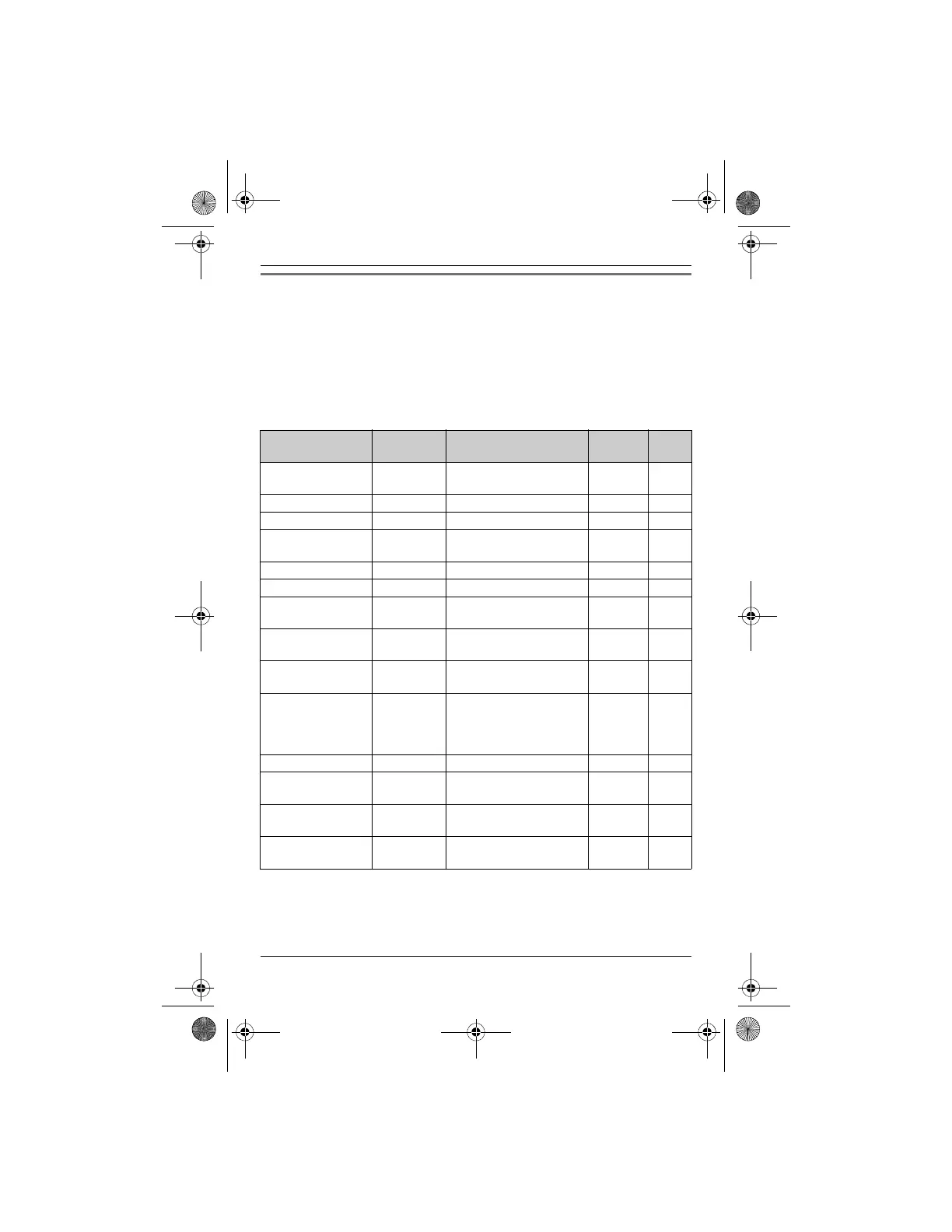
L In the following table, < > indicates the default settings.
*1 If “System setting” column is checked, you do not need to program the same item
using another handset.
*2 If you subscribe to Caller ID service and want to view the caller’s information after
lifting up the handset to answer a call, turn off this feature.
Feature Feature
code
Setting code System
setting
*1
Page
Alarm {7}{2}{0}{1}: Once {2}: Daily
{0}: <Off>
–34
Auto talk
*2
{2}{0}{0}{1}: On {0}: <Off>–22
Block calls {2}{1}{7} – r 33
Customer
support
{6}{8}{0} ––35
Date and time {1}{0}{1} – r 16
Deregistration {1}{3}{1} ––36
Display
(Change language)
{1}{1}{0}{1}: <English>
{2}: Español
–16
Night mode
(On/Off)
{2}{3}{8}{1}: On {0}: <Off>–34
Night mode
(Start/End)
{2
}{3}{7} <11:00 PM/6:00 AM>– 34
HS
registration
(Handset
registration)
{1}{3}{0} ––35
Key tone
*3
{1}{6}{5}{1}: <On> {0}: Off ––
LCD contrast
(Display contrast)
{1}{4}{5}{1}–{6}: Level 1–6 <3> – –
Talking
CallerID
{1}{6}{2}{1}: <On> {0}: Off –37
Voice prompt
(Change language)
{1}{1}{2}{1}: <English>
{2}: Español
r 16
TH12XX.book Page 29 Wednesday, December 19, 2007 4:17 PM











 To Next Page