Temporary Confidential
Programming
30
For assistance, please visit http://www.panasonic.com/help
*3 Turn this feature off if you prefer not to hear key tones while you are dialing or
pressing any keys, including confirmation tones and error tones.
For cellular lines
*1 If “System setting” column is checked, you do not need to program the same item
using another handset.
*2 If you select one of the melody ringer tones, the ringer tone will continue to play for
several seconds even if the caller has already hung up. You may either hear a dial
tone or no one on the line when you answer the call.
*3 When the ringer volume is set to off for a cellular line, “Ringer off” is not
displayed in standby mode.
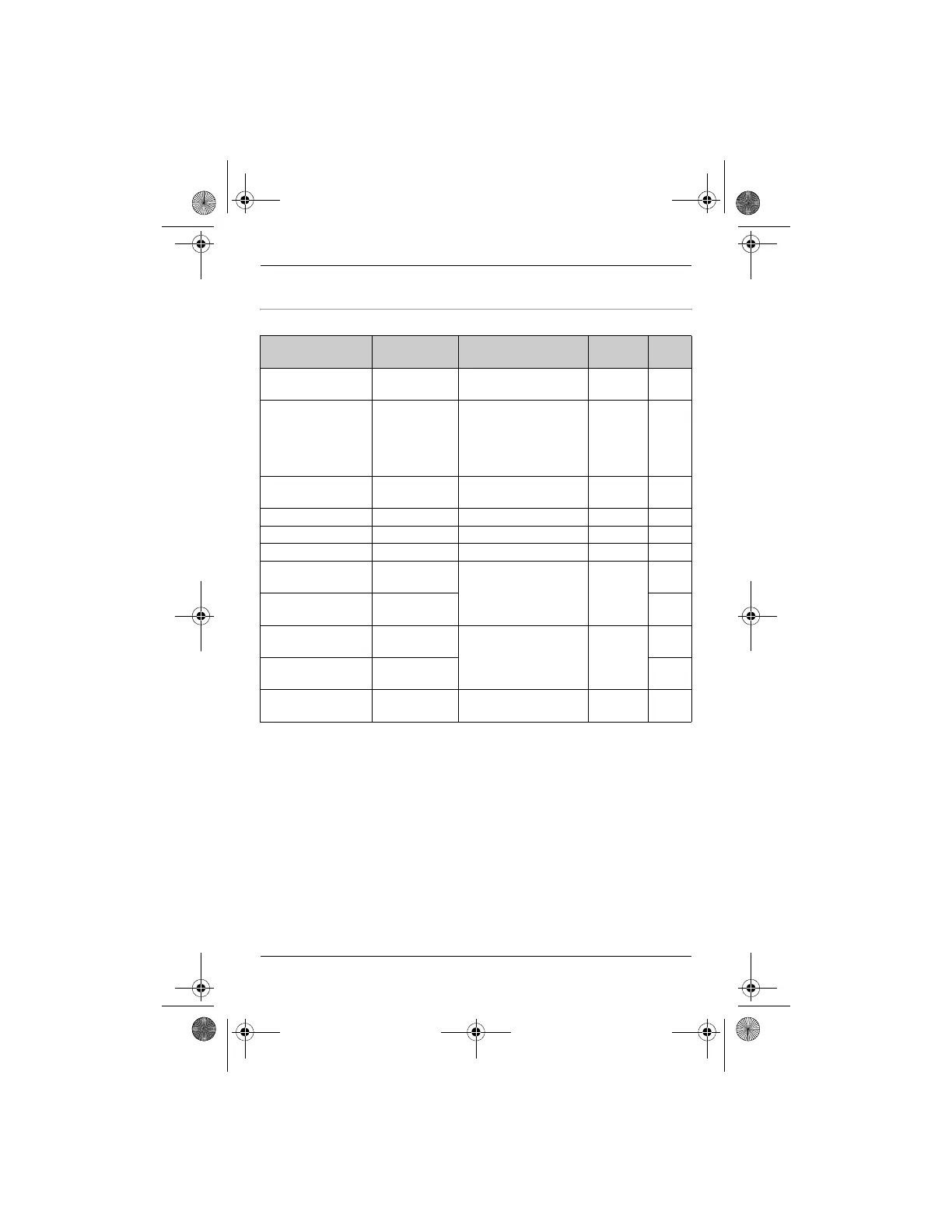
Feature Feature
code
Setting code System
setting
*1
Page
Area
code(cell)
{6}{3}{3} – r 18
Auto
connection
{6}{3}{2}{1}: <1min>
{2}: 3min
{3}: 5min
{4}: 10min
{0}: Off
r 18
Cellular line
mode
{1}{5}{7} – r 35
Change PIN {1}{3}{2} – r 17
Deregistration {*}{1}{3}{4} ––19
Discoverable {6}{2}{0}{1}: On {0}: <Off> r 19
Ringer tone
*2
(Cellular line 1)
{6}{2}{9}i
{1}
{1}–{3}:
Tone 1–<3>
{4}–{7}:
Melody 1–4
–
–
Ringer tone
*2
(Cellular line 2)
{6}{2}{9}i
{2}
–
Ringer volume
*3
(Cellular line 1)
{6}{2}{8}i
{1}
{1}: Low
{2}: Medium
{3}: <High> {0}: Off
–
–
Ringer volume
*3
(Cellular line 2)
{6}{2}{8}i
{2}
–
Select
HS(ring)
{6}{2}{7} – r 19
TH12XX.book Page 30 Wednesday, December 19, 2007 4:17 PM











 To Next Page