Getting Started
11
Helpline Tel. No.: U.K. 0844 844 3898 R.O.I. 01289 8333
Setting up
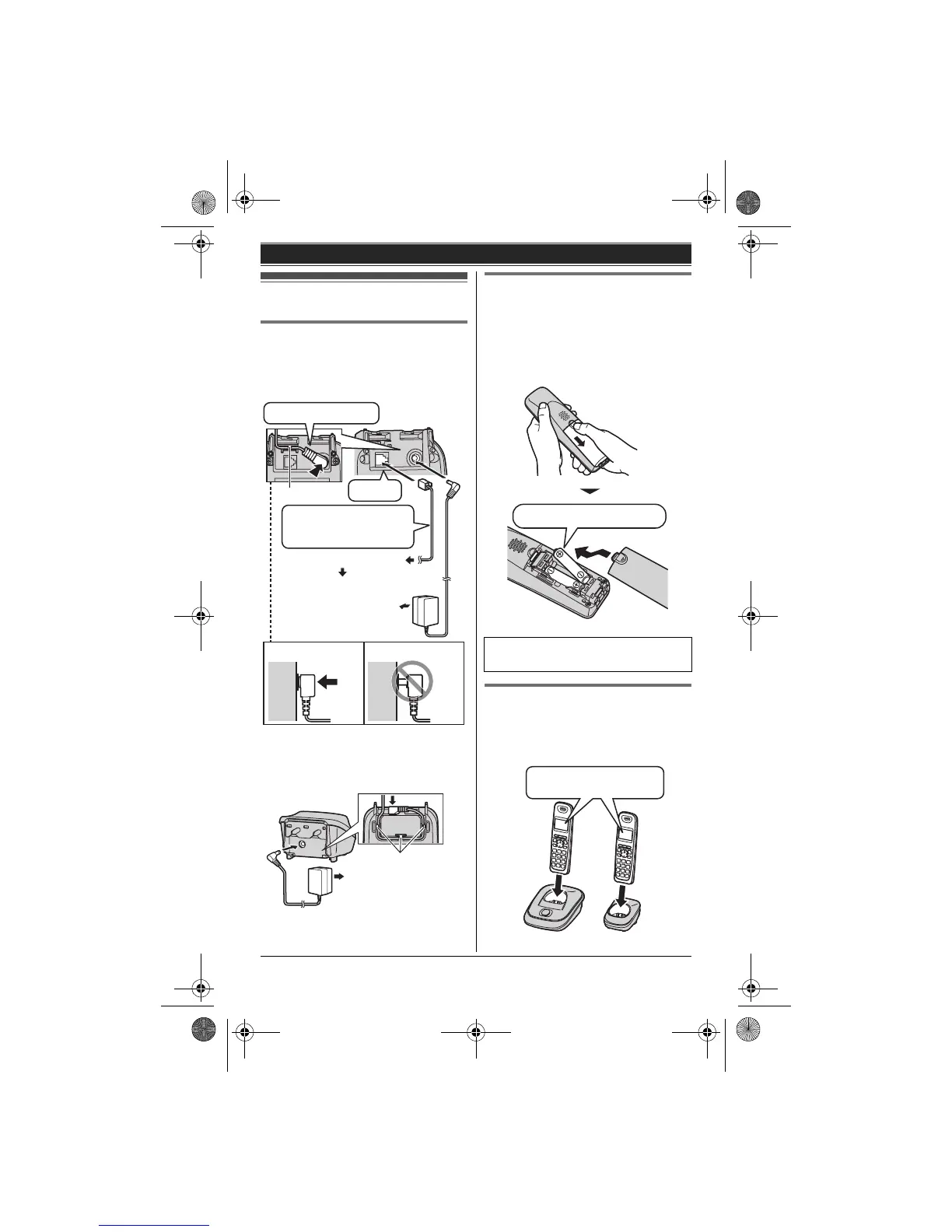
Connections
L Use only the supplied Panasonic AC
adaptor PQLV219E.
■ Base unit
*DSL/ADSL filter (not supplied) is
required if you have DSL/ADSL service.
■ Charger
Battery installation
L USE ONLY Ni-MH batteries AAA
(R03) size.
L Do NOT use Alkaline/Manganese/Ni-
Cd batteries.
L Confirm correct polarities (S, T).
Battery charge
Charge for about 7 hours.
L When the batteries are fully charged,
“Fully charged” is displayed.
(220-240 V AC,
50/60 Hz)
To telephone line
(DSL/ADSL filter*)
Press plug firmly.
Use only the supplied
telephone line cord.
Hook
Correct Wrong
“Click”
(220-240 V AC,
50/60 Hz)
Hooks
L When the language selection is
displayed, see page 14.
Rechargeable Ni-MH ONLY
Confirm “Charging”
is displayed.
TG251x_2xE(e).book Page 11 Monday, January 25, 2010 3:09 PM












 To Next Page