Getting Started
13
Helpline Tel. No.: U.K. 0844 844 3898 R.O.I. 01289 8333
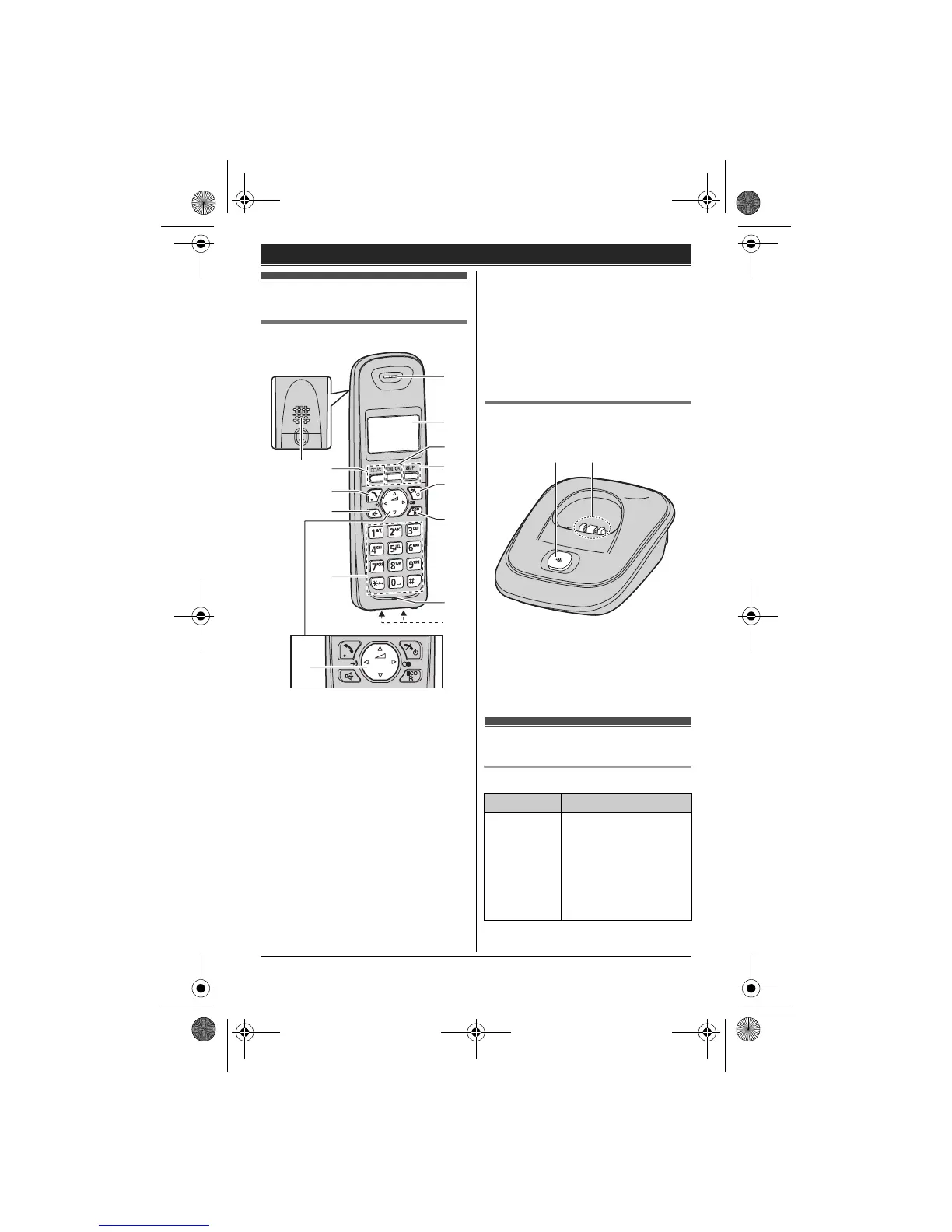
Controls
Handset
A Speaker
B {k/C} (Phonebook/Clear)
C {C } (Talk)
D {s} (Speakerphone)
E Dial keypad
F Receiver
G Display
H {j/OK} (Menu/OK)
I {T/P} (Mute/Pause)
J {ic} (Off/Power)
K {ECO/R}
ECO: Eco mode shortcut key
R: Recall/Flash
L Microphone
M Charge contacts
A Navigator key
– {^}, {V}, {<}, or {>}: Scroll through
various lists and items.
– ? (Volume: {^} or {V}): Adjust the
receiver or speaker volume while
talking.
– {<} (y: Caller list): View the caller list.
– {>} (R: Redial): View the redial list.
Base unit
L Model shown is KX-TG2511.
A {x} (Locator)
B Charge contacts
Display
Handset display items
A
M
C
B
D
E
J
H
K
G
I
F
L
A
Item Meaning
w Within range of a
base unit
L When flashing
slowly:
Handset is
searching for base
unit. (page 37)
AB
TG251x_2xE(e).book Page 13 Monday, January 25, 2010 3:09 PM












 To Next Page