Useful Information
41
Helpline Tel. No.: U.K. 0844 844 3898 R.O.I. 01289 8333
Changing the base unit PIN (Personal Identification Number)
Important:
L If you change the PIN, please make note of your new PIN. The unit will not reveal
the PIN to you. If you forget your PIN, see page 37.
1 {j/OK}
2 {V}/{^}: “Base Unit Setup” i {j/OK}
3 {V}/{^}: “Base Unit PIN” i {j/OK}
4 Enter the current 4-digit base unit PIN (default: “0000”).
5 Enter the new 4-digit base unit PIN. i {j/OK} i {ic}
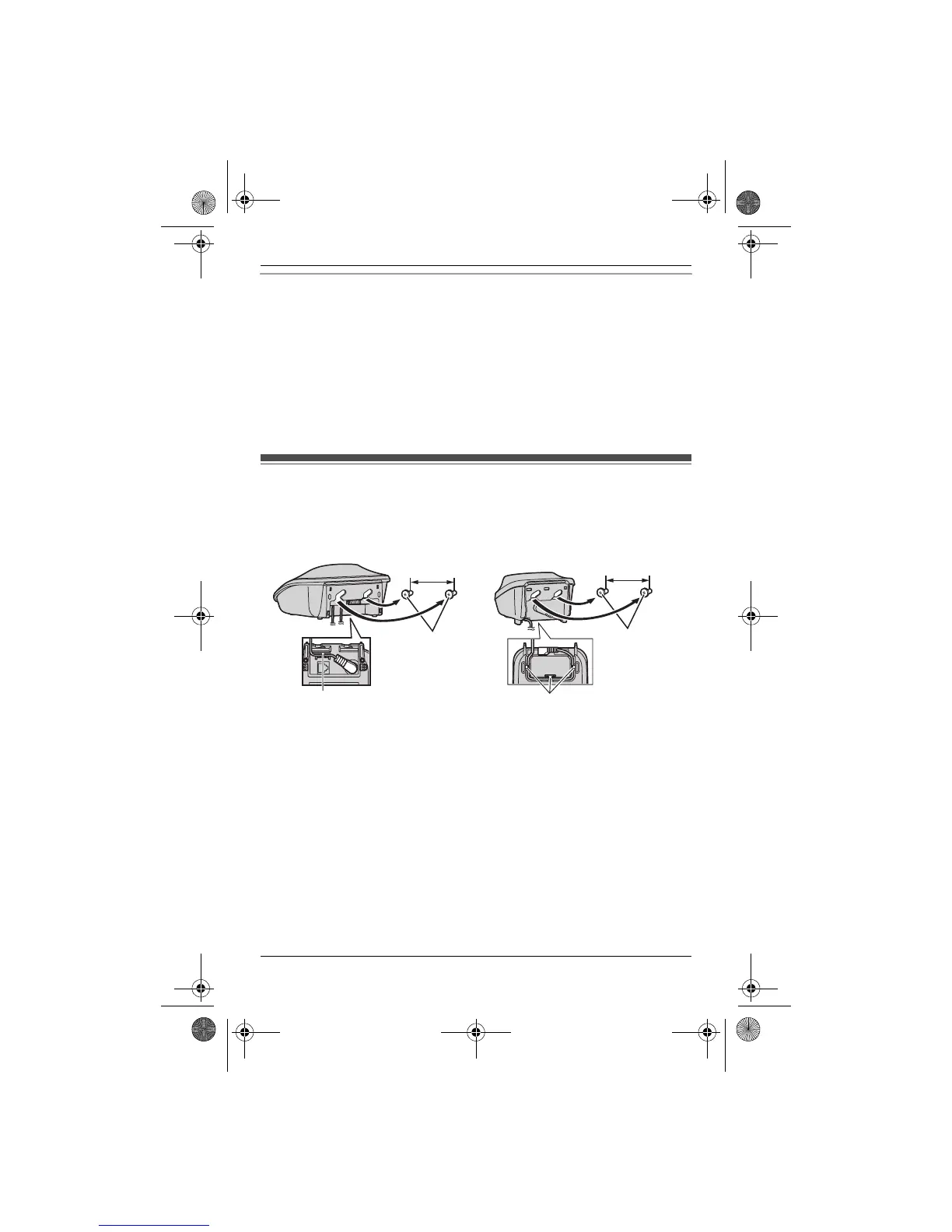
Wall mounting
Note:
L Make sure that the wall is strong enough to support the weight of the unit.
■ Base unit ■ Charger
Hook
Screws
(Not supplied)
30 mm
Hooks
25 mm
Screws
(Not supplied)
TG251x_2xE(e).book Page 41 Monday, January 25, 2010 3:09 PM












 To Next Page