Advanced (Playback)
- 88 -
To allow easy posting to web pages, attachment to email etc., picture size (number of
pixels) is reduced.
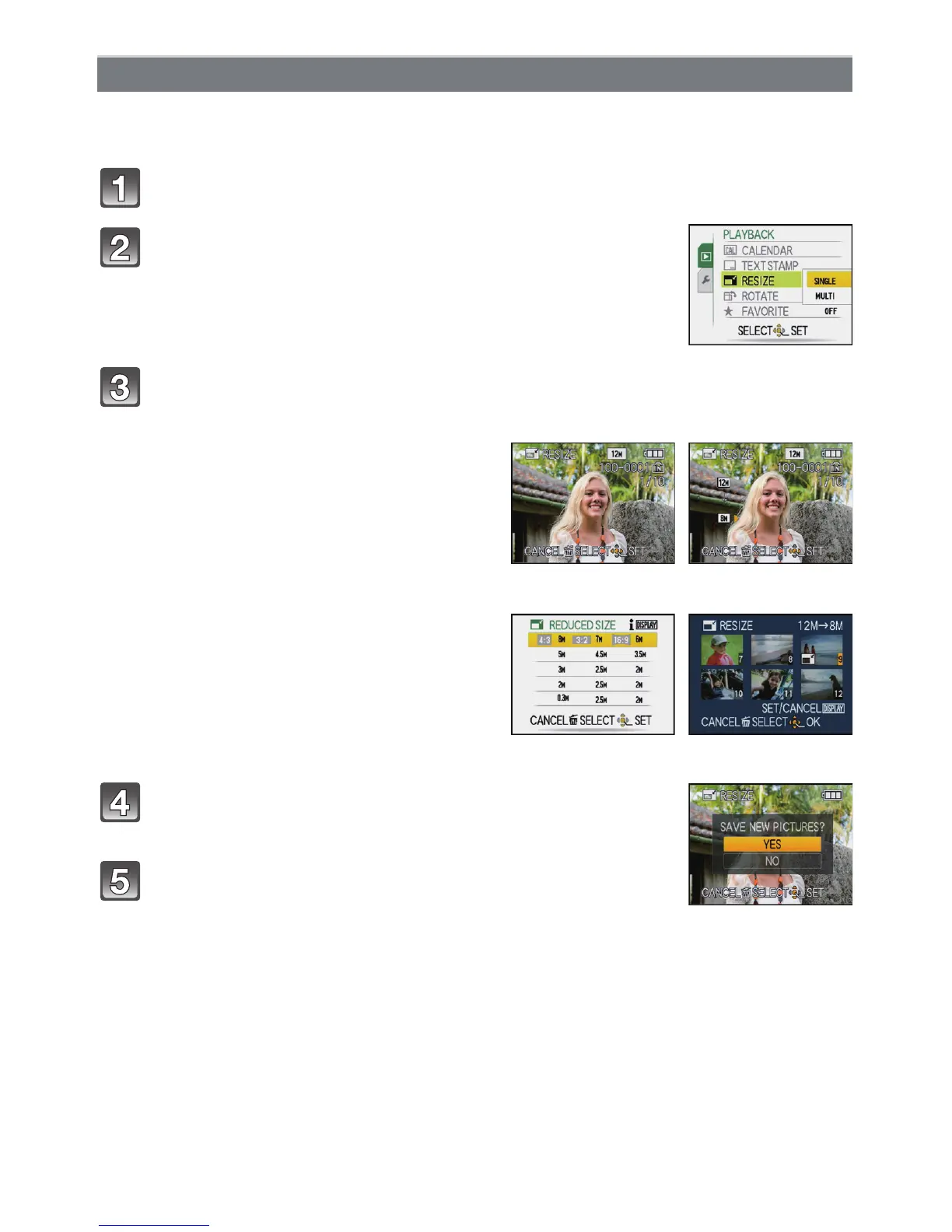
Select [RESIZE] on the [PLAYBACK] Mode menu. (P20)
Press 3 to select [YES] and then press [MENU/
SET].
Press [‚] to return to the menu screen.
¢
¢The menu screen is automatically restored when [MULTI] is
selected.
• Press [MENU/SET] to close the menu.
[RESIZE] Reducing the Picture Size (number of pixels)
Press 3/4 to select [SINGLE] or [MULTI] and then
press [MENU/SET].
Select the picture and size.
[SINGLE] setting
1 Press 2/1 to select the picture,
and then press [MENU/SET].
2 Press 2/1 to select the size
¢
, and
then press [MENU/SET].
¢Only the sizes to which the pictures can be
resized is displayed.
[SINGLE]
[MULTI] setting
1 Press 3/4 to select the size, and
then press [MENU/SET].
• When [DISPLAY] is pressed, an
explanation of resizing is displayed.
2 Press 3/4/2/1 to select the
picture, and then press [DISPLAY].
• Repeat this step for each picture, and
press [MENU/SET] to set.
[MULTI]


 To Next Page
 Loading...