16
SQT0375 (ENG)
Preparations
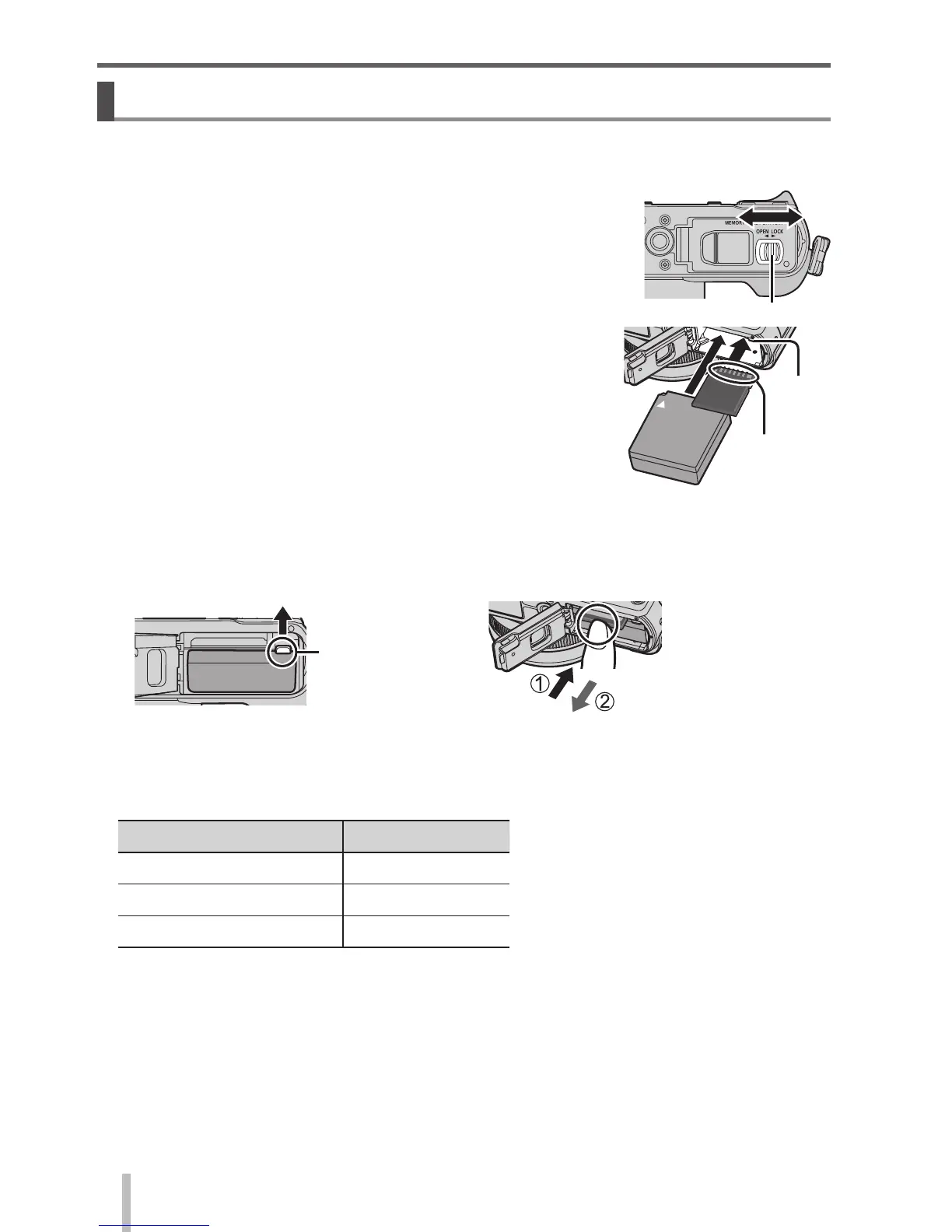
Inserting and removing the battery/the card (optional)
• Always use genuine Panasonic batteries (DMW-BLG10E).
• If you use other batteries, we cannot guarantee the quality of this product.
1
Slide the release lever to the [OPEN] position and
open the card/battery door
Release lever
Do not
touch the
terminal
Lever
2
(Battery)
Insert the battery all the way firmly until a locking
sound is heard, and check that the lever is
hooked over the battery.
(Card)
Insert the card all the way firmly until it clicks.
3
Close the card/battery door and slide the release
lever to the [LOCK] position
■
To remove
• To remove battery:
Move lever in direction of arrow.
• To remove card:
Press the centre of the card.
Lever
■
About the Card
The following SD standard-based cards (Panasonic brand recommended) can
be used.
Type of Card Capacity
SD Memory Cards 8 MB – 2 GB
SDHC Memory Cards 4 GB – 32 GB
SDXC Memory Cards 48 GB, 64 GB
• Keep the Memory Card out of reach of children to prevent swallowing.


 To Next Page
 Loading...