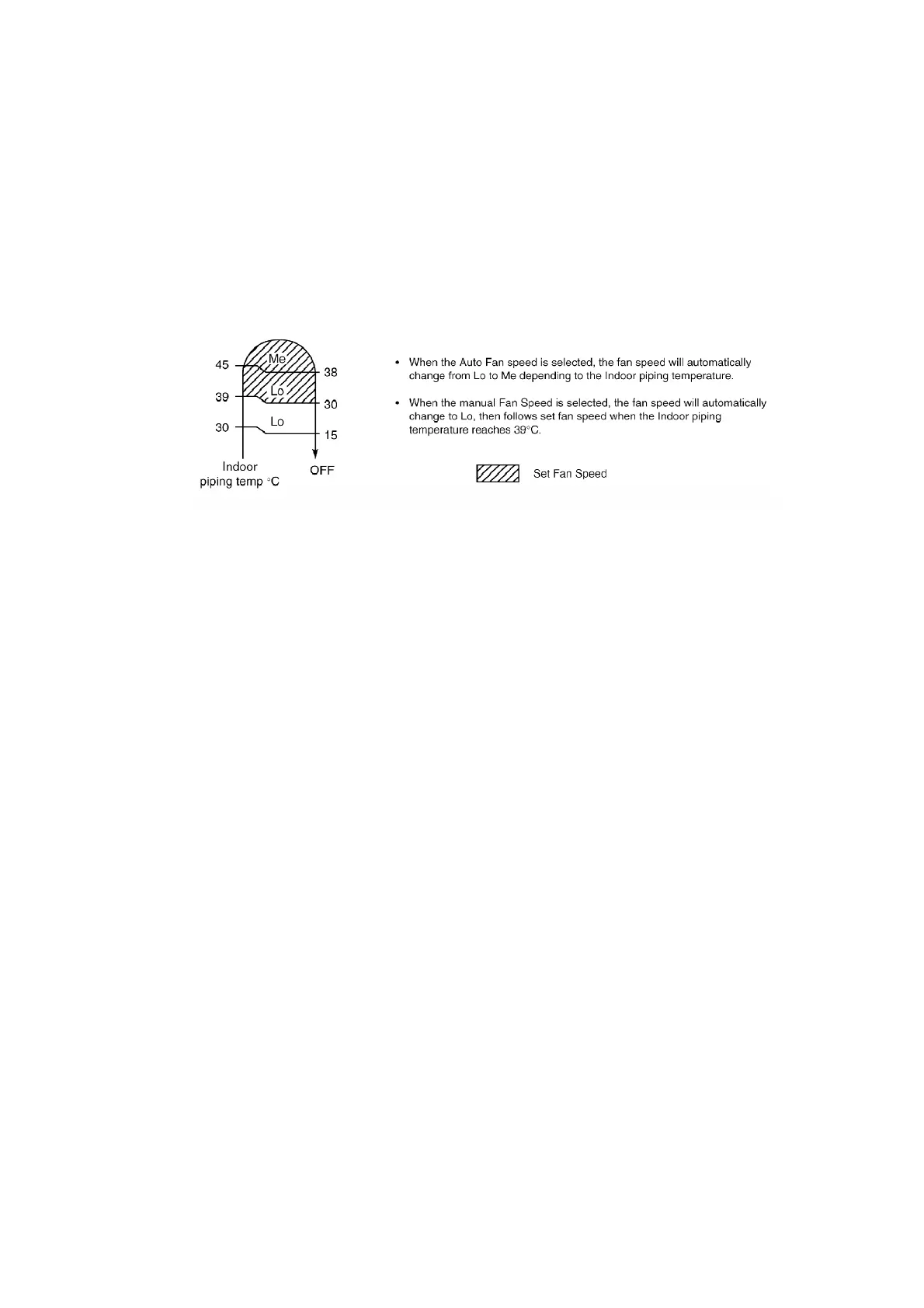
change to Auto Air Swing.
2. Heating Mode
- When the Economy Mode is set, the temperature will be
automatically decreased 0.5°C against the present setting
temperature.
- The Fan Speed will shift as shown below:
- Vertical Airflow Direction:-
In “Manual” or “Auto” setting, the vane will automatically
change to Auto Air Swing. /
3. Economy Mode will stop if:
- Economy mode button is pressed again.
- Stopped by ON / OFF switch.
- Timer-off activates.
- Powerful mode button is pressed.
- Fan Speed control button is pressed.
- Sleep mode button is pressed ON.
- Operating mode is changed.
8.12. Powerful Mode Operation
Purpose of this operation is to be obtain the setting temperature quickly.
1. Cooling and Soft Dry Mode
- When the Powerful Mode is set, the set temperature will be
automatically decreased 3°C against the present setting
temperature. This operation automatically will be running
under Super High Fan speed.
- Vertical Airflow Direction:-
39



 To Next Page