EN8
Cleaning
Start
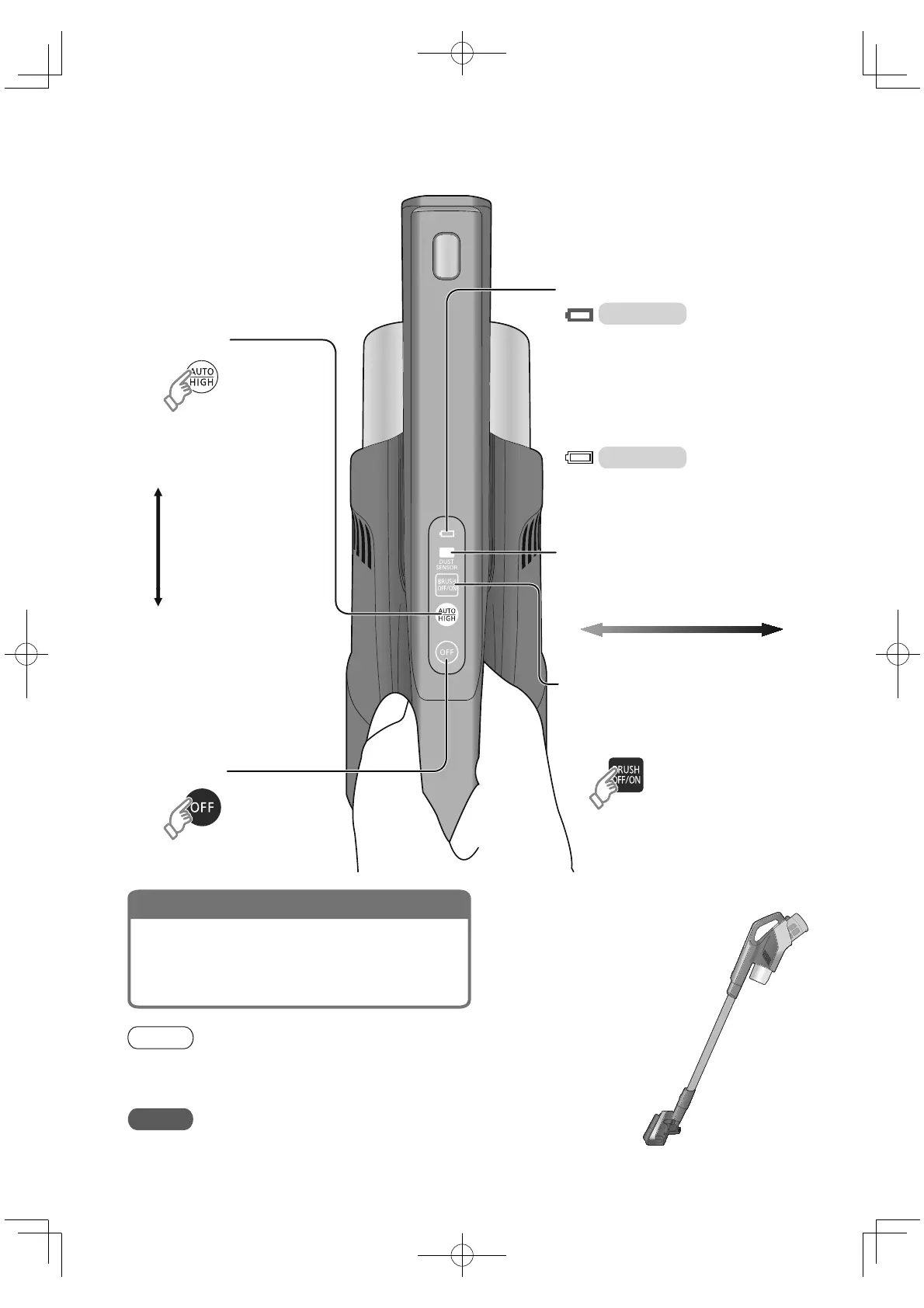
AUTO
Automatically adjust the
suction power according
to the amount of dust
detected
Dust sensor lamp
Visual display of rubbish that is not easily visible
to the naked eye (keratin, dander, mite, etc.)
Battery status indicator lamp
When charging is
fi nished
When the battery is fully charged it will be turned off.
Fast fl ashing (approx. 0.3 second
intervals) indicates an abnormality. See
"Troubleshooting" for details (P. EN14)
(Every time you press it, the brush is
switched between "on" and "off")
Control the rotation of the rotating brush of
the floor nozzle
Brush on: preset mode for cleaning fl oors,
tiles, etc.
Brush off: used for carpets, etc.
When changing the suction mode
End
HIGH
:
High power
Mutual conversion
per press
For safety, when the fl oor nozzle is lifted up, the rotating brush will be stopped. And
after a period of time, the suction of the body will automatically fall, reducing the
power consumption, and will resume when the fl oor nozzle is laid down again.
Note
When replacing the nozzle, turn off the vacuum cleaner fi rst.
To prevent scratches, do not use it to clean burnished surfaces, such as piano.
Request
Gently move the fl oor nozzle and do not press down
forcefully. It is ideal to move the nozzle back and forth at
intervals of 2 to 3 seconds. The optimum distance for each
stroke of the fl oor nozzle is about half of the operator's
height.
Tips of vacuuming
Off Lighting Flashing Flashing rapidly
Clean
A lot of dust
The temperature of the battery will change
depending on the ambient temperature and
the service time. When the battery temperature
is high, the vacuum cleaner will automatically
stand by until the temperature is suitable for
charging and then recharge, so the charging
time will be longer. (up to about 6.5 hours)
Charging
Light (blue)
Turn off



 To Next Page