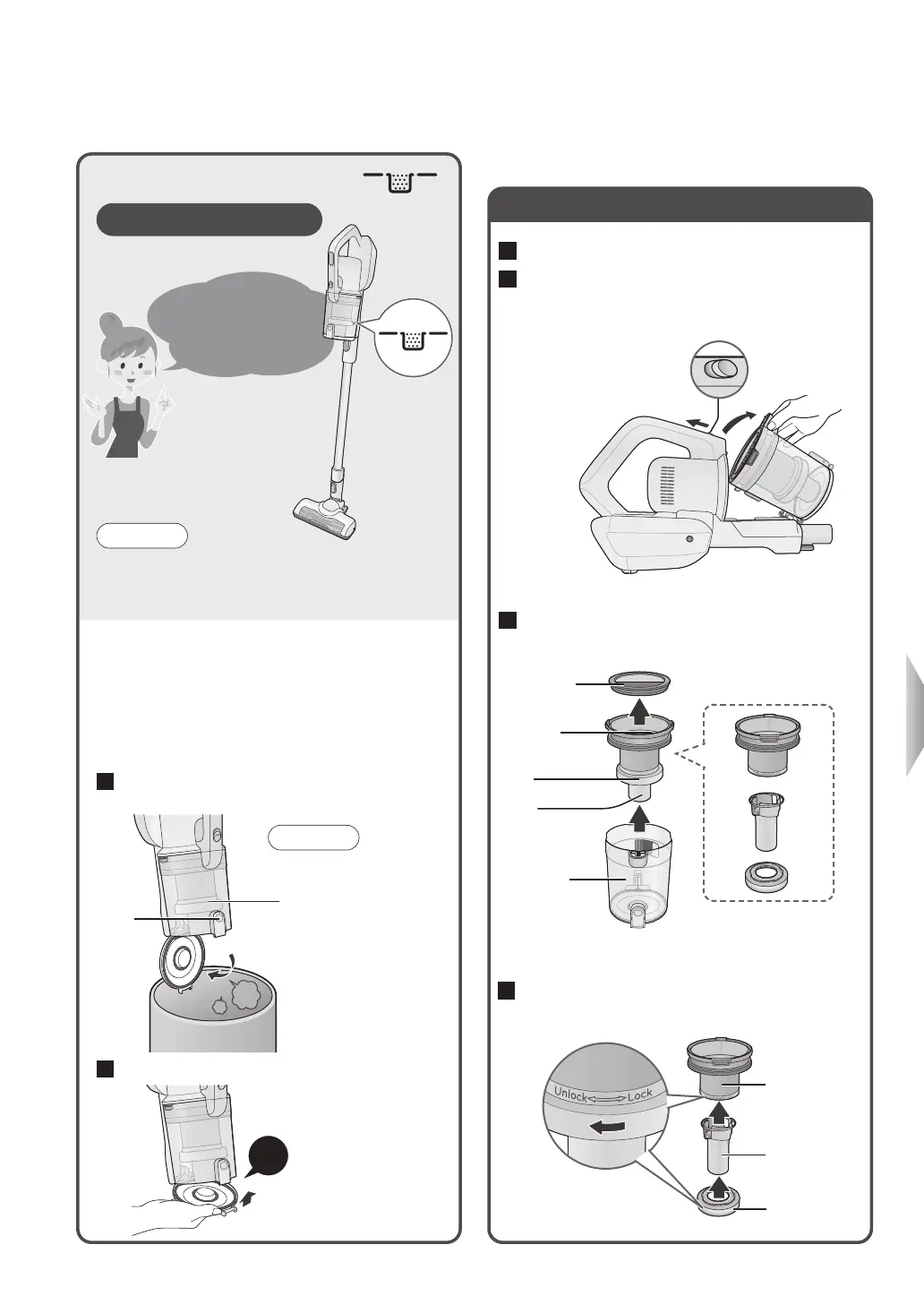
Clear out the debris
before the dust
level MAX line is
exceeded!
12
Empty the dust box
Maintenance
2
Remove the dust box
1
Throw away the debris (on the left)
3
Remove the cyclone unit and mesh filter
from the dust cup
Cyclone unit
Dust cup
Mesh filter
Net filter
Ring
Pipe
4
Remove the net filter and pipe from the
ring
Remove the ring
while turning it in the
“Unlock” direction
Pipe
Net filter
Ring
How fast the dust box fills up
varies depending on the
rubbish type.
Check the Dust Level ( )
As a guide, once a week
Note
●
With a new carpet, the dust box is quickly filled up with
loose tufts.(Loose tufts will decrease with the number
of vacuuming times)
2
Clear out the debris
1
Remove the extension wand
(P. 11)
1
Press the dust disposal button, and
throw away the debris
2
Close the dust box’s bottom lid
Firmly press until you
hear a “click”
●If it is hard to get the
debris to come out, vibrate
the dust cup by lightly
tapping on it, etc.
Request
Dust
disposal
button
①While pressing the removal
button in the direction of
the arrow
②Remove it
Removal
button
①
②
Click
When the suction power does not
recover even if the debris is thrown away



 To Next Page