EN27EN26
4
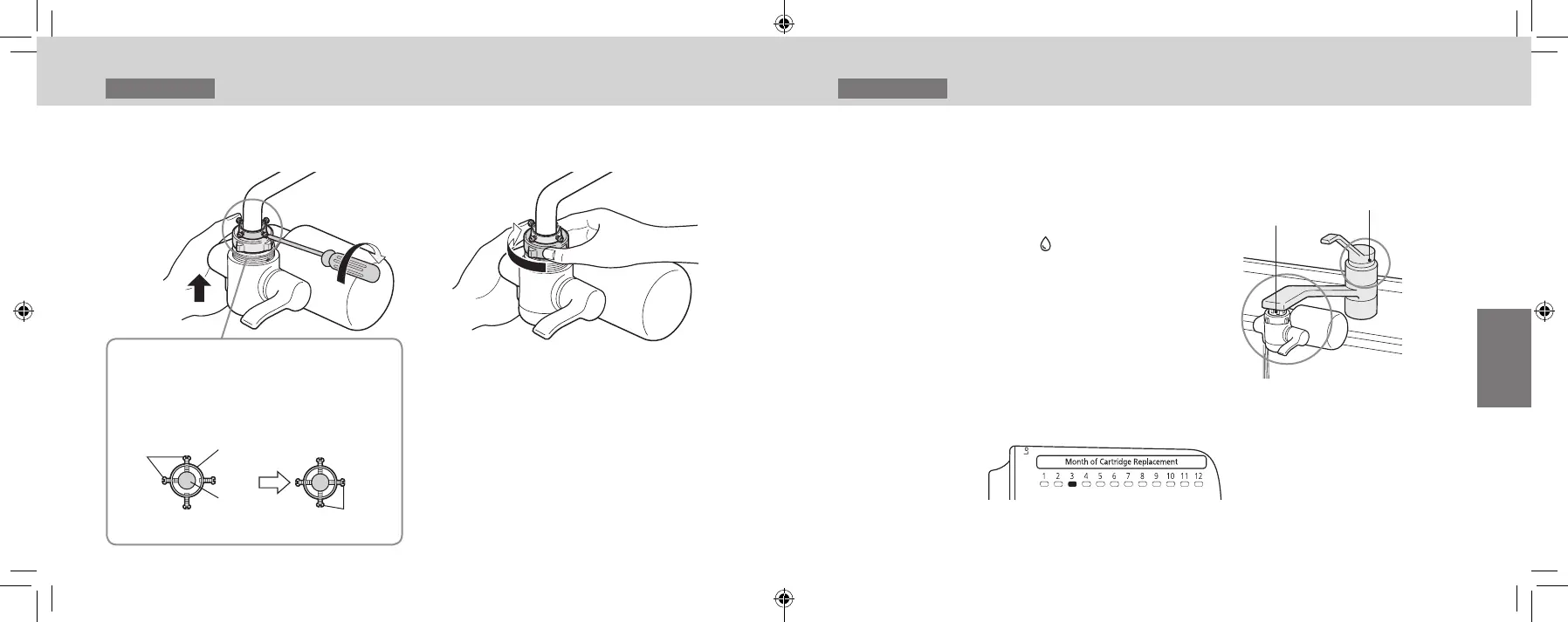
While pushing the main unit up,
install it onto the faucet.
5
Turn the nut manually, and
tighten it securely.
1. Tighten the two rear
screws by hand until they
touch the pipe in such a
way that the pipe is
positioned in the center
of the installation
adaptor.
2. Use a screwdriver
to tighten the two
remaining screws.
Rear
screws
Installation
adaptor
Pipe
(faucet)
Remaining
screws
1
Runpuriedwaterforabout
3 to 4 minutes to expel the air
inside the main unit.
How to run puried water
(P. EN29 – EN30)
① Set the selector lever to “ ”
② Turn on the water faucet to let the water
ow
2
Check the items on P. EN28 for
any malfunctions.
FaucetWater purier
connection
3
Mark the month when the
cartridge was replaced using a
permanent marker.
E.g.:
Replaced in March
Installation 4
InstallingtheWaterPurier(continued)
Installation 5
Checking after Installation
TK-CJ600_CJ300_EXZ.indb 26-27 2022/01/05 15:32:27












 To Next Page