NOTES:
1. Defrost can be used to defrost many cuts of meat, poultry and
fish by weight. The oven will determine the defrosting time and
power levels. Once the oven is programmed, the defrosting
time will appear in the display. For best results the minimum
recommended weight is 0.1 lb (0.1 kg).
2. Turn over the food, remove defrosted food and shield thin
ends/fat bones of roast with foil when buzzer rings in the
middle of cooking.
3. Allow standing time so that the center of the food thaws out.
(Minimum of 1 hour for joints of meat and whole chickens).
Conversion
Follow the chart to convert ounces or hundredths of a pound
into tenths of a pound. To use Defrost, enter the weight of the
food in pounds (1.0) and tenths of a pound (0.1). If a piece of
meat weighs 1.95 lbs or 1 lb 14 oz., enter 1.9 lbs.
Ounces
Hundredths
of a Pound
Tenths of
a Pound
0
1 - 2
3 - 4
5
6 - 7
8
9 - 10
11 - 12
13
14 - 15
.01 - .05
.06 - .15
.16 - .25
.26 - .35
.36 - .45
.46 - .55
.56 - .65
.66 - .75
.76 - .85
.86 - .95
0.0
0.1
0.2
0.3
0.4
0.5
0.6
0.7
0.8
0.9
35
Operation (continued)
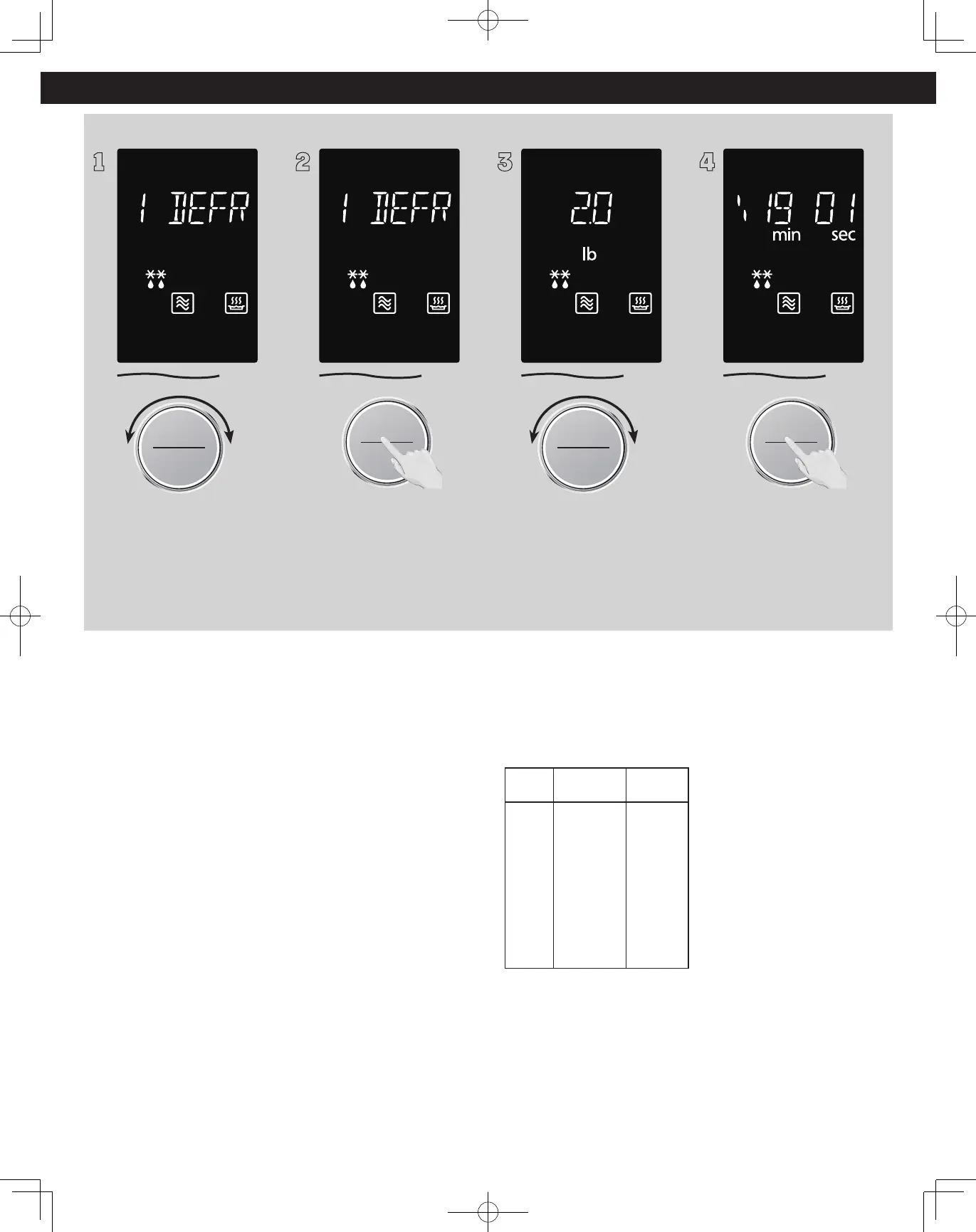
Auto Defrost (No.1)
1
Time Weight
Defrost/Auto Cook
Start/Select
Sensor Reheat
To allow auto program
operation, ensure the oven is in
clock mode. Select the Defrost
by turning dial. The weight is
0.1 - 6.0 lbs (0.1 - 3.0 kg).
(see chart on page 38.)
2
Start/Select
Sensor Reheat
Press the dial to confirm the
program.
3
Time Weight
Defrost/Auto Cook
Start/Select
Sensor Reheat
Select the weight of the food
by turning dial. Turning the dial
slowly will count up in 0.1 lb
(0.1 kg) steps.
4
Start/Select
Sensor Reheat
Press dial to Start. The time
appears in the display window
and begins to count down.







 To Next Page