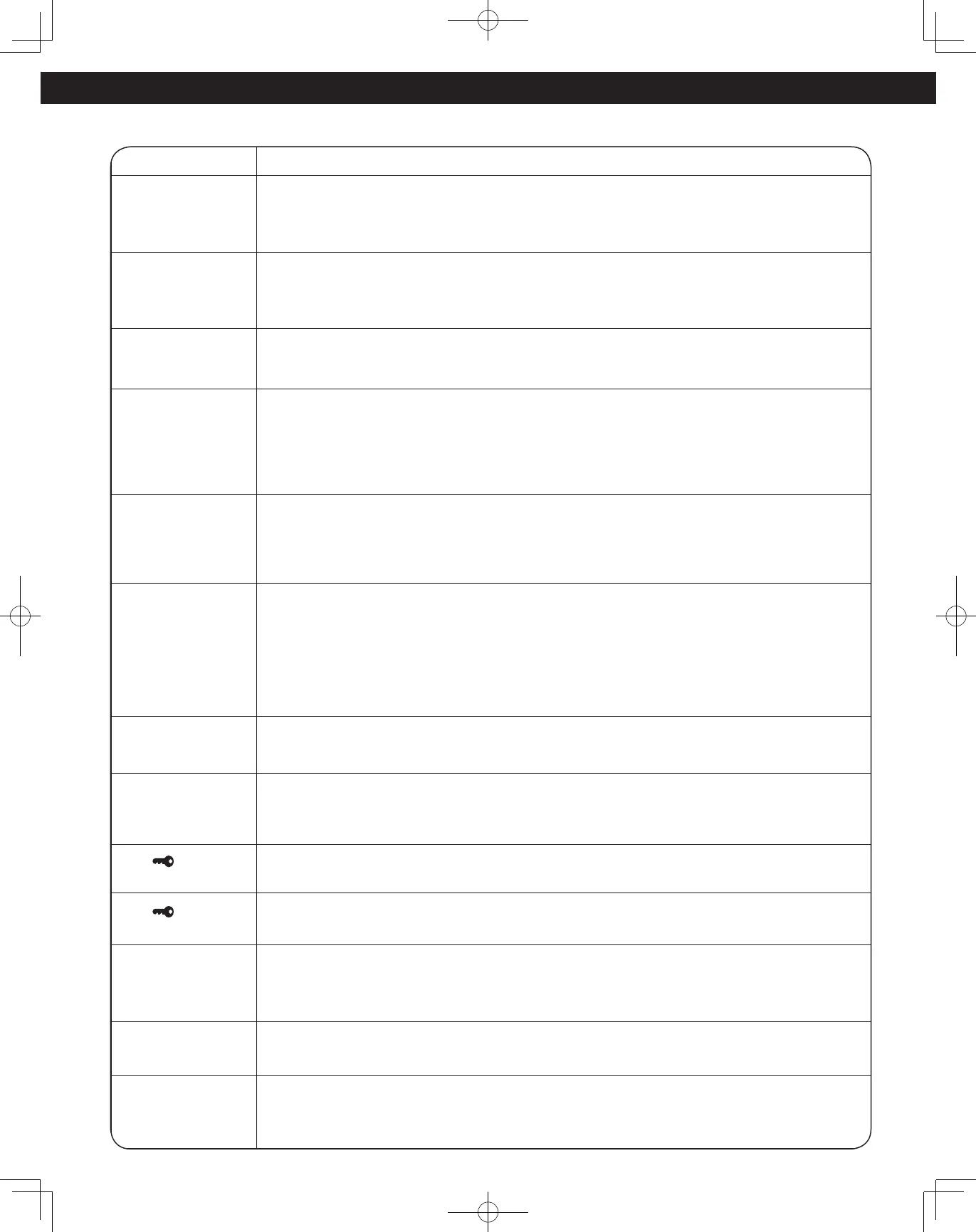
See below before calling for service, as most problems can easily be remedied by following these simple solutions:
Problem Solution
The oven causes TV
interference.
Some radio, TV, Wi-Fi, cordless telephone, baby monitor, blue tooth or other wireless equipment
interference might occur when you cook with the microwave oven. This interference is similar to
the interference caused by small appliances such as mixers, vacuums, blow dryers, etc. It does not
indicate a problem with your oven.
Steam accumulates
on oven door and
warm air comes from
the oven vents.
During cooking, steam and warm air are given off from the food. Most of the steam and warm air
are removed from the oven by the air which circulates in the oven cavity. However, some steam will
condense on cooler surfaces such as the oven door. This is normal. After use, the oven should be
wiped dry (see page 55).
Smoke and burnt
smell will occur after
the first use.
This is not a malfunction and will go away after a few uses.
My oven has an
odour and generates
smoke when using
the Airfry, Broil,
Convection and
Combo function.
Why?
After repeated use, it is recommended to clean the oven (see page 55), and then run the oven without
food, glass tray and roller ring on Broil for 5 minutes. This will burn off any food, residue or oil which
may cause an odour and/or smoking.
Oven will not turn on.
The oven is not plugged in securely or needs to be reset; remove plug from outlet, wait ten seconds
and re-insert.
Main circuit breaker or main fuse is tripped or blown. Reset main circuit breaker or replace main fuse.
There is a problem with the outlet; plug another appliance into the outlet to check if it is working.
Oven will not start
cooking.
The door is not closed completely. Close the oven door securely.
Start was not pressed after programming; Press dial to Start.
Another program is already entered into the oven; press Stop/Reset to cancel the previous program
and enter new program.
The program is not correct; program again according to the Owner’s manual.
Stop/Reset has been pressed accidentally; program oven again.
The Glass Tray
wobbles.
The Glass Tray is not positioned properly on the Roller Ring or there is food under the Roller Ring.
Take out Glass Tray and Roller Ring. Wipe with a damp cloth and reset Roller Ring and Glass Tray
properly.
When the oven is
operating, there is
noise coming from
the Glass Tray.
The Roller Ring and oven bottom are dirty; clean these parts according to Care and Cleaning of Your
Microwave Oven (see page 55).
The “ “ appears in
the display window.
The CHILD SAFETY LOCK was activated by pressing Stop/Reset three times; Deactivate CHILD SAFETY
LOCK by pressing Stop/Reset three times.
The “ “ flashes in
the display window.
The CHILD SAFETY DOOR LOCK was activated. Unlock CHILD SAFETY DOOR LOCK by pressing Timer/
Clock once, and then pressing the door release button.
The oven stops
cooking and “H00“,
“H97” or “H98”
appears in the display.
The oven’s power supply has failed; please contact an authorized Service Center (see next page).
“HOT INSIDE WAIT”
appears in the display
window.
The cavity is overheated. Operate again after it cools down. Please open the door in order to cool the
temperature of the cavity more quickly.
“DEMO MODE PRESS
ANY KEY” or “D”
appears in the display
window.
The oven is under demonstration mode. Press Microwave button once, Start 4 times and Stop/Reset
button 4 times.







 To Next Page