– 13 –
To Use Child Safety Lock
To set:
This feature allows you to prevent operation of the oven by a young child; however, the door will open.
This feature can be set when colon or time of day is displayed.
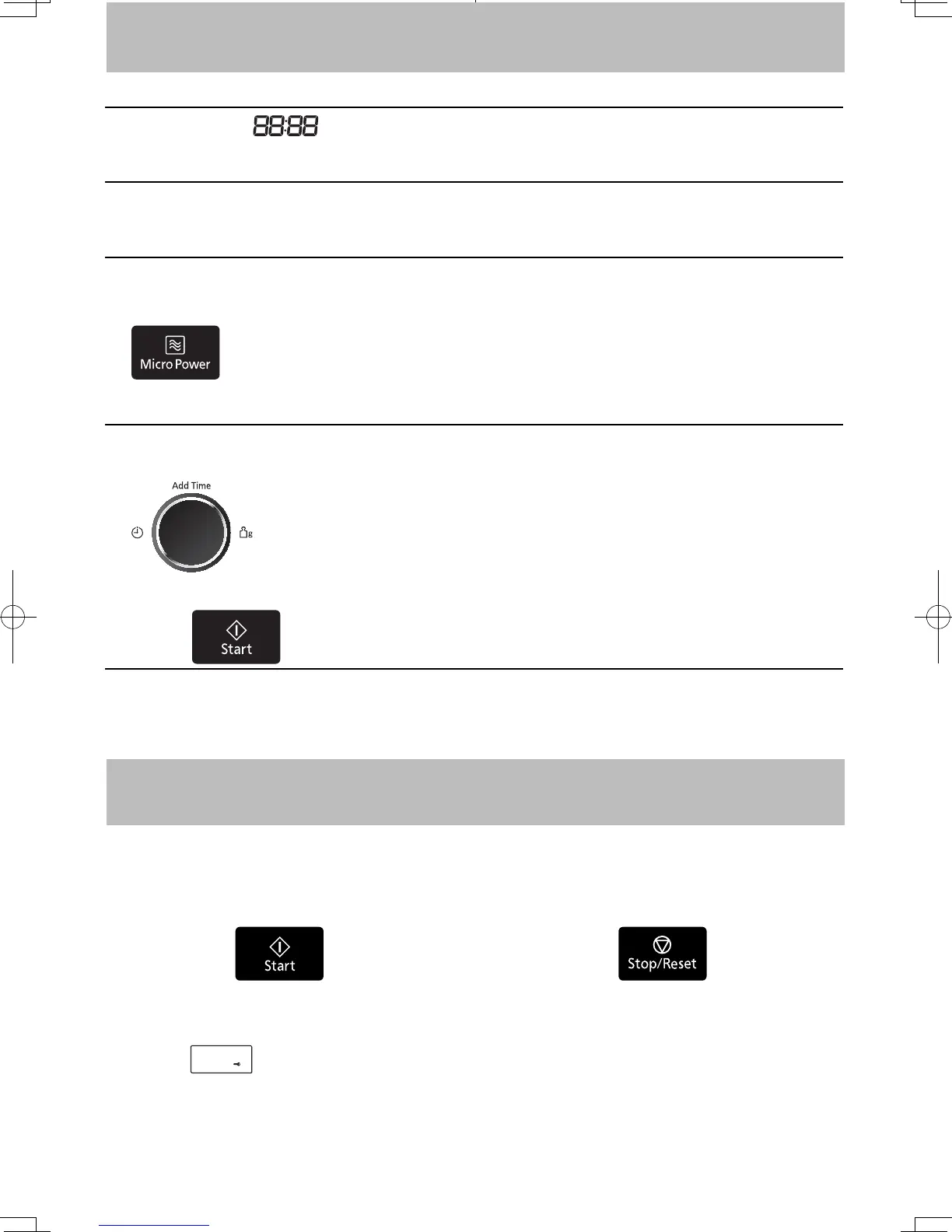
To set or cancel child safety lock, Start Button or Stop/Reset Button must be pressed 3 times within 10
seconds.
Press Start three times.
Colon or time of day will disappear.
Actual time will not be lost.
"
"
appears in the display
window.
Press Stop/Reset three times.
Colon or time of day will reappear
in the display window.
To cancel:
Let's Start To Use Your Oven!
1
Plug in.
After plugging in, “ ” will appears in the display window, then you can start to operate.
2
Open Door.
Open the door and place container with food in a dish on Glass Tray in the oven. Then close the door.
3
Select Power Level.
eg. 800W (MEDIUM-HIGH)
Press Micro Power Button twice.
(see page 15 for Micro Power chart)
4
Set Time.
e.g. 1 minute 30 seconds
Rotate the Time Dial
5
Press .
Verify your selection(s) in the Display Window.
F0003BW40QP_OI_08_170630.indd 13 2017/6/30 13:28:26


 To Next Page