– 22 –
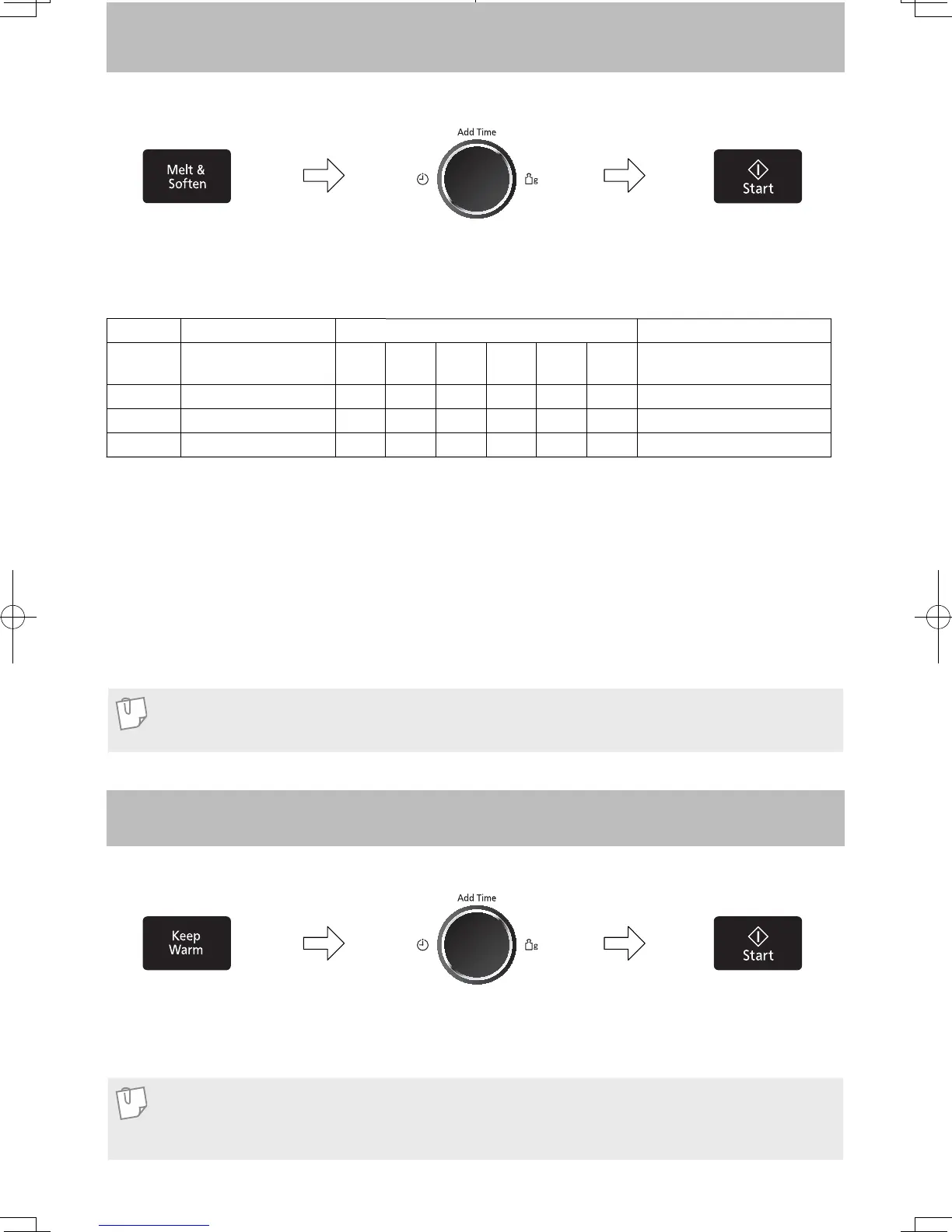
Melt & Soften Feature
2. Select the Weight of
food by turning the dial.
(see chart below)
1. Press Melt & Soften button
until the desired menu number
appear in the display window.
(see chart below)
This feature allows you to melt/soften food at the touch of a button. There is no need to select the power level or
cooking time as the microwave does this for you.
Menu No. Category Weight Recommended containers
13 Melt Butter 50
g
100
g
150
g
200
g
250
g
300
g
microwave safe dish with
plastic wrap
14 Soften Cream Cheese 50
g
100
g
150
g
200
g
250
g
300
g
microwave safe bowl or dish
15 Soften Ice Cream 300
g
600
g
900
g
1200
g
—— —
16 Melt Chocolate 50
g
100
g
150
g
200
g
250
g
300
g
microwave safe dish
For best results, follow these recommendations:
Keep Warm Feature
This feature will keep food warm for up to 30 minutes after cooking.
1. Press Keep Warm
button once.
2. Set warming time by turning
the dial.
3. Press Start.
Keep Warm will start.
The time in the display
window will count down.
3. Press Start.
The time in the display
window will count down.
13. Melt Butter
Remove wrapper, cut butter into 2 tbsp cube, and
place into a microwave safe dish. Melt with lid or
plastic wrap. Stir after cooking.
14. Soften Cream Cheese
Remove wrapper and place in a microwave safe bowl/
dish. Soften without cover.
Note
If food needs more time cooking or weight exceeds range, cook using 300 W for melting and softening.
Note
Keep Warm can be programmed as the fi nal stage after cook times have been manually entered. It cannot
be programmed together with Turbo Defrost and Auto Menus (Auto Reheat, Auto Cook and Melt & Soften).
15. Soften Ice Cream
Soften slightly without lid.
16. Melt Chocolate
Remove wrapper and place chocolate into a
microwave safe dish. Cook without cover. After
heating, stir until completely melted.
Note: Chocolate holds its shape even when softened.
F0003BW40QP_OI_08_170630.indd 22 2017/6/30 13:28:27


 To Next Page