EasyManua.ls Logo

Panasonic NV-DS28A - List of Menus

Panasonic NV-DS28A
50 pages
Print Icon
To Next Page IconTo Next Page
To Previous Page IconTo Previous Page
Loading...
I.
CAMERA
SETUP
}
DIGITAL
EFFECT'
5. CARD
SETUP
*.
RECORD I
NG
SETUP
s. DISPLAY
SETUP
6.
OTHER
FUNCTIONS
7. DEMO
MODE
/
PROGRESS
I
VE*OFF
SIS
*OFF
D.
ZOOM voff
CINEMA
OFF
M.
SENSOR
*OFF
ON
AUTO
ON
3
Ox
SO
Ox
ON
ON
R E
TUB
N
7)
"
8)
*
EFFECT!
*0
F
F
WIPE
MIX
STROBE
GAINUP
EFFECT2^0FF
NEGA
SEPIA
B^W
SOLAR
I
RETURN
YES
9)
-P I
CTURE
QUAL
I TV
10)—
CREATE
't^^J^eT
12)
13)
14)
15)
/
REC
SPEED
^SP
AUD
I
0 REC
!
2Hi
SCENE
I
N0EX>2HOUR
'WIND
CUT
OFF
ZOOM
MIC
OFF
L P
1 «Hl
DAY
ON
ON
VPS
16)
17)
18)
19)
20)
21)
22)
23)
24)
25)
26)
DATExT
I
MEP-OFF
TIMS
DATE
C.
D
I SPL
AY^COUNTER
MEMORY
TIME
CODE
C.
RESET
y
ES
DISPLAY
ALL
PARTIAL
OFF
T
FORMAL
BRIGHT
f
L
CD/E V
F
SET
YES
27)
N ^REMOTE
VCR1
VCR2
OFF
-
V
REC
LAMP
OFF
ON
BEEP
SOUND
OFF
ON
SHTR
EFFECT
OF F
ON
CLOCK
SET
YES
y
SELFSHOOT*NOF?MAL
MIRROR
ft ETURN
yes
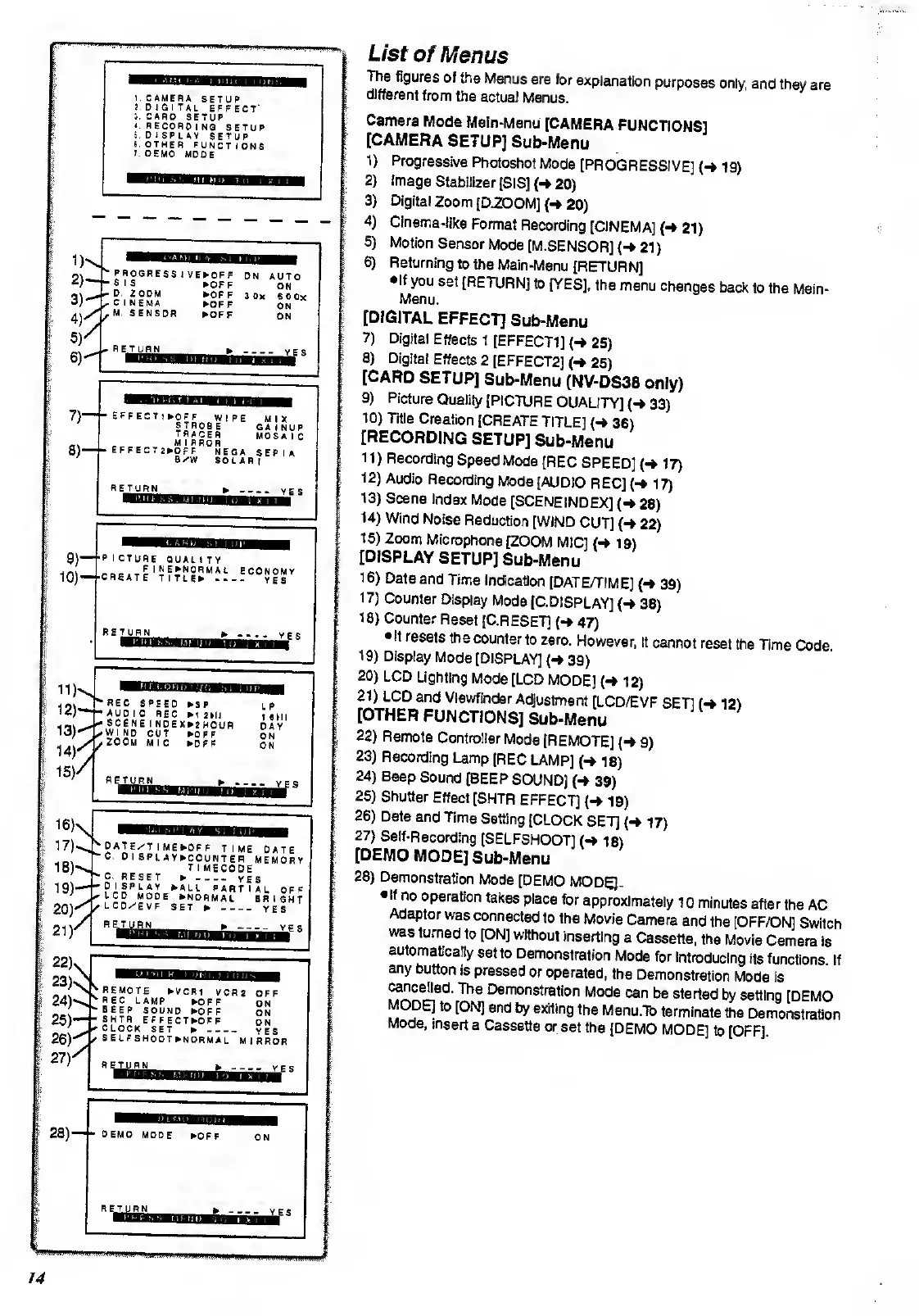
List
of
Menus
The
figures
of
the
Menus are
for
explanation
purposes
only,
and
they
are
different
from
the
actual
Menus.
Camera
Mode
Main-Menu
[CAMERA
FUNCTIONS]
[CAMERA
SETUP]
Sub-Menu
D
2)
3)
4)
5)
6)
Progressive
Photoshot
Mode
[PROGRESSIVE]
(-*
19)
image
Stabilizer
[SIS]
(->
20)
Digital
Zoom
[D.ZOOM]
(-»
20)
Cinema-like
Format
Recording
[CINEMA]
(-
21)
Motion
Sensor
Mode
[M
.SENSOR]
(-»
21)
Returning
to
the
Main-Menu
[RETURN]
•If
you
set
[RETURN]
to
[YES],
the
menu
changes
back
to the
Main-
Menu.
[DIGITAL
EFFECT]
Sub-Menu
7)
Digital
Effects
1
[EFFECT1]
(*
25)
8)
Digital
Effects
2
[EFFECT2]
(-*
25)
[CARD
SETUP]
Sub-Menu
(NV-DS38
only)
9)
Picture
Quality
[PICTURE
QUALITY]
(*
33)
10)
Title
Creation
[CREATE
TITLE]
(«»
36)
[RECORDING
SETUP]
Sub-Menu
11)
Recording
Speed
Mode
[REC
SPEED]
(-»
17)
12)
Audio
Recording
Mode
[AUDIO
REC]
17)
13)
Scene
Index
Mode
[SCENE
INDEX]
(-»
28)
14)
Wind
Noise
Reduction
[WIND
CUT]
(«*
22)
15)
Zoom
Microphone
[ZOOM
MIC]
(-»
19)
[DISPLAY
SETUP]
Sub-Menu
16)
Date
and
Time
Indication
[DATE/TIME]
39)
17)
Counter
Display
Mode
[C.DISPLAYJ
(-*
38)
18) Counter
Reset
[C.RESET]
47)
•It
resets
the
counter
to zero.
However,
it
cannot
reset
the
Time
Code
19)
Display
Mode
[DISPLAY]
39)
20)
LCD
Lighting
Mode
[LCD
MODE]
(-»
12)
21)
LCD
and
Viewfinder
Adjustment
[LCD/EVF
SET]
f-f
121
[OTHER
FUNCTIONS]
Sub-Menu
22)
Remote
Controller
Mode
[REMOTE]
(-
9)
23) Recording
Lamp
[REC
LAMP]
(->
18)
24)
Beep
Sound
[BEEP
SOUND]
{->
39)
25)
Shutter
Effect
[SHTR
EFFECT]
(-
19)
26)
Date
and
Time
Setting
[CLOCK
SET]
(-»
17)
27) Self-Recording
[SELFSHOOT]
(-»
18)
[DEMO
MODE]
Sub-Menu
28) Demonstration
Mode
[DEMO
MODEjL
lf
no
operation
takes
place
for
approximately
10
minutes
after
the
AC
Adaptor
was
connected
to
the
Movie
Camera
and the
[OFF/ON]
Switch
was
turned
to
[ON]
without
inserting
a
Cassette,
the
Movie
Camera
is
automatically
set
to
Demonstration
Mode
for
introducing
its
functions
If
any
button
is
pressed
or
operated,
the
Demonstration
Mode is
cancelled.
The
Demonstration
Mode
can
be
started
by setting
[DEMO
MODE]
to
[ON]
and
by exiting
the
Menu.To
terminate
the
Demonstration
Mode,
insert
a
Cassette
or
set
the
[DEMO
MODE]
to
[OFF]
28)

Related product manuals