EasyManua.ls Logo

Panasonic NV-DS28A - Digital Effect Functions

Panasonic NV-DS28A
50 pages
Print Icon
To Next Page IconTo Next Page
To Previous Page IconTo Previous Page
Loading...
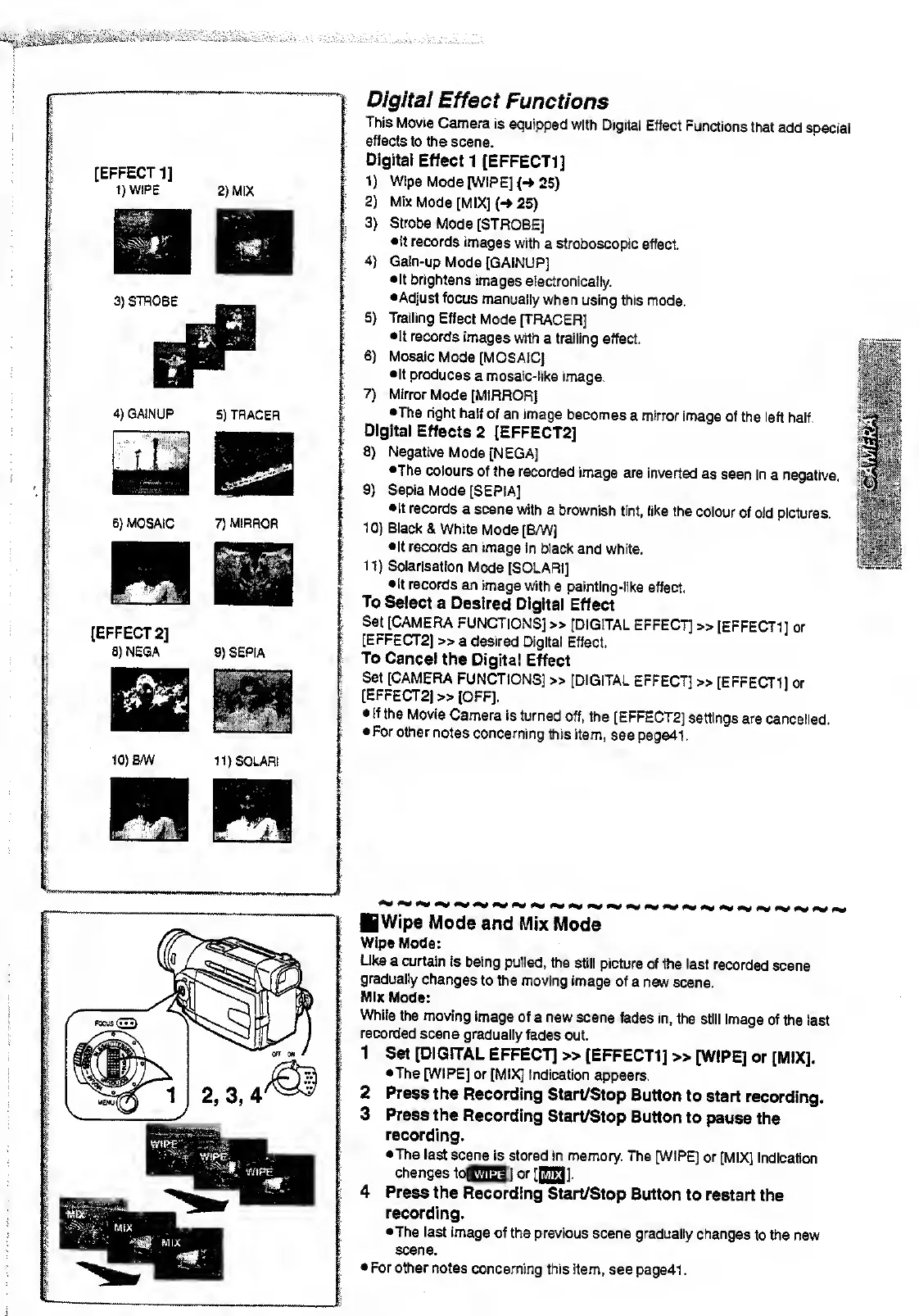
[EFFECT
1]
1)WIPE
3)
STROBE
[EFFECT
2]
8) NEGA
10)B/W
2)
MIX
4)
GAINUP
S)
TRACER
iS
6)
MOSAIC
7)
MIRROR
9)
SEPIA
11)SOLARI
2)
3)
4)
7)
0/0/fa/
Effect
Functions
This
Movie
Camera
is
equipped with
Digital
Effect
Functions
that
add
special
effects
to the
scene.
Digital
Effect
1 [EFFECT!
J
I)
Wipe
Mode
[WIPE]
(->
25)
Mix
Mode
[MIX]
{-»
25)
Strobe
Mode
[STROBE]
•It
records
images
with
a stroboscopic
effect.
Galn-up
Mode
[GAINUP]
•It
brightens
images
electronically.
•Adjust
focus
manually
when
using this
mode.
Trailing
Effect
Mode
[TRACER]
•It
records
images with
a
trailing
effect.
Mosaic
Mode
[MOSAIC]
•It
produces
a mosaic-like
image.
Mirror
Mode
[MIRROR]
•The
right half
of
an
image
becomes
a
mirror
image
of
the left
half
Digital
Effects
2
[EFFECT2J
8)
Negative
Mode
[NEGA]
•The
colours
of the recorded
image are
inverted
as
seen in
a negative.
9)
Sepia
Mode
[SEPIA]
•It
records
a scene
with a
brownish
tint, like
the
colour
of old
pictures.
10)
Black
& White
Mode
[BAN]
•It
records
an image
in black
and white.
II)
Solarisation
Mode
[SOLARI]
•It records
an image with
a painting-like
effect.
To
Select
a
Desired
Digital
Effect
Set
[CAMERA
FUNCTIONS]
»
[DIGITAL
EFFECT]
»
[EFFECT1]
or
[EFFECT2]
» a desired
Digital
Effect.
To
Cancel
the
Digital
Effect
Set
[CAMERA
FUNCTIONS]
»
[DIGITAL
EFFECT]
»
[EFFECT1]
or
[EFFECT2]
»
[OFF].
If
the Movie
Camera is
turned
off, the
[EFFECT2]
settings are
cancelled.
For
other
notes
concerning
this item,
see page41.
II
11
ill 1 1
Wipe
Mode
and
Mix Mode
Wipe Mode:
Like
a curtain
is
being pulled,
the
still picture
of the last
recorded
scene
gradually
changes
to the
moving image
of
a new scene.
Mix
Mode:
While
the moving
image
of
a
new
scene
fades in,
the still
image
of the
last
recorded
scene gradually
fades
out.
1
Set [DIGITAL
EFFECT]
»
[EFFECT1]
»
[WIPE] or
[MIX].
•The
[WIPE]
or [MIX]
Indication
appears.
2
Press
the
Recording Start/Stop
Button
to start
recording.
3
Press the
Recording
Start/Stop Button
to
pause
the
recording.
•The last
scene
is stored in memory.
The [WIPE]
or
[MIX]
Indication
changes
to[QQ] or
fiffll.
4
Press
the Recording
Start/Stop
Button to restart
the
recording.
•The last image
of the
previous scene
gradually
changes
to the
new
scene.
For
other notes
concerning this
item, see page41
.

Related product manuals