EasyManua.ls Logo

Panasonic NV-RX1A - Manual White Balance Adjustment

Panasonic NV-RX1A
60 pages
Print Icon
To Next Page IconTo Next Page
To Previous Page IconTo Previous Page
Loading...
@
Manual
White
Balance
Adjustment
With
the
Manual
White
Balance
Adjustment,
the
user
can
adjust
the
colour
compensation
for
the
light
source
used
for
a
particular
scene.
For
this
adjustment,
the
Lens
Cap
is
put
on
the
lens
and
the
{W.B]
Button
pressed,
so
the
Movie
Camera
can
determine
how
much
the
white
of
the
lens
cap
under
the
present
lighting
deviates
from
the
value
for
pure
white
stored
in
memory.
Alternatively,
the
user
can
aim
the
Movie
Camera
ata
pure
white
object
(e.g.
a
sheet
of
pure
white
paper)
instead
of
using
the
Lens
Cap.
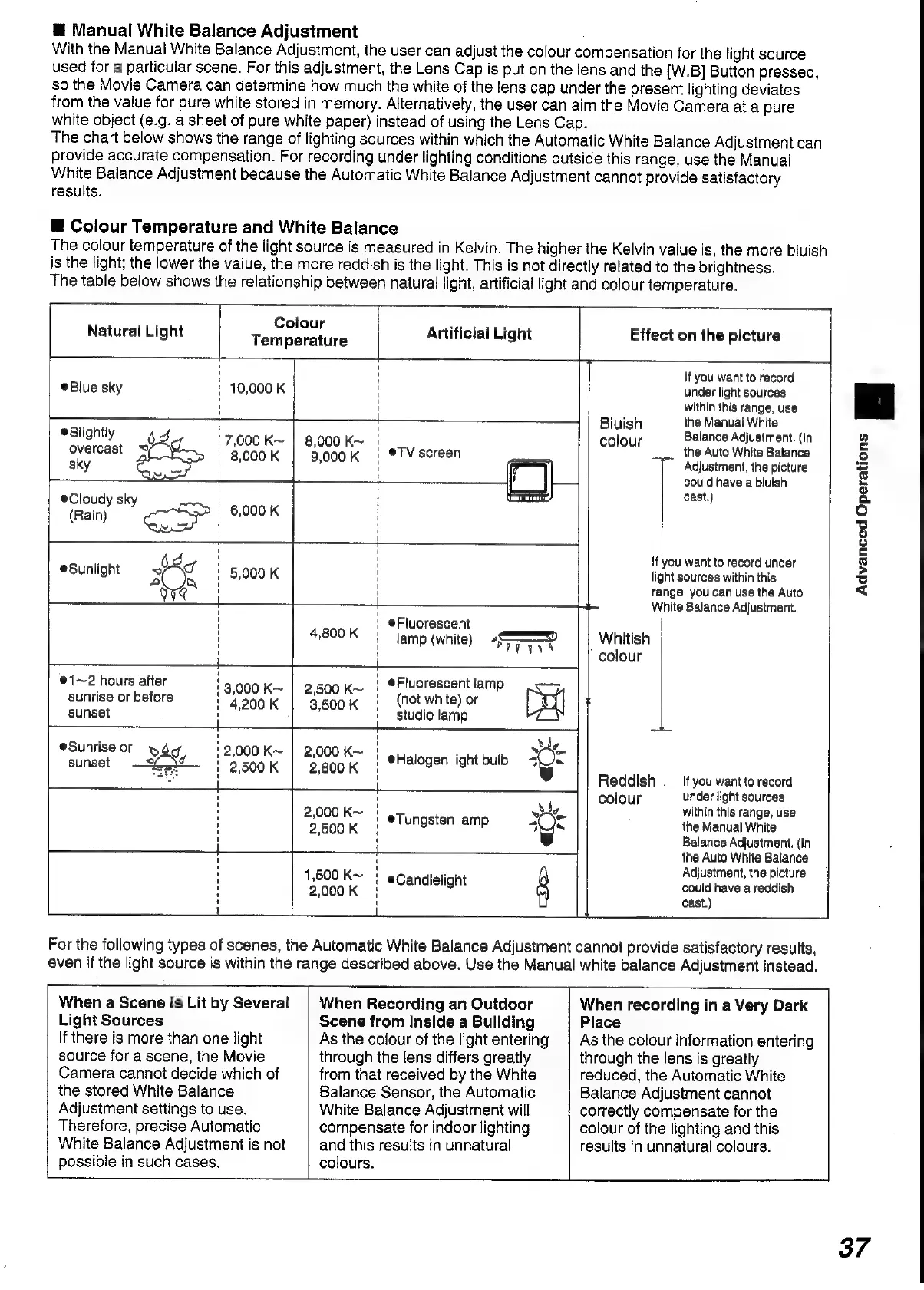
The
chart
below
shows
the
range
of
lighting
sources
within
which
the
Automatic
White
Balance
Adjustment
can
provide
accurate
compensation.
For
recording
under
lighting
conditions
outside
this
range,
use
the
Manual
White
Balance
Adjustment
because
the
Automatic
White
Balance
Adjustment
cannot
provide
satisfactory
results.
@
Colour
Temperature
and
White
Balance
The
colour
temperature
of
the
light
source
is
measured
in
Kelvin.
The
higher
the
Kelvin
value
is,
the
more
bluish
is
the
fight,
the
lower
the
vaiue,
the
more
reddish
is
the
light.
This
is
not
directly
related
to
the
brightness.
The
table
below
shows
the
relationship
between
natural
light,
artificial
light
and
colour
temperature.
Natural
Light
Toccoa
;
Artificial
Light
Effect
on
the
picture
' '
If
you
want
to
record
Blue
sky
'
10,000
K
H
under
light
sources
'
i
within
this
range,
use
+
—t
——t
Bluish
the
Manual
White
@Slightly
Jd
fs
ot
lour
Balance
Adjustment.
(In
overcast
~
Pees
nas
'
eTV
screen
parol
_..
the
Auto
White
Balance
sky
Me
ae
,
,
Adjustment,
the
picture
—|
ears:
could
have
a
bluish
@Cloudy
sky
cae)
(Rain)
!
6,000
K
i
,
3
'
{f
you
want
to
record
under
Sunlight
XZ
'
5,000
K
!
light
sources
within
this
Y)
xa
H
'
range,
you
can
use
the
Auto
+
t
White
Balance
Adjustment.
' |
@Fluorescent
4,800
K
|
lamp
(white)
Sve
Whitish
'
colour
e1~2
hours
after
!
@Fluorescent
lamp
:
+3,
~
|
2,
ae
sunrise
or
before
'
8
Sone
sca
a
'
(not
white)
or
psi
x
sunset
studio
lamp
:
4
eSunrise
or
yd
Bs
saat
,
we
sunset
x
Sa
:
cea
pia
|
@Halogen
light
bulb
4}_/s
aE
i
:
P
“i
Reddish
__
Ifyou
want
to
record
H
Hl
5
colour
under
light
sources
'
ithin
thi
;
SROOK
|
@Tungsten
lamp
4
ie
the
Manuel
yeas:
'
:
Balance
Adjustment.
(In
+
——
the
Auto
White
Balance
Hl
sy
.
Adjustment,
the
picture
1,500
Ke
eCandielight
could
have
a
reddish
H
2,000K
}
tant
For
the
following
types
of
scenes,
the
Automatic
White
Balance
Adjustment
cannot
provide
satisfactory
results,
even
if
the
light
source
is
within
the
range
described
above.
Use
the
Manual
white
balance
Adjustment
instead.
When
a
Scene
is
Lit
by
Several
|
When
Recording
an
Outdoor
When
recording
in
a
Very
Dark
Light
Sources
Scene
from
Inside
a
Building
Place
If
there
is
more
than
one
light
As
the
colour
of
the
lignt
entering
|
As
the
colour
information
entering
source
for
a
scene,
the
Movie
through
the
lens
differs
greatly
through
the
lens
is
greatly
Camera
cannot
decide
which
of
from
that
received
by
the
White
reduced,
the
Automatic
White
the
stored
White
Balance
Balance
Sensor,
the
Automatic
Balance
Adjustment
cannot
Adjustment
settings
to
use.
White
Balance
Adjustment
will
correctly
compensate
for
the
Therefore,
precise
Automatic
compensate
for
indoor
lighting
colour
of
the
lighting
and
this
White
Balance
Adjustment
is
not
and
this
results
in
unnatural
results
in
unnatural
colours.
possible
in
such
cases.
colours.
Advanced
Operations
|
37

Table of Contents

Related product manuals