EasyManua.ls Logo

Panasonic NV-RX1A - Page 47

Panasonic NV-RX1A
60 pages
Print Icon
To Next Page IconTo Next Page
To Previous Page IconTo Previous Page
Loading...
@
[EDIT]
Socket
1)
By
connecting
a
Panasonic
Editing
Controller
(optional)
to
this
socket
as
well
as
to
a
Panasonic
VCR
equipped
with
Edit
Socket,
highly
precise
and
speedy
editing
becomes
possible.
The
following
types
of
Editing
Controller
can
be
used
with
this
Movie
Camera.
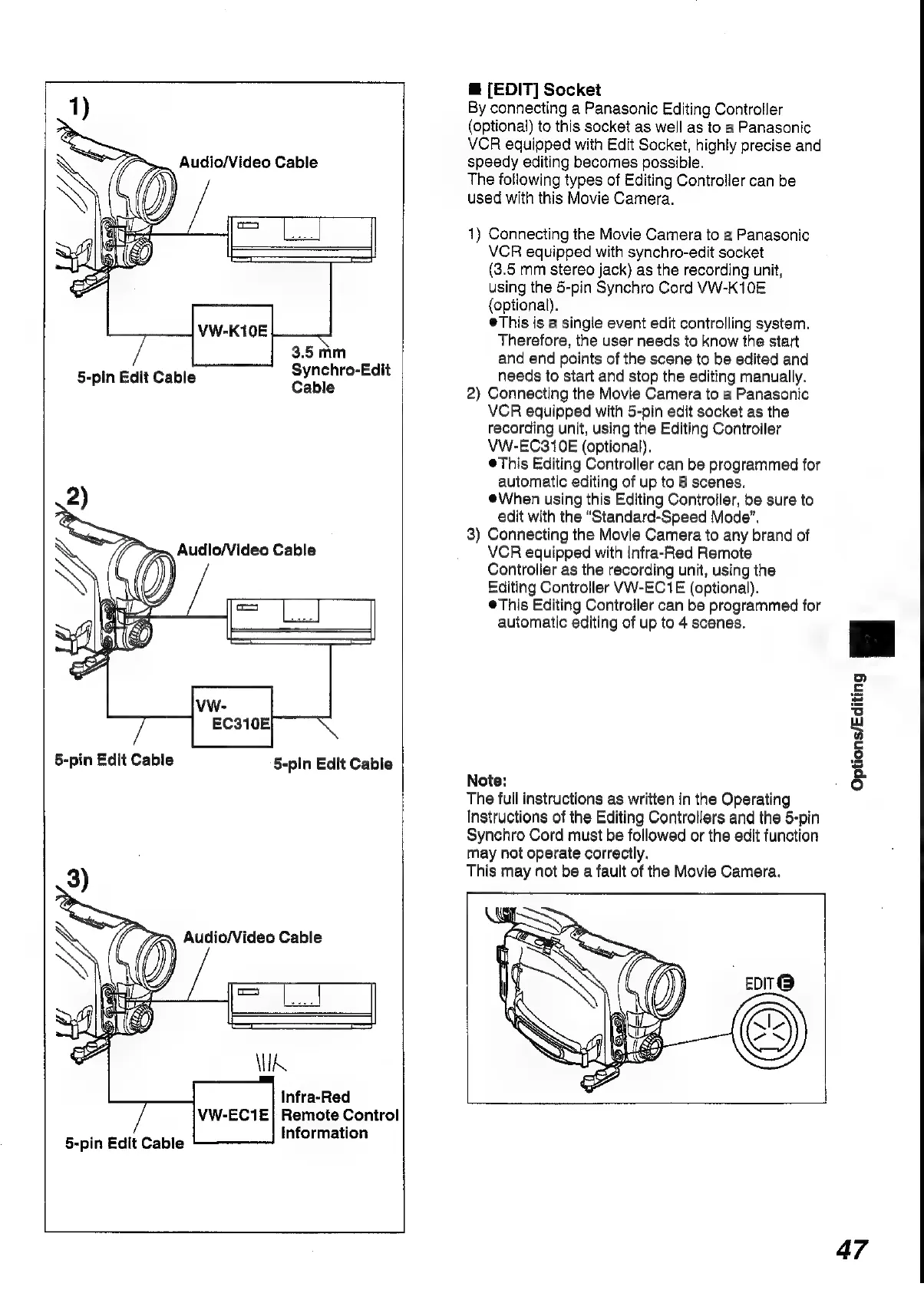
1)
Connecting
the
Movie
Camera
to
a
Panasonic
VCR
equipped
with
synchro-edit
socket
(3.5
mm
stereo
jack)
as
the
recording
unit,
using
the
5-pin
Synchro
Cord
VW-K10E
(optional).
®This
is
a
single
event
edit
controlling
system.
Therefore,
the
user
needs
to
know
the
start
3.5mm
and
end
points
of
the
scene
to
be
edited
and
5-pin
Edit
Cable
Synchro-Edit
needs
to
start
and
stop
the
editing
manually.
Cable
2)
Connecting
the
Movie
Camera
to
a
Panasonic
VCR
equipped
with
5-pin
edit
socket
as
the
recording
unit,
using
the
Editing
Controller
VW-EC310E
(optional).
®This
Editing
Controller
can
be
programmed
for
automatic
editing
of
up
to
8
scenes.
@When
using
this
Editing
Controller,
be
sure
to
edit
with
the
“Standard-Speed
Mode”.
3)
Connecting
the
Movie
Camera
to
any
brand
of
VCR
equipped
with
Infra-Red
Remote
Controller
as
the
recording
unit,
using
the
Editing
Controller
VW-EC1E
(optional).
®This
Editing
Controller
can
be
programmed
for
automatic
editing
of
up
to
4
scenes.
5-pin
Edit
Cable
5-pin
Edit
Cable
Note:
The
full
instructions
as
written
in
the
Operating
nstructions
of
the
Editing
Controllers
and
the
5-pin
Synchro
Cord
must
be
followed
or
the
edit
function
may
not
operate
correctly.
3)
This
may
not
be
a
fault
of
the
Movie
Camera.
Options/Editing
a
Infra-Red
VW-EC1E}
Remote
Conirol
Information
5-pin
Edit
Cable
47

Table of Contents

Related product manuals