EasyManua.ls Logo

Panasonic NV-RX1A - Page 49

Panasonic NV-RX1A
60 pages
Print Icon
To Next Page IconTo Next Page
To Previous Page IconTo Previous Page
Loading...
Attaching
the
Filter
(Optional)
Filter
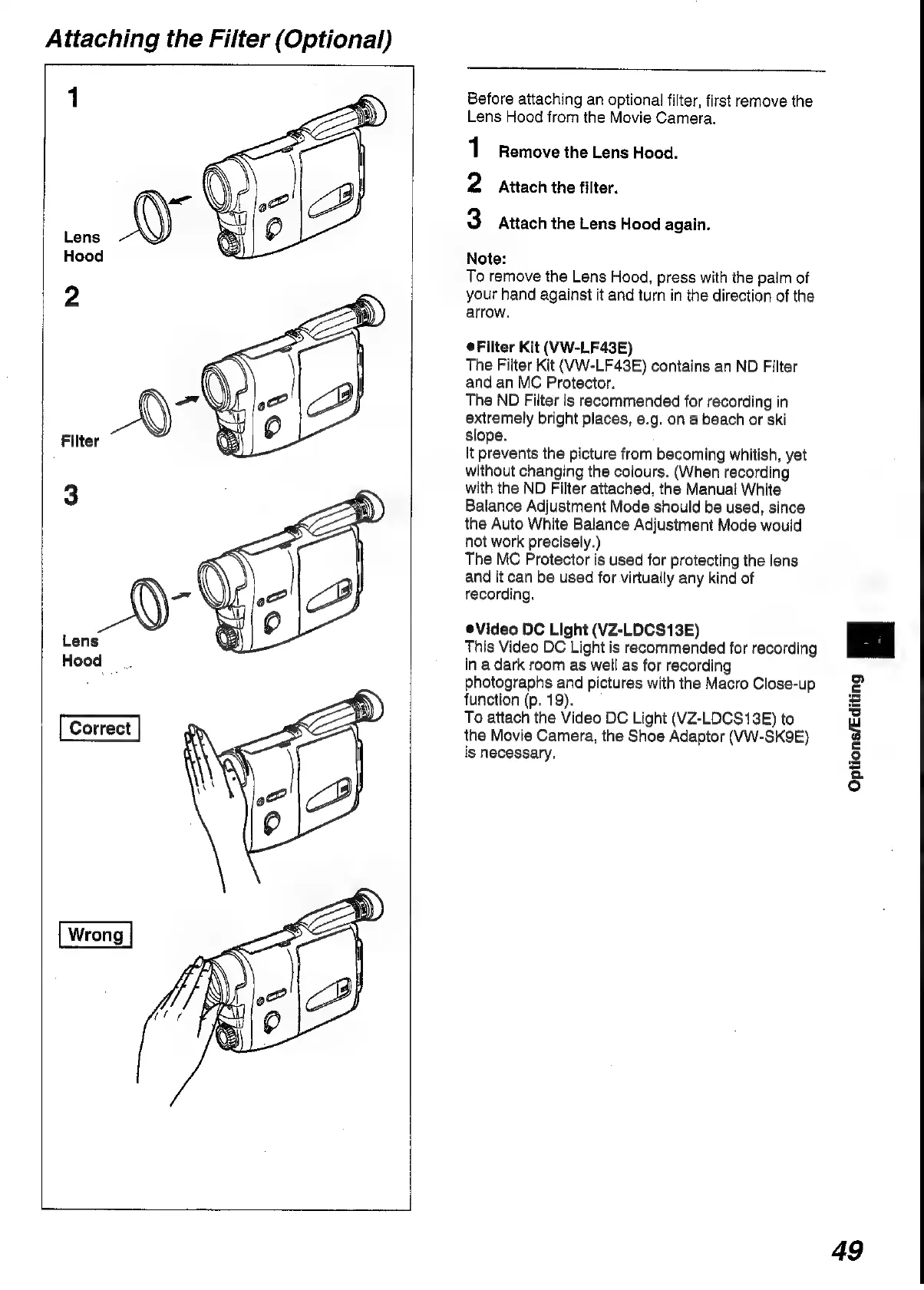
Before
attaching
an
optional
filter,
first
remove
the
Lens
Hood
from
the
Movie
Camera.
1
Remove
the
Lens
Hood.
2
Attach
the
filter.
3
Attach
the
Lens
Hood
again.
Note:
To
remove
the
Lens
Hood,
press
with
the
paim
of
your
hand
against
it
and
turn
in
the
direction
of
the
arrow.
@Filter
Kit
(VW-LF43E)
The
Filter
Kit
(VW-LF43E)
contains
an
ND
Filter
and
an
MC
Protector.
The
ND
Filter
is
recommended
for
recording
in
extremely
bright
places,
e.g.
on
a
beach
or
ski
slope.
It
prevents
the
picture
from
becoming
whitish,
yet
without
changing
the
colours.
(When
recording
with
the
ND
Filter
attached,
the
Manual
White
Balance
Adjustment
Mode
should
be
used,
since
the
Auto
White
Balance
Adjustment
Mode
would
not
work
precisely.)
The
MC
Protector
is
used
for
protecting
the
lens
and
it
can
be
used
for
virtually
any
kind
of
recording.
eVideo
DC
Light
(VZ-LDCS13E)
This
Video
DC
Light
is
recommended
for
recording
in
a
dark
room
as
well
as
for
recording
photographs
and
pictures
with
the
Macro
Close-up
function
(p.
19).
To
attach
the
Video
DC
Light
(VZ-LDCS13E)
to
the
Movie
Camera,
the
Shoe
Adaptor
(VW-SK9E)
is
necessary.
Options/Editing
Bl
49

Table of Contents

Related product manuals