EasyManua.ls Logo

Panasonic NV-RX1A - Page 54

Panasonic NV-RX1A
60 pages
Print Icon
To Next Page IconTo Next Page
To Previous Page IconTo Previous Page
Loading...
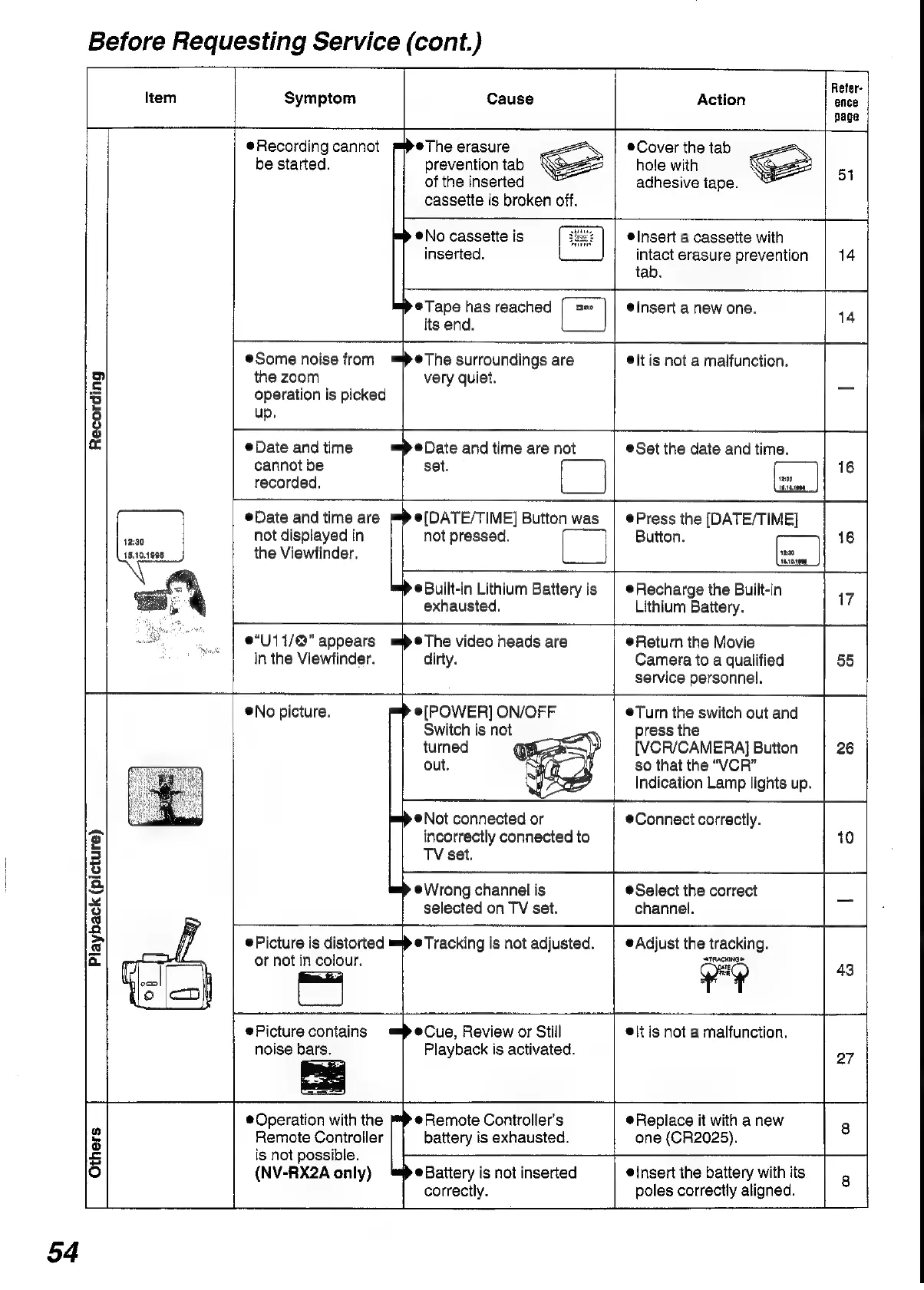
Before
Requesting
Service
(cont.)
Item
Symptom
Recording
Playback
(picture)
Others
54
Recording
cannot
be
started.
Some
noise
from
=®The
surroundings
are
Refer-
Action
its
end.
Cause
ence
page
po
@The
erasure
|
©@Cover
the tab
prevention
tab
hole
with
eS
54
of
the
inserted
adhesive
tape.
cassette
is
broken
off.
@No
cassette
is
elnsert
a
cassette
with
inserted.
intact
erasure
prevention
14
tab.
@Tape
has
reached
Insert
a
new
one.
14
®@lt
is
not
a
malfunction.
the
zoom
very
quiet.
_
operation
is
picked
up,
Date
and
time
mae
and
time
are
not
®Set
the
date
and
time.
cannot
be
set.
16
recorded.
Date
and
time
are
e(DATE/TIME]
Button
was
|
@Press
the
[DATE/TIME]
not
displayed
in
not
pressed.
Button.
16
the
Viewfinder,
e“U11/@"
appears
mpeThe
video
heads
are
in
the
Viewfinder.
®No
picture.
®Built-in
Lithium
Battery
is
exhausted.
Recharge
the
Built-in
Lithium
Battery.
Return
the
Movie
Picture
is
distorted
or
not
in
colour.
Picture
contains
noise
bars.
@Operation
with
the
Remote
Controller
is
not
possible.
(NV-RX2A
only)
dirty.
Camera
to
a
qualified
55
service
personnel.
[POWER]
ON/OFF
Turn
the
switch
out
and
Switch
is
not
press
the
turned
(
[VCR/CAMERA]
Button
26
out.
so
that
the
“VCR”
Indication
Lamp
lights
up.
®Not
connected
or
Connect
correctly.
incorrectly
connected
to
10
TV
set.
e@Wrong
channel
is
@Select
the
correct
_
selected
on
TV
set.
channel.
=
e
Tracking
is
not
adjusted.
|
Adjust
the
tracking.
vy
43
a
=>
@Cue,
Review
or
Still
@\t
is
not
a
malfunction.
Playback
is
activated.
27
@Remote
Controller's
battery
is
exhausted.
®Battery
is
not
inserted
correctly.
@insert
the
battery
with
its
@Replace
it
with
a
new
8
one
(CR2025).
poles
correctly
aligned.

Table of Contents

Related product manuals